

StreamCam for OBS & Streamlabs
Dorian Grolaux Photo & Video iPhoneiPadiPod touch
StreamCam for OBS & Streamlabs is a free Photo & Video app for iPhone and iPad by Dorian Grolaux. Requires iOS 26.0. Updated October 6, 2026.
- Price
- Free
- on the App Store
- Size
- 44 MB
- Age 4+
- Updated
- Oct 6
- 2026 · v2.0.0
Screenshots

About StreamCam for OBS & Streamlabs
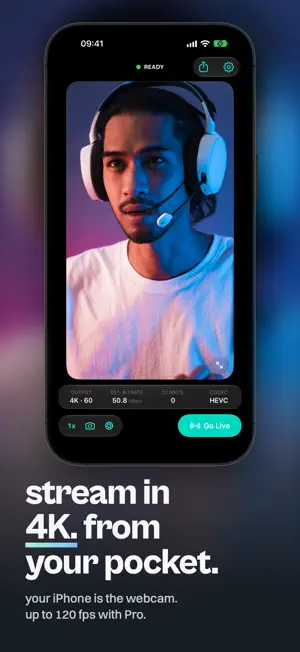
Livestreaming on Twitch/Youtube and ready for the face reveal? Looking for a webcam but they're all either expensive, or just terrible quality? Since you have an iPhone, why not simply use its amazing camera? With StreamCam, this is possible! StreamCam allows you to use the amazing camera in your iPhone directly in your live streams. Besides, with StreamCam, there’s no need for any extra hardware or drivers. It doesn't even need to be plugged-in! Simply open the app, copy the url and you're ready to go! Features: - Use your device as a livestream webcam - Super low latency, high speed, pro-quality video in many resolutions, up to and including 4K, 1080p HD, 720p - Beautiful in both Dark Mode & Light Mode - Performance friendly: StreamCam does all the processing on your iOS device - Works in landscape or portrait mode with full rotation controls - Switch between any of your device’s front and back cameras in real-time - Works with OBS Studio, Twitch Studio, StreamLabs & many more - Easy Multicam Solution: have another iPhone lying around? Use it too for an extra camera angle - No cables needed! Works with Wi-Fi - No extra software needed! StreamCam runs a browser source directly - Works with Mac, Windows & Linux - No ads, no accounts. Run the app & start streaming TERMS OF USE https://www.apple.com/legal/internet-services/itunes/dev/stdeula/
What’s new
Version 2.0.0 · Updated October 6, 2026
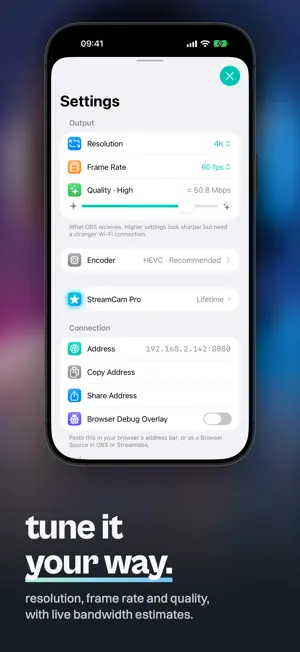
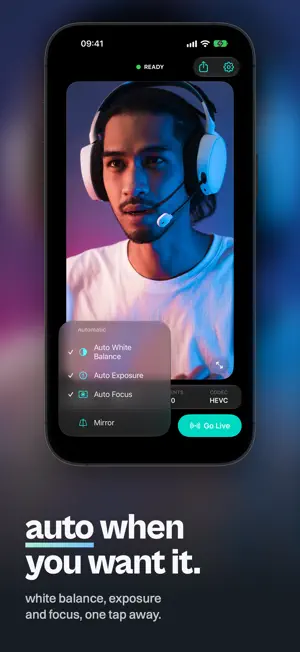
StreamCam 2.0 is a ground-up rebuild: new engine, new app, new look. NEW ENGINE • Streams real H.264 or HEVC video from your camera's hardware encoder, instead of a stream of JPEGs • Much less data over your Wi-Fi for the same picture • Up to 4K and up to 120 fps, offering only the sizes and frame rates your camera can capture • Still plug and play: open the address shown in the app in OBS (or any browser). Nothing to install on your computer, no account, and your video goes straight from your phone to your computer NEW APP • A camera-monitor layout: big preview, a red glow while you're live, and a readout of size, bitrate, connected browsers and codec • Lens switching, front/back flip, mirror and tap-to-focus right on the preview • Fullscreen mode that floats the controls over the picture • Redesigned Settings that sit on top of the live preview, with a bandwidth estimate before you commit • Advanced encoder settings for Pro • iPad gets its own layout, and iPhone and iPad work in any orientation UPGRADING FROM 1.x • Your settings carry over automatically • If you bought Pro before, you keep it Questions or feedback? [email protected]
App privacy
The developer, Dorian Grolaux, reported these privacy practices to Apple.
Data Not Linked to You
The following data, which may be collected but is not linked to your identity, may be used for the following purposes:
- Usage Data: Product Interaction
Used for: Analytics
Alternatives to StreamCam for OBS & Streamlabs
Looking for apps like StreamCam for OBS & Streamlabs? Here are 6 similar apps on the App Store. The highest rated is LM-Cam for OBS studio (4.2/5), and all 6 are free to download.
-
 LM-Cam for OBS studio
4.2
LM-Cam for OBS studio
4.2
-
 PhoneCam - Local Wifi Camera
4.2
PhoneCam - Local Wifi Camera
4.2
-
 TopDirector (NDI,SRT,UVC,RTSP)
4.1
TopDirector (NDI,SRT,UVC,RTSP)
4.1
-
 SplitCam Live Streaming App
2.8
SplitCam Live Streaming App
2.8
-
 RECnGO: Live stream like a pro
3.3
RECnGO: Live stream like a pro
3.3
-
 Stream Studio NDI OBS Camera
4.1
Stream Studio NDI OBS Camera
4.1
| App | Rating | Price | Last updated | Compare |
|---|---|---|---|---|
| StreamCam for OBS & Streamlabs | – | Free | October 6, 2026 | |
| LM-Cam for OBS studio | 4.2 / 5 (5) | Free | Sep 15, 2026 | Compare |
| PhoneCam - Local Wifi Camera | 4.2 / 5 (1,098) | Free | Jun 11, 2025 | Compare |
| TopDirector (NDI,SRT,UVC,RTSP) | 4.1 / 5 (114) | Free | Sep 15, 2026 | Compare |
| SplitCam Live Streaming App | 2.8 / 5 (5) | Free | Sep 17, 2026 | Compare |
| RECnGO: Live stream like a pro | 3.3 / 5 (14) | Free | Jan 22, 2025 | Compare |
| Stream Studio NDI OBS Camera | 4.1 / 5 (9) | Free | Aug 8, 2025 | Compare |