

Tonbridge App
Tonbridge School Education iPhoneiPadiPod touchMac
Tonbridge App is a free Education app for iPhone and iPad by Tonbridge School. Requires iOS 15.6. Updated October 17, 2026.
- Price
- Free
- on the App Store
- Size
- 442 MB
- Age 4+
- Updated
- Oct 17
- 2026 · v2026.10.3
Screenshots


About Tonbridge App
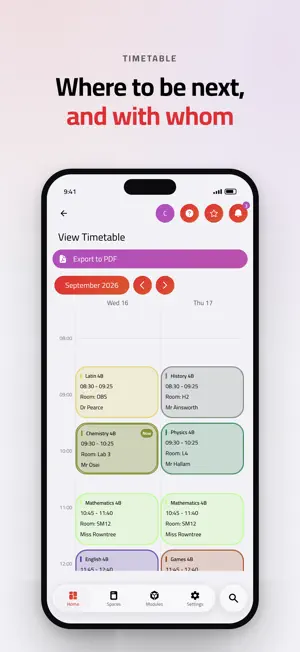
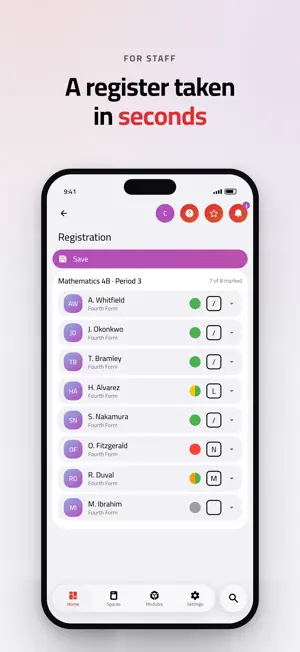
The Tonbridge App puts the School day in one place. Sign in with your Tonbridge account to see your timetable, your reports, the notices that matter, and the forms and bookings that used to mean an email chain. It is for pupils, parents and staff at Tonbridge School, and it needs a School account to show anything at all. What you see depends on who you are, so there is nothing to set up and no wrong version to download. PUPILS • Your timetable, with the week letter and the room, so you know where to be next • School reports and exam results as they are published • Rewards and sanctions, so nothing arrives as a surprise • Absence and Offex requests, sent from your phone instead of chased in person • The School calendar, trips, event sign-ups and club lists • Handbooks, policies and your reading list • Report an IT or facilities problem, and follow it through to a fix PARENTS • All of your children in one app, a tap apart • School reports, exam results and a summary of how each term has gone • Book parents' evening appointments yourself, at a time that works • Absence and Offex requests, and the School's answers to them • Trip information and forms • Termly health forms and Check Your Details, so the School holds the right information • Billing extras, itemised, so a term's charges are never a mystery STAFF • Registers taken in seconds, on a phone in a corridor or a laptop in a classroom • Class lists, set lists and pupil profiles, with the pastoral context in front of you • Lesson cover, free periods and who is where • Rewards, sanctions and private notes, recorded where pupils are actually discussed • Leave requests, allowances and approvals, with your team's cover visible before you book • Professional development submissions and approvals • House and site compliance: fire checks, accident reports, critical incidents • Advanced search and saved queries across the data your role allows MADE AT TONBRIDGE The app is built and run in-house by the School's IT and Digital team. If something is wrong or missing, the people who can fix it are down the corridor. Log a ticket from Service Desk in the app. DETAILS • Light and dark, plus a set of colour themes • Respects your system text size • The same app on iPhone, iPad and Mac • Notifications open the screen you need, not the home page SIGNING IN Sign in with your School account. Parents new to the School receive their sign-in details from the School. Without a Tonbridge account, the app has nothing to show you. PRIVACY You only ever see the information your role entitles you to. The app is covered by the School's privacy policy: https://tonbridge.school/privacy
What’s new
Version 2026.10.3 · Updated October 17, 2026
This update focuses on School reports, with a redesigned AI checker, a clearer Re-allocation screen and a series of fixes, plus improved support for iPhone Duo. The AI checker now presents its suggestions as a proofread, with removed words struck through and added words underlined, and the option to switch between the changes, the original and the result. Each suggestion can be accepted or declined individually, and the review screen is now the same whether checking before or after saving. The checker also keeps strictly to steps where it has been switched on. Re-allocation now opens with a view by teacher, showing each teacher's progress and allowing a teacher to be removed from a whole report in one step. A summary shows sets, teachers and how much has been written. When removing a set a teacher still teaches, administrators can choose whether this applies to future reports and Parents' Evenings too. Report setup now warns about steps that close on or after the publish date. Parents can once again open their child's reports where the child's School record number begins with zero, and the same correction has been applied across the app. Marking reports as completed, re-allocation and report creation now work for every member of staff. New reports take their academic year from the School's records, and a missing grade option on some reports has been restored. On iPhone Duo, the app now works around the camera and the fold, calendars size themselves to the space available, the leave calendar has been redesigned, and search opens as a full page. Staff can now see Parents' Evening preference times, and preferences set by an administrator can no longer be changed by mistake.
App privacy
The developer, Tonbridge School, reported these privacy practices to Apple.
Data Linked to You
The following data, which may be collected and linked to your identity, may be used for the following purposes:
- Contact Info: Email Address
- Identifiers: Device ID, User ID
- Diagnostics: Crash Data
Used for: Developer’s Advertising or Marketing, Analytics, Product Personalization, App Functionality
Data Not Linked to You
The following data, which may be collected but is not linked to your identity, may be used for the following purposes:
- Diagnostics: Performance Data, Other Diagnostic Data
Used for: Analytics
Alternatives to Tonbridge App
Looking for apps like Tonbridge App? Here are 6 similar apps on the App Store. The highest rated is MyDulwich (2.0/5), and all 6 are free to download.
-
 The New Beacon
-
 Sutton Valence School
-
 Uppingham
-
 MyDulwich
2.0
MyDulwich
2.0
-
 The Athlete Place
-
 Chinese International School
| App | Rating | Price | Last updated | Compare |
|---|---|---|---|---|
| Tonbridge App | – | Free | October 17, 2026 | |
| The New Beacon | – | Free | Aug 19, 2026 | Compare |
| Sutton Valence School | – | Free | Aug 18, 2025 | Compare |
| Uppingham | – | Free | Aug 15, 2025 | Compare |
| MyDulwich | 2.0 / 5 (3) | Free | Nov 13, 2024 | Compare |
| The Athlete Place | – | Free | Jul 21, 2026 | Compare |
| Chinese International School | – | Free | Aug 19, 2026 | Compare |
Compare Tonbridge App with the top alternatives: ratings, updates, ASO score and keyword gaps →