

Retouch: AI Object Remover
Anthony Durbin Photo & Video iPhoneiPadiPod touch
Retouch: AI Object Remover is a free Photo & Video app for iPhone and iPad by Anthony Durbin. Rated 4.6/5 from 4,354 ratings. Requires iOS 15.0.
- Rating
- 4.6
- 4.3K ratings
- Price
- Free
- on the App Store
- Size
- 231 MB
- Age 4+
- Updated
- Aug 29
- 2026 · v5.4
Screenshots


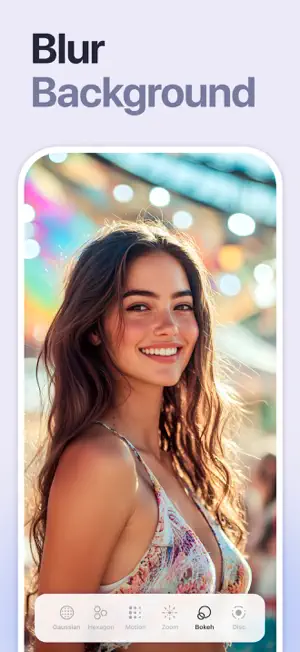
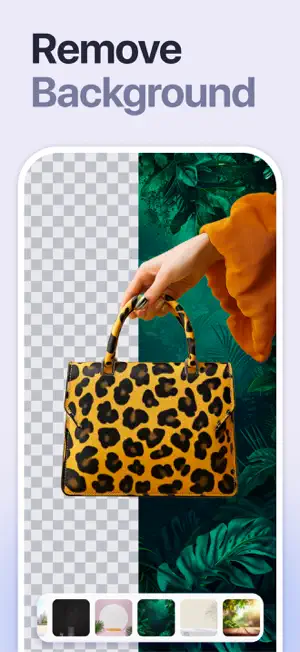
About Retouch: AI Object Remover
Remove objects & people from photos easily with this ai retouch app. Erase backgrounds of a photo and save as transparent with just one tap. Fix your blemishes also with advanced one-tap-retouch feature. Features Remove Object: Tap or brush away tourists, wires, or stains. Quick Mode erases with AI; Brush & Lasso gives precise control. Clone Stamp: Sample any clean patch and paint over distractions. Edge-aware blending matches texture, light, and perspective. AI Retouch: One swipe zaps blemishes, smooths skin, sharpens eyes, adds a natural glow, and whitens teeth while preserving pores. Replace Background: Auto-cut subjects and drop them onto built-in scenes, your own images, or transparent PNGs for pro-grade product shots. Background Blur: Pop subjects with DSLR-style depth—Gaussian, Motion, Bokeh, Hexagon, Disc, and more—and adjust focus and strength in real time. Photo Overlay & Double Exposure: Layer textures, designer frames, or a second image, then fine-tune opacity and blend modes for instant magazine vibes. Stylish Portrait: Soft-focus backgrounds, polish facial details, and apply studio color toning for a cover-ready finish. Sky Changer: Auto-detect the horizon and swap gray skies for golden sunsets, auroras, or storm clouds with natural color matching and crisp edges. Photo Blending: AI isolates your subject and fuses it with artistic overlays; refine with manual brush and eraser for cinematic double exposures. Dripping Portrait: Melt edges into flowing paint drips; pick preset shapes or draw your own, then adjust length, direction, and gradients. Spiral Effects: Wrap subjects in neon coils, glitter ribbons, or dotted trails. Tweak thickness, color, and rotation for instant 3-D pop. This app includes advertisement. To enjoy ad free experience and using all premium contents, we are offering a Premium subscription package. Retouch Premium Subscription information • Subscription Length: Weekly, Monthly. • Your payment will be charged to your Apple account as soon as you confirm your purchase. • You can manage your subscriptions and turn off auto-renewal from your Account Settings after the purchase. • Your subscription will renew automatically unless you turn off auto-renew at least 24 hours before the end of the current period. • The cost of renewal will be charged to your account 24 hours before the end of the current period. • When canceling a subscription, your subscription will stay active until the end of the period. Auto-renewal will be disabled, but the current subscription will not be refunded. • Any unused portion of a free trial period, if offered, will be forfeited when purchasing a subscription. Privacy policy: https://sites.google.com/view/anthonydurbins/privacy Terms of service: https://sites.google.com/view/anthonydurbins/terms Contact for support, reporting bug or improvement suggestions email: [email protected] You may also contact our support team through the app’s settings screen.
Ratings & reviews
4.6
4.3K ratings
What’s new
Version 5.4 · Updated August 29, 2026
We update our apps on a regular basis in order to make it better for you. Feel free to contact us with your valuable feedback at [email protected] or leave us a review on the App Store.
App privacy
The developer, Anthony Durbin, reported these privacy practices to Apple.
Data Used to Track You
The following data may be used to track you across apps and websites owned by other companies:
- Identifiers: Device ID
Data Not Linked to You
The following data, which may be collected but is not linked to your identity, may be used for the following purposes:
- Identifiers: Device ID
Used for: Third-Party Advertising
Alternatives to Retouch: AI Object Remover
Looking for apps like Retouch: AI Object Remover? Here are 6 similar apps on the App Store. The highest rated is Remove Objects: AI Retouch (4.8/5), and all 6 are free to download.
-
 Retouch Photo - Remove Objects
4.7
Retouch Photo - Remove Objects
4.7
-
 Photo Eraser - Remove Objects
4.6
Photo Eraser - Remove Objects
4.6
-
 Photo Retouch-Object Removal
4.5
Photo Retouch-Object Removal
4.5
-
 Background Eraser: AI Remove
4.5
Background Eraser: AI Remove
4.5
-
 Object Remover by Touch Up
4.6
Object Remover by Touch Up
4.6
-
 Remove Objects: AI Retouch
4.8
Remove Objects: AI Retouch
4.8
| App | Rating | Price | Last updated | Compare |
|---|---|---|---|---|
| Retouch: AI Object Remover | 4.6 / 5 (4,354 ratings) | Free | August 29, 2026 | |
| Retouch Photo - Remove Objects | 4.7 / 5 (18,683) | Free | Jul 25, 2026 | Compare |
| Photo Eraser - Remove Objects | 4.6 / 5 (22,524) | Free | Jul 21, 2026 | Compare |
| Photo Retouch-Object Removal | 4.5 / 5 (122,642) | Free | Nov 2, 2026 | Compare |
| Background Eraser: AI Remove | 4.5 / 5 (134,225) | Free | Oct 21, 2026 | Compare |
| Object Remover by Touch Up | 4.6 / 5 (16,319) | Free | Jan 28, 2026 | Compare |
| Remove Objects: AI Retouch | 4.8 / 5 (1,080) | Free | Oct 28, 2026 | Compare |