

VPN - iUVPN
cnc07 Business iPhoneiPadiPod touch
VPN - iUVPN is a free Business app for iPhone and iPad by cnc07. Rated 4.5/5 from 88 ratings. Requires iOS 15.0. Updated November 5, 2026.
- Rating
- 4.5
- 88 ratings
- Price
- Free
- on the App Store
- Size
- 139 MB
- Age 9+
- Updated
- Nov 5
- 2026 · v1.2.1
Screenshots
Save to Pinterest


About VPN - iUVPN
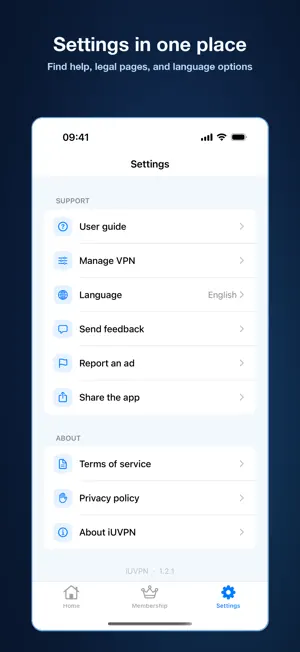
iUVPN lets you connect to a VPN and manage your route configurations. Choose an available built-in route, then tap Connect VPN on Home. On your first connection, follow the iOS prompt to add a VPN configuration. Bring your own routes Tap + on Home to open Import configuration. Paste a link or text, choose a file, scan a QR code, or read one from Photos. Then select the imported route in My routes and return to Home to connect. Manage your configuration Open Settings and tap Manage VPN to update configuration sources, adjust routing and DNS, or back up and restore local configurations. Go to Settings → Language to change the app language. Membership and auto-renewal Optional App Store membership gives you access to member routes and removes in-app ads while active. Ads may appear during free use. Plans renew every 1, 3, or 12 months. Check the current price on the App Store purchase confirmation screen. Payment is charged to your Apple Account when you confirm the purchase. The plan renews unless you turn off auto-renewal. Apple may charge for the next period within 24 hours before it begins. Manage or cancel in iOS Settings → Apple Account → Subscriptions. To restore a purchase, open Membership and tap Restore purchases. Need help? Open Settings → Send feedback. Privacy Policy https://cnc07.com/rocket/en/privacy.html Membership Terms https://cnc07.com/rocket/en/membership.html
Ratings & reviews
4.5
88 ratings
What’s new
Version 1.2.1 · Updated November 5, 2026
Added Import configuration to Home for links, text, files, and QR codes. Selecting an imported route returns you to Home to connect. Configuration sources, routing and DNS, backups, and activity are now grouped under Settings → Manage VPN. You can also choose the app language in Settings.
App privacy
The developer, cnc07, reported these privacy practices to Apple.
Data Used to Track You
The following data may be used to track you across apps and websites owned by other companies:
- Location: Precise Location, Coarse Location
- Identifiers: User ID, Device ID
- Usage Data: Advertising Data
- Diagnostics: Crash Data, Performance Data, Other Diagnostic Data
- Other Data: Other Data Types
Data Linked to You
The following data, which may be collected and linked to your identity, may be used for the following purposes:
- Location: Precise Location, Coarse Location
- Identifiers: User ID, Device ID
- Usage Data: Product Interaction, Advertising Data
- Diagnostics: Crash Data, Performance Data, Other Diagnostic Data
- Other Data: Other Data Types
Used for: Third-Party Advertising
Data Not Linked to You
The following data, which may be collected but is not linked to your identity, may be used for the following purposes:
- Usage Data: Other Usage Data
Used for: Third-Party Advertising
Alternatives to VPN - iUVPN
Looking for apps like VPN - iUVPN? Here are 6 similar apps on the App Store. The highest rated is 风速加速器 (4.6/5), and all 6 are free to download.
-
 风速加速器
4.6
-
 绿叶加速器-VPN全球网络加速
4.3
-
 super vpn -Faster Internet von
3.5
-
 蓝鲸加速器-网络性能优化服务
1.0
-
 树洞加速器-VPN海外加速
3.0
-
 辣条加速- VPN华人专属加速器
4.2
| App | Rating | Price | Last updated | Compare |
|---|---|---|---|---|
| VPN - iUVPN | 4.5 / 5 (88 ratings) | Free | November 5, 2026 | |
| 风速加速器 | 4.6 / 5 (73) | Free | Feb 18, 2025 | Compare |
| 绿叶加速器-VPN全球网络加速 | 4.3 / 5 (1,140) | Free | Sep 24, 2024 | Compare |
| super vpn -Faster Internet von | 3.5 / 5 (2) | Free | May 6, 2026 | Compare |
| 蓝鲸加速器-网络性能优化服务 | 1.0 / 5 (1) | Free | Aug 24, 2026 | Compare |
| 树洞加速器-VPN海外加速 | 3.0 / 5 (2) | Free | Jun 29, 2026 | Compare |
| 辣条加速- VPN华人专属加速器 | 4.3 / 5 (4) | Free | Oct 28, 2026 | Compare |
Compare VPN - iUVPN with the top alternatives: ratings, updates, ASO score and keyword gaps →