

Grammar & punctuation checker
Maksim Gusev Education iPhoneiPadiPod touch
Grammar & punctuation checker is a free Education app for iPhone and iPad by Maksim Gusev. Rated 4.3/5 from 112 ratings. Requires iOS 17.0.
- Rating
- 4.3
- 112 ratings
- Price
- Free
- on the App Store
- Size
- 51 MB
- Age 4+
- Updated
- May 28
- 2026 · v4.3
Screenshots


About Grammar & punctuation checker
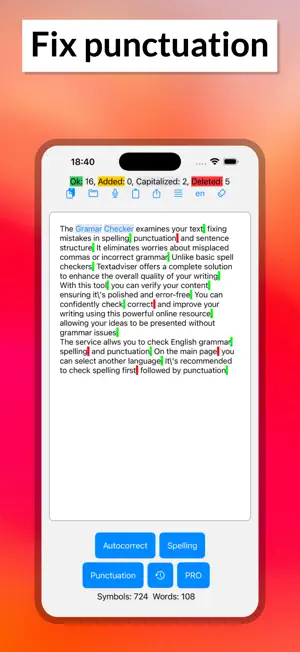
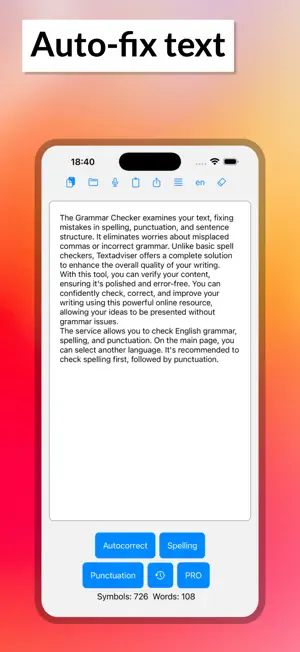
A mobile app for checking spelling and punctuation is a program that helps users verify the spelling of words and sentences in different languages. It can be used for educational purposes as well as for everyday use, since incorrect spelling can negatively affect communication on social media, in text messages, and in emails. This app is a convenient and easy-to-use tool that allows users to quickly and easily check text for errors. It has a range of useful features that make it a very practical and functional tool. One of the main features of the app is spell checking. The user can input text into the app or copy it from another source, such as an email or a social media post. The app will then automatically check the text for spelling errors. Mistakes will be highlighted with color or underlining, and the user can click on a word to see possible corrections. In addition to spell checking, the app also checks punctuation. It automatically identifies punctuation errors and helps correct them. For example, if a sentence is written without commas or periods, the app will suggest where they should be placed. This can be very helpful for people who are not confident in their grammar skills. The spelling and punctuation check is available in several languages, which can be selected in the app's settings. If the app doesn't find any errors, make sure that the language selected in the settings matches the language of the text. By default, the language used is the one set in the phone's settings. There is a text limit for each check: 1,000 characters for the regular version and 100,000 for the Pro version. The spelling and punctuation check occurs in two stages: first, check the spelling by pressing the first button on the control panel, and then check the punctuation. After completing the spell check, words with errors are highlighted in color. Click on these words to open a menu with correction options. If you want to edit the text after the spell check, click the "clear formatting" button to remove the word highlights. Currently, the punctuation check detects about 70% of errors, so you may need to correct some mistakes manually. Additionally, keep in mind that the suggested punctuation placement may not match your intended meaning, as punctuation can influence the text's interpretation. Red indicates marks that the app suggests removing, while yellow indicates marks that the app has automatically inserted. Terms of Use (EULA) - https://www.apple.com/legal/internet-services/itunes/dev/stdeula/
Ratings & reviews
4.3
112 ratings
What’s new
Version 4.3 · Updated May 28, 2026
Added check history, paste from clipboard, text file opening, and voice input.
App privacy
The developer, Maksim Gusev, reported these privacy practices to Apple.
Data Used to Track You
The following data may be used to track you across apps and websites owned by other companies:
- Location: Coarse Location
- Identifiers: User ID, Device ID
- Usage Data: Product Interaction, Advertising Data, Other Usage Data
Data Linked to You
The following data, which may be collected and linked to your identity, may be used for the following purposes:
- User Content: Other User Content
Used for: App Functionality
Data Not Linked to You
The following data, which may be collected but is not linked to your identity, may be used for the following purposes:
- Location: Coarse Location
- Identifiers: User ID, Device ID
- Usage Data: Product Interaction, Advertising Data, Other Usage Data
- Purchases: Purchase History
- Diagnostics: Crash Data, Performance Data, Other Diagnostic Data
Used for: Third-Party Advertising, Developer’s Advertising or Marketing, Analytics
Alternatives to Grammar & punctuation checker
Looking for apps like Grammar & punctuation checker? Here are 6 similar apps on the App Store. The highest rated is Russian Dictionary Wiki Word (4.9/5), and all 6 are free to download.
-
 AiText: Grammar & Spell Check
4.7
AiText: Grammar & Spell Check
4.7
-
 AI Grammar Check & Spell Check
3.4
AI Grammar Check & Spell Check
3.4
-
 Grammar Check Corrector +
4.8
Grammar Check Corrector +
4.8
-
 Punc: Learn Punctuation
4.7
Punc: Learn Punctuation
4.7
-
 Polish: AI Keyboard & Voice
4.4
Polish: AI Keyboard & Voice
4.4
-
 Russian Dictionary Wiki Word
4.9
Russian Dictionary Wiki Word
4.9
| App | Rating | Price | Last updated | Compare |
|---|---|---|---|---|
| Grammar & punctuation checker | 4.3 / 5 (112 ratings) | Free | May 28, 2026 | |
| AiText: Grammar & Spell Check | 4.7 / 5 (156) | Free | Oct 9, 2026 | Compare |
| AI Grammar Check & Spell Check | 3.4 / 5 (120) | Free | Sep 23, 2026 | Compare |
| Grammar Check Corrector + | 4.8 / 5 (203) | Free | Mar 24, 2026 | Compare |
| Punc: Learn Punctuation | 4.7 / 5 (160) | Free | Aug 28, 2026 | Compare |
| Polish: AI Keyboard & Voice | 4.4 / 5 (36) | Free | Oct 2, 2026 | Compare |
| Russian Dictionary Wiki Word | 4.9 / 5 (384) | Free | Jun 15, 2024 | Compare |