

FieldLab Mobile
Ralston Instruments, LLC Productivity iPhoneiPadiPod touch
FieldLab Mobile is a free Productivity app for iPhone and iPad by Ralston Instruments, LLC. Rated 5.0/5 from 3 ratings. Requires iOS 16.4.
- Rating
- 5.0
- 3 ratings
- Price
- Free
- on the App Store
- Size
- 79 MB
- Age 4+
- Updated
- Aug 19
- 2026 · v2.0.1
Screenshots


About FieldLab Mobile
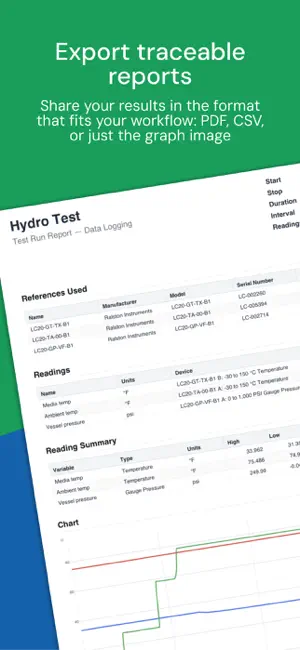
FieldLab Mobile is a powerful test-and-measurement app compatible with Ralston Instruments Gauges. Connect one or more Ralston Gauges to your iPhone or iPad via Bluetooth and perform tests and monitor live pressure and temperature readings. LOG MULTIPLE GAUGES IN A SINGLE TEST RUN Connect multiple Ralston gauges at once and record pressure and temperature from every sensor simultaneously. Each reading is logged with a precise timestamp, so your complete test data lives in one place. VIEW ALL READINGS ON ONE GRAPH All test readings appear on a single, time-based pressure and/or temperature chart. View multiple pressure and temperature trends together to spot correlations and pinpoint exactly when changes occurred during your test. EXPORT TRACEABLE REPORTS Every export includes detailed information about the gauges used in the test: Manufacturer, model, and serial number, so your records meet traceability requirements. Share your results in the format that fits your workflow: • PDF: A formatted test report with a reading summary showing high, low, and average values, the full chart, and a complete data table. Ready to email, print, or file for regulatory records. • CSV: The full test run in a spreadsheet-compatible format for further analysis. • Graph image: A simple color PNG image of the test run graph showing all readings, pressure, and/or temperature axis. EDITABLE TEST RUN TITLES, REFERENCES & READING NAMES Name your Test Run outputs to match work orders, customers or any SOP. Assign custom names to each pressure and temperature readings before or after a test. Label readings by location, function, or whatever makes sense for the job. When you review the graph or share the report, every data point is clearly identified. Name your gauges for asset tracking, nicknames, or any reference to help with traceability requirements. WORK FROM A SAFE DISTANCE Bluetooth connectivity lets you monitor tests from a safe distance while maintaining full visibility of live readings on your device, even from the cab of your truck or job-site trailer. Test data is logged on the gauge, so even if you lose connection, your data will be collected back to the FieldLab Mobile App when you reconnect. CHOOSE THE RIGHT GAUGE FOR YOUR APPLICATION Ralston offers a wide range of Bluetooth-equipped gauges, all compatible with FieldLab Mobile: • Pressure gauges in ranges from vacuum to 30,000 PSI • Dual pressure gauges with two independent sensors in a single unit • Dual pressure + temperature gauges with temp measurement up to 302 F (150 C) • Temperature-only gauges with temp measurement up to 302 F (150 C) All models feature +/-0.1% full-span accuracy, a rugged IP67-rated housing that's dustproof and waterproof up to 1-meter submersion, and are powered by replaceable AA batteries. The gauges log data independently, so even if you walk out of Bluetooth range during a test, your test continues to log without interruption on the gauges and remains safe there until you reconnect. Find the model that fits your needs at www.ralstoninst.com.
What’s new
Version 2.0.1 · Updated August 19, 2026
FieldLab Mobile 2.0 is a complete redesign of the app, rebuilt from the ground up for 2026. Your existing data comes with you — all of your data sets from previous versions are automatically converted to Test Runs when you update. • Log multiple gauges in a single Test Run — record pressure and temperature from every sensor simultaneously, each reading timestamped so your complete test data lives in one place • View all readings on one time-based graph to spot correlations and pinpoint exactly when changes occurred • Export traceable reports as PDF, CSV, or graph image — every export includes the manufacturer, model, and serial number of each gauge used • Name your gauges and readings — label by location, function, or asset number so every data point is clearly identified in graphs and reports • Works with all Bluetooth-capable Ralston gauges, including older models WHAT'S NEW IN 2.0.1 • Chart view now can handle multiple different pressure or temp units, each with its own axis • More reliable Bluetooth connections — gauges that go out of range now reconnect automatically and rejoin the test in progress • No more false "gauge stopped early" alerts when a gauge is temporarily out of range during a test • Test Run data is safer — if a gauge is out of range when a test ends, the app keeps retrying until your data is safely transferred, even if the app is closed in between • Resuming test sessions 100% more reliable • Large data sets now open instantly and scroll smoothly • Improved PDF and CSV reports — reading types are labeled and every value shows its units • Many more bug fixes and performance improvements
App privacy
The developer, Ralston Instruments, LLC, reported these privacy practices to Apple.
Data Not Linked to You
The following data, which may be collected but is not linked to your identity, may be used for the following purposes:
- User Content: Other User Content
- Identifiers: Device ID
- Diagnostics: Crash Data, Performance Data, Other Diagnostic Data
Used for: App Functionality
Alternatives to FieldLab Mobile
Looking for apps like FieldLab Mobile? Here are 6 similar apps on the App Store. The highest rated is Empower, by ISN (4.8/5), and all 6 are free to download.
-
 EWN Mobile
4.6
EWN Mobile
4.6
-
 Pipe Fitting
4.7
Pipe Fitting
4.7
-
 Fluke Connect
4.4
Fluke Connect
4.4
-
 Brady Express Labels
4.3
Brady Express Labels
4.3
-
 Empower, by ISN
4.8
Empower, by ISN
4.8
-
 ArcGIS Field Maps
2.1
ArcGIS Field Maps
2.1
| App | Rating | Price | Last updated | Compare |
|---|---|---|---|---|
| FieldLab Mobile | 5.0 / 5 (3 ratings) | Free | August 19, 2026 | |
| EWN Mobile | 4.6 / 5 (12) | Free | Sep 4, 2026 | Compare |
| Pipe Fitting | 4.7 / 5 (137) | Free | Apr 8, 2025 | Compare |
| Fluke Connect | 4.4 / 5 (349) | Free | Oct 8, 2026 | Compare |
| Brady Express Labels | 4.3 / 5 (423) | Free | Oct 14, 2026 | Compare |
| Empower, by ISN | 4.8 / 5 (30,367) | Free | Aug 18, 2026 | Compare |
| ArcGIS Field Maps | 2.1 / 5 (55) | Free | Jul 20, 2026 | Compare |
Compare FieldLab Mobile with the top alternatives: ratings, updates, ASO score and keyword gaps →