

Shift Scheduler: Smart Roster
siranet GK Productivity iPhoneiPadiPod touch
Shift Scheduler: Smart Roster is a free Productivity app for iPhone and iPad by siranet GK. Requires iOS 15.0. Updated October 6, 2026.
- Price
- Free
- on the App Store
- Size
- 9 MB
- Age 4+
- Updated
- Oct 6
- 2026 · v1.53
Screenshots
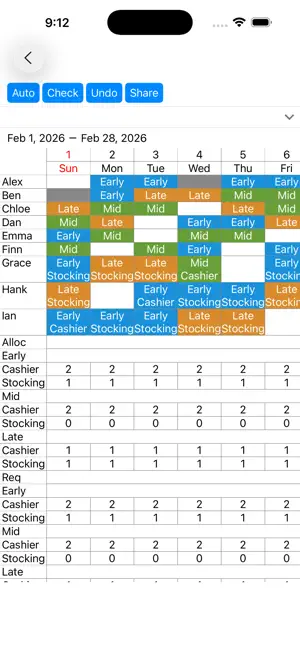


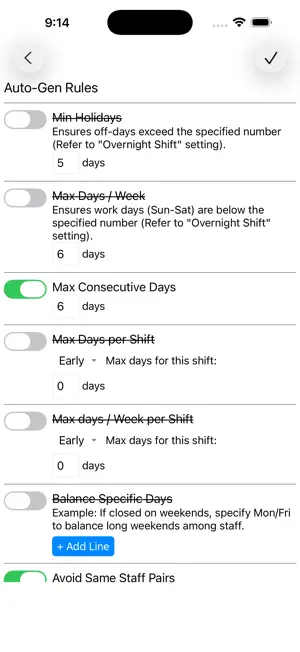
About Shift Scheduler: Smart Roster
Smart Shift Creation & Automation Our app supports your scheduling process from start to finish. You can manually assign specific shifts and let the system automatically fill in the remaining gaps. The auto-assignment engine creates the most balanced and fair schedule possible, strictly following your custom rules. Customizable Assignment Rules: 1. Staffing Requirements Set the required number of staff for each date, shift type, and specific task/role. 2. Individual Staff Settings Basic Availability: Set recurring days off or unavailable shifts by day of the week. Specific Requests: Block or prioritize shifts for specific dates. Workload Limits: Define maximum working days per month or per week. Shift-Specific Limits: Set the maximum number of times a specific shift (e.g., Night Shift) can be assigned. Priority Assignments: Designate preferred shifts for specific staff members. Monthly Hour Caps: Set maximum working hours per month. 3. Advanced Scheduling Logic & Rules Consecutive Work Limits: Prevent burnout by limiting consecutive work days (e.g., no more than 6 days in a row). Consecutive Shift Limits: Restrict back-to-back specific shifts (e.g., no double night shifts). Mandatory Rest Periods: Specify required days off after certain shifts (e.g., 2 days off after a night shift). Shift Sequencing: Prohibit specific shift sequences for health and safety (e.g., no "Early Shift" immediately after a "Night Shift"). Post-Rest Day Rules: Block specific shifts on the day following a post-night-shift rest day. Optimized Holidays: Logic to minimize "isolated" work days and encourage consecutive days off. Turnaround Rules: Prevent "Late Shift to Early Shift" transitions to ensure adequate rest. Mandatory Successions: Define shifts that must follow one another (e.g., "Late Night Shift" must follow a "Semi-Night Shift"). Skill Balancing: Prevent shifts consisting only of staff members who require extra support. Compatibility (Pairing) Rules: Block specific combinations of staff from being assigned to the same shift (e.g., Staff A and Staff B cannot work together).
What’s new
Version 1.53 · Updated October 6, 2026
To make this app better for you, we bring updates to the App Store regularly. The latest version of the app includes performance optimizations and minor bug fixes.
App privacy
The developer, siranet GK, reported these privacy practices to Apple.
Data Used to Track You
The following data may be used to track you across apps and websites owned by other companies:
- Identifiers: Device ID
Data Not Linked to You
The following data, which may be collected but is not linked to your identity, may be used for the following purposes:
- Identifiers: Device ID
- Usage Data: Advertising Data
- Diagnostics: Crash Data
Used for: Third-Party Advertising, App Functionality
Alternatives to Shift Scheduler: Smart Roster
Looking for apps like Shift Scheduler: Smart Roster? Here are 6 similar apps on the App Store. The highest rated is Shift management app! (5.0/5), and all 6 are free to download.
-
 Shift management app!
5.0
Shift management app!
5.0
-
 One-Tap Shifts
-
 シフト作成アプリ - シフト表 勤務表作成
-
 TapShift: Shift Scheduler
4.3
TapShift: Shift Scheduler
4.3
-
 クックシフト | シフトを自動作成・管理・共有できるアプリ
-
 シフトつく朗
| App | Rating | Price | Last updated | Compare |
|---|---|---|---|---|
| Shift Scheduler: Smart Roster | – | Free | October 6, 2026 | |
| Shift management app! | 5.0 / 5 (1) | Free | Sep 21, 2026 | Compare |
| One-Tap Shifts | – | Free | Sep 9, 2026 | Compare |
| シフト作成アプリ - シフト表 勤務表作成 | – | Free | May 16, 2026 | Compare |
| TapShift: Shift Scheduler | 4.3 / 5 (3) | Free | Aug 7, 2026 | Compare |
| クックシフト | シフトを自動作成・管理・共有できるアプリ | – | Free | Sep 27, 2026 | Compare |
| シフトつく朗 | – | Free | Jan 14, 2026 | Compare |