

FRME: Story & Carousel Maker
Md Asfanur Arafin Photo & Video iPhoneiPadiPod touch
FRME: Story & Carousel Maker is a free Photo & Video app for iPhone and iPad by Md Asfanur Arafin. Rated 4.3/5 from 3 ratings. Requires iOS 18.6.
- Rating
- 4.3
- 3 ratings
- Price
- Free
- on the App Store
- Size
- 323 MB
- Age 4+
- Updated
- Oct 26
- 2026 · v1.29
Screenshots



About FRME: Story & Carousel Maker
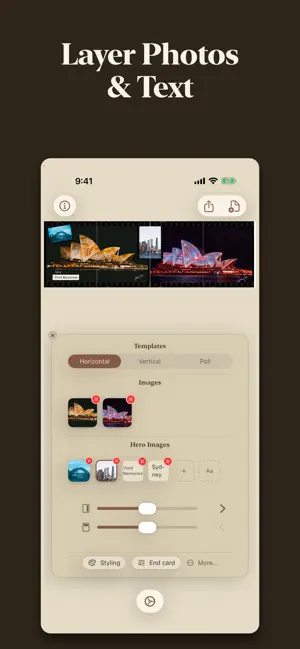
Turn your photos into gallery-ready art — framed, stacked, and set in motion. Pick a template, drop in a photo, and it's composed. No layers, no timeline, no learning curve. FRAME IT • Classic film looks — No Crop, Instant, Scanned • Any aspect ratio: square, portrait, story, print • Dial in padding, canvas colour and framing until it sits right BUILD A SET • Seamless carousels — one photo split across slides so it scrolls unbroken • Horizontal, vertical or poll layouts • Stack shots into one tall, scroll-stopping column • Collage and scrapbook layouts for a whole roll • Monthly dump: a month of photos in one auto-extracted palette BRING IT TO LIFE • Wall Art — your photo hung on a real wall as a looping clip • Cinematic motion video from stills: parallax, film gate, palette • Save finished images and video straight to Photos NOTHING LEAVES YOUR PHONE Everything renders on your device, so it's quick and it stays yours. No account, no sign-up, no uploads. Your photos are never transmitted anywhere. Made for people who care how a photo is presented: film shooters, print sellers, artists sizing up a wall, anyone whose feed deserves better than a bare crop. Import your photos, try every template, and see your own work in the frame for free. A subscription unlocks saving to Photos — weekly, monthly or yearly, with the first week free on the weekly plan. Payment is charged to your Apple Account at confirmation of purchase. Subscriptions renew automatically unless cancelled at least 24 hours before the end of the current period; manage or cancel in Settings → Apple Account → Subscriptions. Available in English, 日本語, বাংলা and Español. Privacy policy: https://tintoflife.com/privacy/ Terms of Use (EULA): https://www.apple.com/legal/internet-services/itunes/dev/stdeula/
What’s new
Version 1.29 · Updated October 26, 2026
Keep tapping Auto on Horizontal carousels for two new looks: a torn Tape Transfer collage and magazine covers.
App privacy
The developer, Md Asfanur Arafin, reported these privacy practices to Apple.
Data Not Collected
The developer does not collect any data from this app.
Alternatives to FRME: Story & Carousel Maker
Looking for apps like FRME: Story & Carousel Maker? Here are 6 similar apps on the App Store. The highest rated is No Crop Wow (5.0/5), and all 6 are free to download.
-
 No Crop Wow
5.0
No Crop Wow
5.0
-
 Square Fit Photo: PicFitter
4.8
Square Fit Photo: PicFitter
4.8
-
 NoCrop Photo - Picture Resizer
4.5
NoCrop Photo - Picture Resizer
4.5
-
 Square Fit: No Crop Photo Edit
4.7
Square Fit: No Crop Photo Edit
4.7
-
 Highlight Cover Maker 2026
4.6
Highlight Cover Maker 2026
4.6
-
 Panoslice: Carousel Post Maker
4.2
Panoslice: Carousel Post Maker
4.2
| App | Rating | Price | Last updated | Compare |
|---|---|---|---|---|
| FRME: Story & Carousel Maker | 4.3 / 5 (3 ratings) | Free | October 26, 2026 | |
| No Crop Wow | 5.0 / 5 (1) | Free | Sep 21, 2026 | Compare |
| Square Fit Photo: PicFitter | 4.8 / 5 (203) | Free | Sep 27, 2026 | Compare |
| NoCrop Photo - Picture Resizer | 4.5 / 5 (91) | Free | Jan 31, 2026 | Compare |
| Square Fit: No Crop Photo Edit | 4.7 / 5 (2,643) | Free | Aug 27, 2026 | Compare |
| Highlight Cover Maker 2026 | 4.6 / 5 (127) | Free | Oct 30, 2026 | Compare |
| Panoslice: Carousel Post Maker | 4.2 / 5 (45) | Free | Oct 27, 2026 | Compare |