

Mateflow
Socibd, Inc. Social Networking iPhoneiPadiPod touch
Mateflow is a free Social Networking app for iPhone and iPad by Socibd, Inc. Requires iOS 16.4. Updated October 28, 2026.
- Price
- Free
- on the App Store
- Size
- 77 MB
- Age 17+
- Updated
- Oct 28
- 2026 · v1.6.1
Screenshots

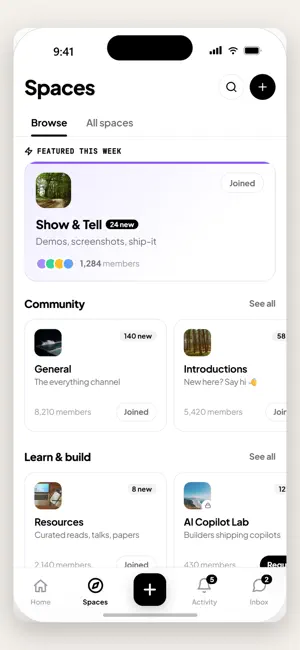


About Mateflow
Mateflow is where your communities come together. Join Spaces, share posts, chat in real time, take courses, and never miss an event — all in one clean, fast app. WHAT YOU CAN DO • Communities & Spaces — Join Spaces built around the topics you care about and follow the conversations that matter. • Posts & discussions — Share text, photos, videos, polls and links. React, reply and quote. • Real-time chat & DMs — Message members one-on-one or in group chat rooms. • AI assistant — Ask questions and get answers grounded in your community's content. • Courses — Keep learning on the go with built-in courses. • Events — Discover, RSVP and stay on top of what's happening. BUILT FOR A GREAT EXPERIENCE • Light & dark themes • Available in multiple languages • Fast, smooth and privacy-respecting Sign in with email, social accounts or Apple. Your data is yours — you can delete your account any time from within the app. Bring your community with you, everywhere. Terms of Use (EULA): https://www.apple.com/legal/internet-services/itunes/dev/stdeula/ Privacy Policy: https://mateflow.com/privacy
What’s new
Version 1.6.1 · Updated October 28, 2026
Faster • The app starts faster, and a community's colors are there from the first screen instead of switching in after launch. • Going back to a feed or list no longer reloads it, and events, live sessions and courses opened from a list appear right away. • Scrolling and typing are smoother: avatars no longer fade in again as you scroll, and chats and the post editor keep up as you type. • Coming back from Control Center, Face ID or a system alert no longer reloads the screen or reconnects chat. • Photos in posts and chats upload faster and use less data, and uploading a large video no longer slows the app down. Keep what you typed • A message you haven't sent stays in its chat when you leave and come back. • The app now asks before throwing away a post or reply you're editing, a form you've filled in, a report or a voice recording. Events • Cancelling an event now asks for a reason, which attendees see in the cancellation notice. Before, cancelling from the app could fail. • Cancelled events now say so on their cards, with the reason when one was given. Fixes • Text, checkboxes and badges on a community's brand color are readable in every theme, including the default dark theme. • Scrolling a feed no longer carries one post's state over to another, such as a revealed sensitive post or an expanded long post. • A new group chat is named with just its members' names instead of a phrase in the creator's language, and long names no longer stop it from being created. • "Continue learning" no longer points back to the lesson you just completed. • A like or bookmark in search's Top results now shows right away. • If a report can't be sent, the app now says so instead of saying it was submitted. • In Notifications, a post or comment that has since been deleted now says so, instead of opening a page that can't be found. • The screen shown when something goes wrong is now in your language.
App privacy
The developer, Socibd, Inc., reported these privacy practices to Apple.
Data Linked to You
The following data, which may be collected and linked to your identity, may be used for the following purposes:
- Search History: Search History
- Usage Data: Product Interaction
- Diagnostics: Crash Data, Performance Data, Other Diagnostic Data
- Purchases: Purchase History
- Contact Info: Email Address, Name
- User Content: Emails or Text Messages, Photos or Videos, Customer Support, Other User Content
- Identifiers: User ID, Device ID
Used for: Analytics, Product Personalization, App Functionality
Alternatives to Mateflow
Looking for apps like Mateflow? Here are 6 similar apps on the App Store.


| App | Rating | Price | Last updated | Compare |
|---|---|---|---|---|
| Mateflow | – | Free | October 28, 2026 | |
| Birdie Buddy - From The Tee | – | Free | Jul 24, 2024 | Compare |
| Looow | – | Free | Jun 4, 2024 | Compare |
| AFP Collaborate | – | Free | Oct 20, 2026 | Compare |
| coemee - 声で遊ぶ音声SNS | – | Free | Nov 2, 2026 | Compare |
| enclayve | – | Free | Oct 26, 2026 | Compare |
| Ageless-Social | – | Free | Sep 18, 2025 | Compare |
Compare Mateflow with the top alternatives: ratings, updates, ASO score and keyword gaps →