

Freefly Ember
FREEFLY SYSTEMS INC. Photo & Video iPhoneiPadiPod touchMac
Freefly Ember is a free Photo & Video app for iPhone and iPad by FREEFLY SYSTEMS INC. Rated 5.0/5 from 6 ratings. Requires iOS 17.0. Updated July 20, 2026.
- Rating
- 5.0
- 6 ratings
- Price
- Free
- on the App Store
- Size
- 9 MB
- Age 4+
- Updated
- Jul 20
- 2026 · v3.0.4
Screenshots
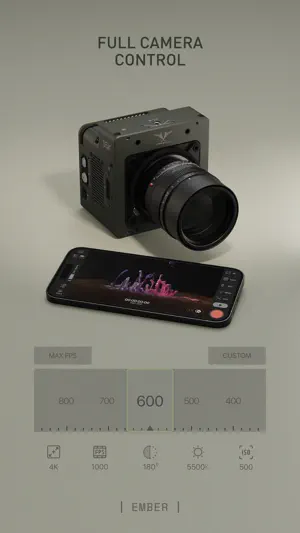


About Freefly Ember
Introducing remote wireless control for your Freefly Ember on iOS and iPadOS. Quickly adjust your camera settings, enjoy instant playback, and easily export your favorite shots, all directly from the app. The Ember app replicates all camera controls available on the on-camera UI, providing a cohesive and intuitive experience. Any changes made on your camera are reflected in the app instantly, ensuring you're always in full control. Key Features: Wireless Connection: Connect the app to your Freely Ember camera via the camera’s WiFi network to view live preview and control your camera settings. Instant Playback: Replay your shots instantly, allowing you to check and perfect your videos on the go. Export: Specify in/out points on videos and transfer your shots directly from the camera to your device with a few simple taps. Synced UI: Changes made on your camera are instantly mirrored on the app for a seamless experience. Video playback requires a device that supports ProRes decoding: iPhone 13 and newer iPad Mini 6th generation and newer iPad Pro 12.9” 5th generation and newer iPad Pro 11” 3rd generation and newer iPad Air 5th generation and newer Ensure your device's compatibility for the best experience.
Ratings & reviews
5.0
6 ratings
What’s new
Version 3.0.4 · Updated July 20, 2026
Compatibility with Ember Firmware 3.0, which supports higher maximum frame rates at 2K and 4K resolutions New Match Shot Tool (onion skin) New Rotate Tool for Live Preview and Playback New Software ProRes decode fallback – official support for iPhone Air, etc New gesture control for zoom slider and playback; use your mouse or trackpad for more precise control Bugfix for Last Clip Bugfix for Loop Tool + Frame Skip Tool Additional Notes This build requires Ember Firmware V3.0, which can be found at https://freeflysystems.com/support/ember-support App control requires changing USB Mode from Disk to Network on the camera UI, over Wi-Fi, or by holding down the select button when inserting the USB cable (the cable must already be inserted on one end) The v2.0 App will remain available on TestFlight for 90 days from initial 3.0 release. Contact [email protected] for more information.
App privacy
The developer, FREEFLY SYSTEMS INC., reported these privacy practices to Apple.
Data Not Collected
The developer does not collect any data from this app.
Alternatives to Freefly Ember
Looking for apps like Freefly Ember? Here are 6 similar apps on the App Store. The highest rated is LensKit: Lens Tools (4.9/5), and all 6 are free to download.
-
 ARRI ECS
-
 Teradek Serv
-
 ZoeLog
4.7
ZoeLog
4.7
-
 RED_CONTROL
4.1
RED_CONTROL
4.1
-
 LensKit: Lens Tools
4.9
LensKit: Lens Tools
4.9
-
 CameraKit: Camera Tools
4.7
CameraKit: Camera Tools
4.7
| App | Rating | Price | Last updated | Compare |
|---|---|---|---|---|
| Freefly Ember | 5.0 / 5 (6 ratings) | Free | July 20, 2026 | |
| ARRI ECS | – | Free | May 20, 2025 | Compare |
| Teradek Serv | – | Free | Sep 4, 2025 | Compare |
| ZoeLog | 4.7 / 5 (35) | Free | Oct 21, 2026 | Compare |
| RED_CONTROL | 4.1 / 5 (53) | Free | Oct 15, 2026 | Compare |
| LensKit: Lens Tools | 4.9 / 5 (56) | Free | Sep 25, 2026 | Compare |
| CameraKit: Camera Tools | 4.7 / 5 (321) | Free | Sep 25, 2026 | Compare |
Compare Freefly Ember with the top alternatives: ratings, updates, ASO score and keyword gaps →