
OnDot Alarm: Shift & Holiday
亚娟 秦 Productivity iPhoneiPadiPod touch
OnDot Alarm: Shift & Holiday is a free Productivity app for iPhone and iPad by 亚娟 秦. Requires iOS 26.2. Updated October 9, 2026.
- Price
- Free
- on the App Store
- Size
- 18 MB
- Age 4+
- Updated
- Oct 9
- 2026 · v2.2.0
Screenshots

About OnDot Alarm: Shift & Holiday
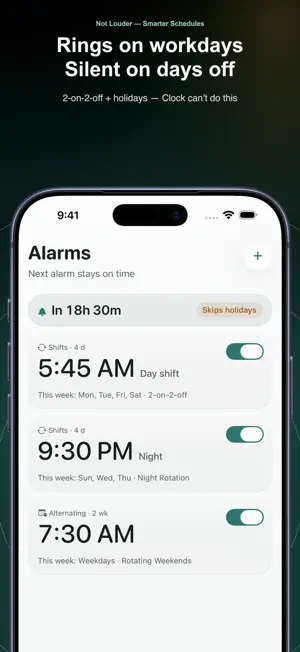
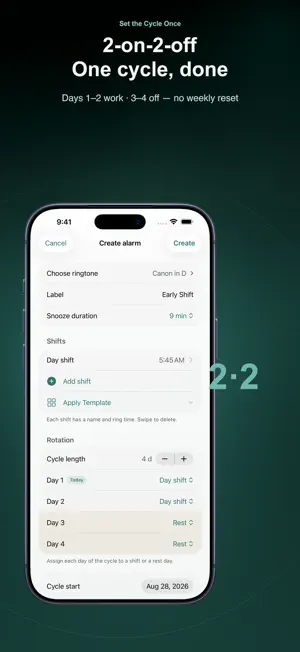
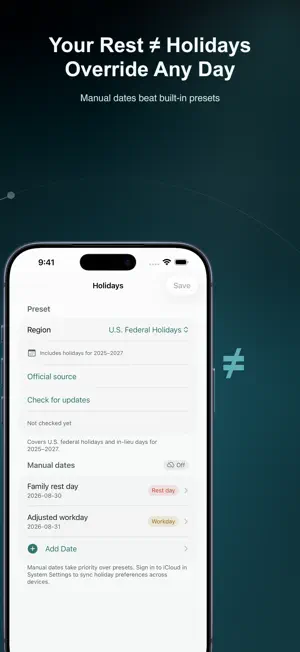
The stock alarm counts to seven. Your roster doesn't. OnDot Alarm is the iPhone alarm for people who don't work Monday to Friday. Alternating weeks, rotating shifts, public holidays — it schedules around your real life, so you stop editing alarms week to week. WHAT IT DOES • Alternating and custom weeks — one rest day this week, two the next, or any n-week cycle. Set it once. • Shift rotation — day, swing and night shifts, each with its own time. 2-on-2-off and 3-shift templates are built in. • Holiday aware — skips public holidays automatically and rings on make-up workdays, following official calendars bundled with the app. Pick your region, and keep your own custom rest days and workdays. • Clock — Timer, Stopwatch and World Clock in one tab; control timers from the Lock Screen and Dynamic Island. • Widgets — see the next alarm right on your Lock Screen and Home Screen, plus World Clock and, with Pro, Shift Week. • Sounds — a built-in set; Pro adds import of your own audio. FREE, WITH NO LIMIT Alternating weeks, shift rotations and holiday skip are free, with no cap on how many alarms you create. Upgrading never takes them away. ONDOT PRO Pro adds iCloud sync, so alarms, rotations and holiday settings stay consistent across your devices. Your data lives in your own iCloud account — there are no accounts to create, no ads, and no tracking. Pro also lets you import your own audio as alarm sounds and unlocks the Shift Week widget, with your shifts for the next 7 days at a glance. Pro also includes every Pro feature shipped later, and supports the continued development of this independent app. The yearly plan includes a 7-day free trial. Monthly, yearly and lifetime options are available; prices are shown in the app before you buy. Payment is charged to your Apple Account at confirmation of purchase. Subscriptions renew automatically unless auto-renew is turned off at least 24 hours before the end of the current period. Manage or cancel anytime in Settings on your iPhone. Privacy Policy: https://dotalarm.pages.dev/en/privacy Terms of Use: https://dotalarm.pages.dev/en/terms Support: [email protected]
What’s new
Version 2.2.0 · Updated October 9, 2026
The tab bar is now Alarms, Clock, Calendar and Settings. Timers have moved into Clock alongside the new Stopwatch and World Clock; switch between them at the top, and Clock remembers which one you used last. Stopwatch records laps and marks your fastest and slowest. World Clock lets you search for cities and shows each one's local time, how many hours ahead or behind it is, and whether it's yesterday, today or tomorrow there. Widgets have been redesigned: Next Alarm now shows which day it rings and names the holiday when one is skipped. There's a new free World Clock widget, plus the Pro Shift Week widget, which shows your shifts for the next 7 days at a glance, with ring times on the large size. Recent timers stay visible while a timer is running, so you can start another with one tap. A paused timer can now be resumed right from the Lock Screen and Dynamic Island. Importing custom sounds now requires Pro; sounds you've already imported keep working. Custom sounds can now be deleted with a swipe, and swiping to delete a timer, recent entry, city or sound now asks you to confirm. Added built-in holiday calendars for the Taiwan and Hong Kong regions (2025–2027), selected automatically when your device region matches. Fixes: with holiday rules on, the next ring time for some overnight shifts could be miscalculated; holiday changes made on different devices no longer overwrite each other; Siri no longer reports a ring time for an alarm that couldn't be scheduled; one-time alarms no longer repeat every day in Calendar; and iCloud sync keeps working after you turn off auto-renewal until your subscription ends.
App privacy
The developer, 亚娟 秦, reported these privacy practices to Apple.
Data Not Collected
The developer does not collect any data from this app.
Alternatives to OnDot Alarm: Shift & Holiday
Looking for apps like OnDot Alarm: Shift & Holiday? Here are 6 similar apps on the App Store. The highest rated is 冰鹅事记 排班日历 排班助手 排班表 倒班日历 排版系统管理 (5.0/5), and 5 of the 6 are free to download.
-
 Dr Alarm-schedule manager
4.5
Dr Alarm-schedule manager
4.5
-
 排班
排班
-
 冰鹅事记 排班日历 排班助手 排班表 倒班日历 排版系统管理
5.0
冰鹅事记 排班日历 排班助手 排班表 倒班日历 排版系统管理
5.0
-
 TC Scheduling Table
2.0
TC Scheduling Table
2.0
-
 Shift Calendar - Work Schedule
-
 PureAlarm
| App | Rating | Price | Last updated | Compare |
|---|---|---|---|---|
| OnDot Alarm: Shift & Holiday | – | Free | October 9, 2026 | |
| Dr Alarm-schedule manager | 4.5 / 5 (8) | 0.99 USD | Sep 22, 2026 | Compare |
| 排班 | – | Free | Nov 27, 2023 | Compare |
| 冰鹅事记 排班日历 排班助手 排班表 倒班日历 排版系统管理 | 5.0 / 5 (1) | Free | May 27, 2024 | Compare |
| TC Scheduling Table | 2.0 / 5 (1) | Free | Oct 29, 2025 | Compare |
| Shift Calendar - Work Schedule | – | Free | Aug 12, 2026 | Compare |
| PureAlarm | – | Free | Oct 6, 2026 | Compare |