

Video Game Tracker - GameLog
MasterMind Software LLC Entertainment iPhoneiPadiPod touch
Video Game Tracker - GameLog is a free Entertainment app for iPhone and iPad by MasterMind Software LLC. Rated 4.1/5 from 72 ratings. Requires iOS 26.0.
- Rating
- 4.1
- 72 ratings
- Price
- Free
- on the App Store
- Size
- 54 MB
- Age 4+
- Updated
- Oct 13
- 2026 · v2.4
Screenshots


About Video Game Tracker - GameLog
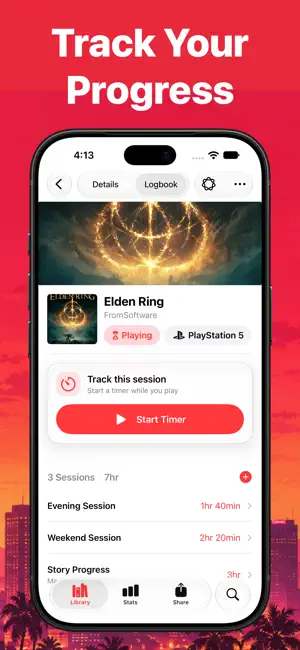
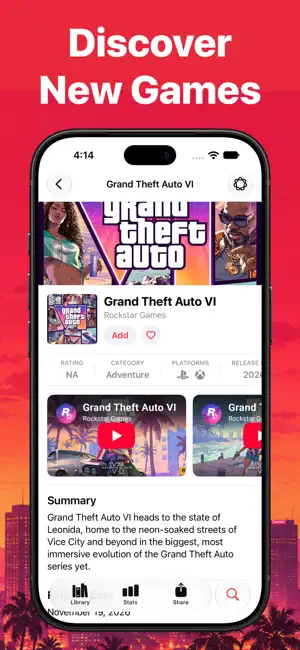
Whether you’re managing a growing backlog, tracking an active playthrough, searching for your next favorite game, or counting down to an upcoming release, GameLog keeps everything organized in one place. Build Your Game Library Create personalized lists for your backlog, favorites, completed games, wishlist, and more. Sort and filter your collection to quickly find exactly what you want to play. Track Every Playthrough Record your progress, playtime, sessions, platforms, notes, and completed playthroughs. Review detailed statistics and milestones to better understand your gaming habits over time. Time Your Play Sessions Track playtime as you play with the built-in session timer. Follow an active session at a glance and save it directly to your game log when you’re finished. Ask Questions About Any Game Use Apple Intelligence on supported devices to ask questions about a game’s story, characters, gameplay, development, releases, and more. GameLog combines available game information with relevant research to provide useful answers. Discover Something New Explore an extensive video game database, browse categories, uncover hidden gems, and use Game Finder to narrow down your next game based on what interests you. Search Smarter Quickly search for games by title or scan game artwork to help identify what you’re looking for. Adding a new discovery to your library only takes a few taps. Follow Upcoming Releases Keep track of anticipated games with release-date countdowns, wishlist organization, and convenient access to upcoming titles. Share Your Gaming Journey Create customizable images for social media and share what you’re playing, your progress, playtime, ratings, and completed adventures with friends and followers. Home Screen Widgets View favorite lists and games directly from your Home Screen for quick access to your collection. Sync Across Devices GameLog uses iCloud to keep your games, lists, playthroughs, and activity synchronized across your Apple devices. Support Independent Development GameLog is designed and maintained by a solo developer. If the app becomes part of your gaming routine, leaving a review is one of the best ways to support its continued development. GameLog Pro unlocks the complete experience and directly supports future features, improvements, and updates. Feedback and Support Have a question, encountered a problem, or have an idea for a new feature? Contact support from the Settings tab inside GameLog. Your feedback helps shape the app’s future. Subscription Details Payment for GameLog Pro will be charged to your Apple Account when your purchase is confirmed. Subscriptions automatically renew unless auto-renewal is turned off at least 24 hours before the end of the current subscription period. Your account will be charged for renewal within 24 hours before the current period ends. You can manage or cancel your subscription at any time through your App Store account settings. Privacy Policy: https://mastermindsoftware.co/privacypolicy Terms of Use: https://mastermindsoftware.co/termsofuse
Ratings & reviews
4.1
72 ratings
What’s new
Version 2.4 · Updated October 13, 2026
A major GameLog refresh for iOS 27! • Refreshed design throughout the app • Choose the platform you’re playing on • Save games to your new wishlist • Track sessions with the in-game timer and Live Activities • Scan game boxes and artwork using Visual Intelligence • Ask game-related questions with Apple Intelligence • Faster loading with cached game information • Tracked data is preserved when adding or moving games between lists • Expanded statistics with date-range filtering • Update multiple game statuses from the list context menu • New themes and a custom color picker • Quickly add games without opening their details • Improved search and game database results • Expand or collapse list sections • Faster, more polished countdown timers • Improved iPad layouts • Better balance between free and Pro features • Additional interface improvements and bug fixes
App privacy
The developer, MasterMind Software LLC, reported these privacy practices to Apple.
Data Not Linked to You
The following data, which may be collected but is not linked to your identity, may be used for the following purposes:
- Purchases: Purchase History
- Identifiers: Device ID
- Usage Data: Product Interaction
Used for: Analytics, App Functionality
Alternatives to Video Game Tracker - GameLog
Looking for apps like Video Game Tracker - GameLog? Here are 6 similar apps on the App Store. The highest rated is Game Tracker: Play & Log (4.7/5), and all 6 are free to download.
-
 Gamery: Organize Your Library
4.6
Gamery: Organize Your Library
4.6
-
 My Games: Collection & Tracker
4.3
My Games: Collection & Tracker
4.3
-
 Game Tracker: Play & Log
4.7
Game Tracker: Play & Log
4.7
-
 GamePal: Track Your Gaming
4.7
GamePal: Track Your Gaming
4.7
-
 Inventory: Game Collection
3.2
Inventory: Game Collection
3.2
-
 MyBacklog
3.6
MyBacklog
3.6
| App | Rating | Price | Last updated | Compare |
|---|---|---|---|---|
| Video Game Tracker - GameLog | 4.1 / 5 (72 ratings) | Free | October 13, 2026 | |
| Gamery: Organize Your Library | 4.6 / 5 (206) | Free | Oct 8, 2026 | Compare |
| My Games: Collection & Tracker | 4.3 / 5 (43) | Free | Apr 14, 2024 | Compare |
| Game Tracker: Play & Log | 4.7 / 5 (122) | Free | Sep 29, 2026 | Compare |
| GamePal: Track Your Gaming | 4.7 / 5 (59) | Free | Jun 4, 2026 | Compare |
| Inventory: Game Collection | 3.3 / 5 (4) | Free | Jan 1, 2026 | Compare |
| MyBacklog | 3.6 / 5 (8) | Free | Sep 3, 2025 | Compare |