

Cashbolt: Expense Tracker
JoFlee Finance iPhoneiPadiPod touch
Cashbolt: Expense Tracker is a free Finance app for iPhone and iPad by JoFlee. Requires iOS 18.0. Updated November 27, 2026.
- Price
- Free
- on the App Store
- Size
- 107 MB
- Age 4+
- Updated
- Nov 27
- 2026 · v1.8.7
Screenshots
Save to Pinterest


About Cashbolt: Expense Tracker
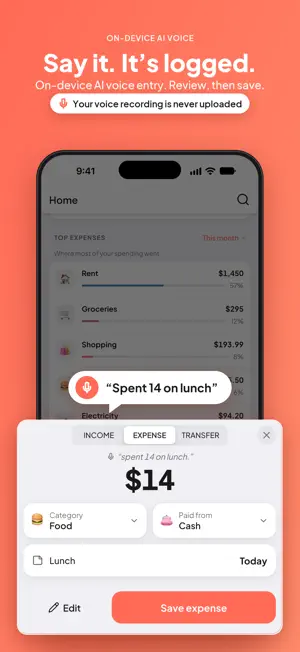
Cashbolt is an expense tracker and budget planner for iPhone and iPad that lets you log spending by speaking, plan budgets and see where your money goes, with no sign-up and no bank login. Formerly Money Manager. Same app, new name and a new look. SPEAK TO LOG AN ENTRY • Tap the mic and say what you spent, like “Spent 14 on lunch”. • Speech is turned into text on your device by an on-device AI speech model. Cashbolt fills in the amount, category and account; you review, then save. • Speak in English, Hindi, Hinglish and 9 more Indian languages. Each language is a one-time download (about 150 to 190 MB, Wi-Fi suggested). BUDGETS THAT SHOW YOUR PACE • Plan weekly, monthly, quarterly or yearly budgets for the categories you pick. • Budgets are grouped into over, slow down and on track, and show what you can spend a day. HOME-SCREEN WIDGETS AND QUICK ADD • 10 home-screen widgets: Today, Balance, Accounts, Budget, This month, Cash flow, Top spending, Recent (Pro), Quick add and Voice add. • Add an expense by tap or by voice from your Home Screen or Control Center. • Or ask Siri or search in Spotlight. REPORTS AND SEARCH • See money in, money out and each day at a glance, by week, month or year. • Tags like “Beach trip”, with spend per tag (Pro). • Category breakdown and search with filters. Export to Excel and custom periods with Pro. ACCOUNTS • Bank accounts (name them checking, savings or anything you like) and cash, in one total. Tap an account for its history. MAKE IT YOURS • Light or dark theme, accent colors, app icons and your Home layout. • Your own emoji categories, 107 currencies, date formats and a daily reminder. • Lock Cashbolt with Face ID, Touch ID or your passcode (Pro). YOUR DATA • Your entries are stored on your phone. There is no sign-up and no account. • Cashbolt does not connect to your bank and does not read your SMS. • Voice: speech is turned into text on your phone, and your voice recording is never uploaded. • Backups go to your own iCloud or Google Drive when you turn backup on (Pro). • Cashbolt sends usage analytics and crash reports to help us improve the app. For voice entries, those analytics include the recognized text and the entry details (amount, category, account, note). Details are in the privacy policy. FREE AND PRO Cashbolt is free to download, with an optional Pro subscription. • Free: one bank account, one cash account and one budget, voice entry, widgets, themes and reports. After your first free entries, there is a daily allowance; past it, an optional short video saves each extra entry. There are no banner ads. • Pro: unlimited entries, accounts and budgets, no ads, backup and restore, custom periods, export to Excel, app lock, unlimited tags, the Recent widget and more. FAQ What is Cashbolt? A money manager and expense tracker: add income and expenses by typing, from a widget or by voice, then follow them with budgets and reports. Do I need an account? No. There is no sign-up. A Google sign-in is used only if you choose Google Drive backup (Pro). Does Cashbolt connect to my bank? No. There is no bank login. You add entries yourself, by typing, from a widget or by speaking. How does voice entry work? Say what you spent. Speech is turned into text on your device, and Cashbolt fills in the entry for you to review and save. Does voice entry need the internet? The one-time language download needs the internet. Speech recognition then runs on your device. Which languages can I speak? English, Hindi, Hinglish, Marathi, Gujarati, Bengali, Punjabi, Tamil, Telugu, Kannada, Malayalam and Odia. Where is my data stored? Your entries are stored on your iPhone or iPad. Is Cashbolt free? Cashbolt is free to download, with an optional Pro subscription. Which currencies does it support? 107, including the US dollar ($) and the Indian rupee (₹). Support: [email protected] Privacy Policy: https://cashbolt.app/privacy Terms of Use: https://cashbolt.app/terms
What’s new
Version 1.8.7 · Updated November 27, 2026
• Privacy choices in Settings: turn usage analytics and ad measurement on or off at any time. • Bug fixes and performance improvements.
App privacy
The developer, JoFlee, reported these privacy practices to Apple.
Data Used to Track You
The following data may be used to track you across apps and websites owned by other companies:
- Purchases: Purchase History
- Location: Coarse Location
- Identifiers: User ID, Device ID
- Usage Data: Product Interaction, Advertising Data
Data Linked to You
The following data, which may be collected and linked to your identity, may be used for the following purposes:
- Purchases: Purchase History
- Location: Coarse Location
- Identifiers: User ID, Device ID
- Usage Data: Product Interaction, Advertising Data
- Financial Info: Other Financial Info
- Diagnostics: Performance Data, Other Diagnostic Data
Used for: Third-Party Advertising, Developer’s Advertising or Marketing, Analytics, App Functionality
Data Not Linked to You
The following data, which may be collected but is not linked to your identity, may be used for the following purposes:
- Diagnostics: Crash Data
Used for: App Functionality
Alternatives to Cashbolt: Expense Tracker
Looking for apps like Cashbolt: Expense Tracker? Here are 6 similar apps on the App Store. The highest rated is Money Manager: Expense Planner (5.0/5), and 5 of the 6 are free to download.
-
 Money Manager: Expense Planner
5.0
-
 Budget Planner, Money Manager
5.0
-
 Money Tracker - Money Manager
-
 Money Manager: Budget Pro
4.0
-
 MoneyMint: Finance Tracker
-
 Surplus: Expense Tracker
4.8
| App | Rating | Price | Last updated | Compare |
|---|---|---|---|---|
| Cashbolt: Expense Tracker | – | Free | November 27, 2026 | |
| Money Manager: Expense Planner | 5.0 / 5 (1) | Free | Dec 10, 2025 | Compare |
| Budget Planner, Money Manager | 5.0 / 5 (1) | Free | Oct 21, 2026 | Compare |
| Money Tracker - Money Manager | – | Free | Mar 5, 2024 | Compare |
| Money Manager: Budget Pro | 4.0 / 5 (2) | 1.99 USD | Oct 17, 2026 | Compare |
| MoneyMint: Finance Tracker | – | Free | Jul 31, 2026 | Compare |
| Surplus: Expense Tracker | 4.8 / 5 (28) | Free | Jan 12, 2026 | Compare |