

Kiwipot: Voice notes & diary
Joao Mazarelo Utilities iPhoneiPadiPod touch
Kiwipot: Voice notes & diary is a free Utilities app for iPhone and iPad by Joao Mazarelo. Rated 3.5/5 from 4 ratings. Requires iOS 15.0.
- Rating
- 3.5
- 4 ratings
- Price
- Free
- on the App Store
- Size
- 46 MB
- Age 4+
- Updated
- Oct 26
- 2026 · v1.0.78
Screenshots


About Kiwipot: Voice notes & diary
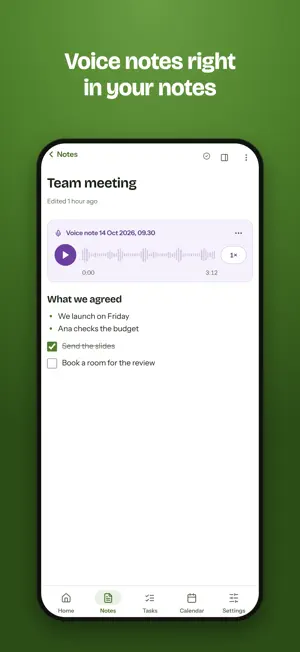
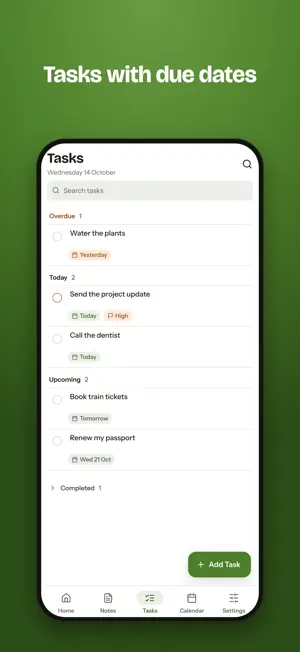
Kiwipot keeps your voice notes, notes and tasks in one place, on your iPhone and iPad, and offline too. VOICE NOTES THAT KEEP RECORDING • Tap Record and lock your iPhone: Kiwipot keeps recording with the screen off or another app open. • Pause and resume as you go. A call pauses the recording, and you pick it up again afterwards. • Play it back on its waveform: tap to jump, go back 10 seconds, listen at 1×, 1.5× or 2×. • Start a new voice note from your notes, or record straight into the note you are writing. NOTES AND TASKS • Write notes with headings, lists, checklists, pictures, videos and files. • Keep them in folders, pin the ones you need most and archive the rest. • Add tasks with due dates and tick them off. • The calendar shows each day: the tasks due, and the notes you wrote on it or about it. • Share a note by email or publish it with a link. LOCKED NOTES • Lock a note, or a whole folder, behind a 4-digit PIN, and open it with Face ID. • Locked notes show only their title in lists and search. WORKS OFFLINE • Write, record and organise without a connection: Kiwipot syncs when you are back online. • No account needed: without one, everything stays on your iPhone. • Sign in to sync across your devices, and use Kiwipot in your browser at kiwipot.com. COMING FROM VOICE DIARY? Kiwipot is the new Voice Diary. Update, and your recordings, notes and folders come with you, locked folders still locked with your passcode. Free to use, with no ads, in 55 languages.
What’s new
Version 1.0.78 · Updated October 26, 2026
Voice Diary is now Kiwipot. • Your recordings, notes and folders come with you, locked folders still locked with your passcode. • Write notes with headings, lists, checklists, pictures and files, next to your voice notes. • Add tasks with due dates, and see your days in a calendar. • Open locked notes with Face ID. • Sign in to sync across your devices and use Kiwipot in your browser at kiwipot.com, or keep everything on this iPhone.
App privacy
The developer, Joao Mazarelo, reported these privacy practices to Apple.
Data Linked to You
The following data, which may be collected and linked to your identity, may be used for the following purposes:
- Location: Precise Location, Coarse Location
- Contact Info: Email Address, Name
- User Content: Photos or Videos, Audio Data, Other User Content
- Identifiers: User ID
Used for: App Functionality
Alternatives to Kiwipot: Voice notes & diary
Looking for apps like Kiwipot: Voice notes & diary? Here are 6 similar apps on the App Store. The highest rated is Voice Journal - Audio Diary (4.9/5), and all 6 are free to download.
-
 Note Recorder - Voicenotes
4.3
-
 Voice Journal - Audio Diary
4.9
-
 Voice Recorder, Audio Memos
4.5
-
 Recorder for iPhone
4.4
-
 File Converter
3.8
-
 Sticky Notes Widget
4.7
| App | Rating | Price | Last updated | Compare |
|---|---|---|---|---|
| Kiwipot: Voice notes & diary | 3.5 / 5 (4 ratings) | Free | October 26, 2026 | |
| Note Recorder - Voicenotes | 4.3 / 5 (7) | Free | Oct 18, 2026 | Compare |
| Voice Journal - Audio Diary | 4.9 / 5 (7) | Free | Oct 2, 2026 | Compare |
| Voice Recorder, Audio Memos | 4.5 / 5 (978) | Free | Mar 16, 2026 | Compare |
| Recorder for iPhone | 4.4 / 5 (2,974) | Free | Oct 23, 2026 | Compare |
| File Converter | 3.8 / 5 (479) | Free | Aug 18, 2026 | Compare |
| Sticky Notes Widget | 4.7 / 5 (6,587) | Free | Mar 14, 2026 | Compare |