

Resource Booking Service
Avero Tech Productivity iPhoneiPadiPod touch
Resource Booking Service is a free Productivity app for iPhone and iPad by Avero Tech. Requires iOS 15.0. Updated October 5, 2026.
- Price
- Free
- on the App Store
- Size
- 19 MB
- Age 4+
- Updated
- Oct 5
- 2026 · v1.1
Screenshots


About Resource Booking Service
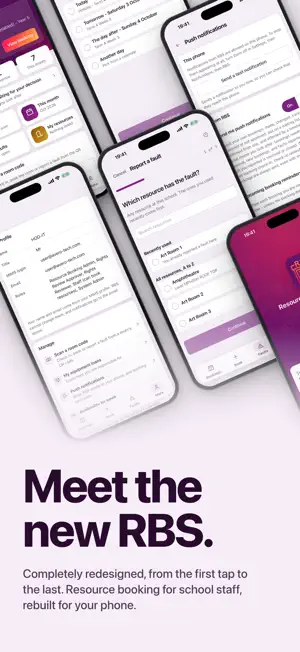
A productivity tool for school staff in Singapore to book resources. This is the mobile version of the Resource Booking Service (RBS) at https://rbs.avero-tech.com. This app requires MIMS authentication and is intended for authorised users only. This release includes: (1) See what you have booked today, tomorrow and across the year, with your next booking and its times on the home screen. (2) Book a room or facility in guided steps: a single date or a repeating weekly or fortnightly booking, choosing from the resources your school lets you book, with a waiting list when a resource is full. (3) View, change, reschedule or cancel your bookings, or book the same again. (4) Report a fault on any resource at your school, add photos or files, and follow it until it is closed. (5) For resource owners: approve or reject booking requests, see the faults reported on the resources you look after, and see the periods when a resource is blocked. (6) Push notifications for bookings made, changed, cancelled, approved or rejected, for requests waiting on your approval and for faults on your resources, and, if you turn them on, reminders before your bookings. Each type can be switched off on its own. (7) Add your bookings to your device's calendar, and lock the app with Face ID, Touch ID or your passcode. (8) If your MIMS account covers more than one school, switch between them. Staff sign in with their MIMS account. RBS never sees your password: sign-in happens on the MIMS page itself. What you can see and do is set by your school, not by this app.
What’s new
Version 1.1 · Updated October 5, 2026
Version 1.1 is a new RBS app, rebuilt from the ground up. - A home screen with today's and tomorrow's bookings and your next booking - Book a room or facility in guided steps, including repeating bookings and waiting lists - View, change, reschedule or cancel your bookings - Report a fault with photos, and follow it until it is closed - Approve requests and see the faults on resources you look after - Push notifications, with each type switchable on its own - Add your bookings to your device's calendar - Lock the app with Face ID, Touch ID or your passcode - Switch between your schools, if your MIMS account covers more than one
App privacy
The developer, Avero Tech, reported these privacy practices to Apple.
Data Linked to You
The following data, which may be collected and linked to your identity, may be used for the following purposes:
- Contact Info: Email Address, Name
- User Content: Photos or Videos, Other User Content
- Identifiers: User ID, Device ID
Used for: App Functionality
Alternatives to Resource Booking Service
Looking for apps like Resource Booking Service? Here are 6 similar apps on the App Store. The highest rated is HOGC One (5.0/5), and all 6 are free to download.
-
 Workpal for SG Public Service
4.9
Workpal for SG Public Service
4.9
-
 HOGC One
5.0
HOGC One
5.0
-
 LifeSG
3.8
LifeSG
3.8
-
 OneNS
1.8
OneNS
1.8
-
 SafeGuardian
1.7
SafeGuardian
1.7
-
 To-day: To-Do Lists & Planner
| App | Rating | Price | Last updated | Compare |
|---|---|---|---|---|
| Resource Booking Service | – | Free | October 5, 2026 | |
| Workpal for SG Public Service | 4.9 / 5 (7) | Free | Oct 5, 2026 | Compare |
| HOGC One | 5.0 / 5 (2) | Free | Oct 16, 2026 | Compare |
| LifeSG | 3.8 / 5 (38) | Free | Aug 27, 2026 | Compare |
| OneNS | 1.8 / 5 (6) | Free | Oct 23, 2026 | Compare |
| SafeGuardian | 1.7 / 5 (3) | Free | Sep 22, 2026 | Compare |
| To-day: To-Do Lists & Planner | – | Free | Mar 21, 2026 | Compare |