

Session Spaces: Multi Account
Hoang Dai Utilities iPhoneiPadiPod touch
Session Spaces: Multi Account is a free Utilities app for iPhone and iPad by Hoang Dai. Rated 5.0/5 from 1 ratings. Requires iOS 17.0.
- Rating
- 5.0
- 1 ratings
- Price
- Free
- on the App Store
- Size
- 43 MB
- Age 17+
- Updated
- Nov 4
- 2026 · v3.0.0
Screenshots
Save to Pinterest


About Session Spaces: Multi Account
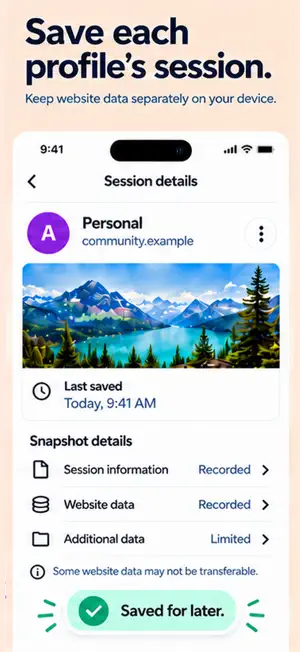
One website. Multiple accounts. Keep your personal, work and other website profiles in separate sessions with Session Spaces. Create a session for each account, sign in on the website, and return to the session you need. Each session has its own website data, so you can organize different accounts for the same site in one app. YOUR ACCOUNTS, CLEARLY ORGANIZED • Create and name separate website sessions. • Find sessions with search and saved page previews. • Keep personal, work and community profiles apart. • Browse with familiar back, forward and reload controls. SAVE AND RETURN Save supported website data manually, or enable auto-save when leaving a session or putting the app in the background. Check saved-session details before continuing. EXPORT AND IMPORT BY FILE Export a session file to save or share using your device's tools. Import supported data into a new session, or confirm replacement of an existing one. No Session Spaces account is required. MAKE IT YOURS Choose a light, dark or system appearance. Choose your preferred language and control auto-save on exit. IMPORTANT TO KNOW Websites control their own sign-in requirements. Some website data cannot be saved or transferred, and a website may ask you to sign in again, especially on another device. Session Spaces does not create website accounts or bypass website security. Session data is stored on your device. Exported files are not encrypted and may contain sign-in information that gives access to a website account. Only share them with people you trust. Deleting a session does not delete your account on the website. Keep your website profiles organized, one session at a time.
What’s new
Version 3.0.0 · Updated November 4, 2026
A fresh look for your website profiles. • Keep multiple accounts on the same website in separate sessions. • Find sessions faster with colorful cards and saved page previews. • Save manually or enable automatic saving when you leave a session. • Export and import supported session data using files. • Choose light or dark appearance and one of 12 languages. • Enjoy clearer progress indicators and smoother navigation. Some websites may require you to sign in again after restoring a session.
App privacy
The developer, Hoang Dai, reported these privacy practices to Apple.
Data Used to Track You
The following data may be used to track you across apps and websites owned by other companies:
- Diagnostics: Crash Data
Data Linked to You
The following data, which may be collected and linked to your identity, may be used for the following purposes:
- Identifiers: Device ID
- Usage Data: Product Interaction
Used for: Analytics, App Functionality
Alternatives to Session Spaces: Multi Account
Looking for apps like Session Spaces: Multi Account? Here are 6 similar apps on the App Store. The highest rated is Onyx: Dark Mode for Safari (5.0/5), and all 6 are free to download.
-
 Tao Browser by Hostao: Private
-
 Gestablo
4.0
-
 Agena
-
 Onyx: Dark Mode for Safari
5.0
-
 VNBrowser
-
 DefaultAI: Default browser
| App | Rating | Price | Last updated | Compare |
|---|---|---|---|---|
| Session Spaces: Multi Account | 5.0 / 5 (1 rating) | Free | November 4, 2026 | |
| Tao Browser by Hostao: Private | – | Free | Nov 13, 2026 | Compare |
| Gestablo | 4.0 / 5 (1) | Free | Nov 5, 2026 | Compare |
| Agena | – | Free | May 22, 2026 | Compare |
| Onyx: Dark Mode for Safari | 5.0 / 5 (1) | Free | Nov 24, 2026 | Compare |
| VNBrowser | – | Free | Aug 5, 2026 | Compare |
| DefaultAI: Default browser | – | Free | Oct 15, 2026 | Compare |