

Was There
JAM Productions LLC Entertainment iPhoneiPadiPod touchApple Watch
Was There is a free Entertainment app for iPhone and iPad by JAM Productions LLC. Requires iOS 26.0. Updated September 7, 2026.
- Price
- Free
- on the App Store
- Size
- 10 MB
- Age 4+
- Updated
- Sep 7
- 2026 · v9.1.1
Screenshots
About Was There
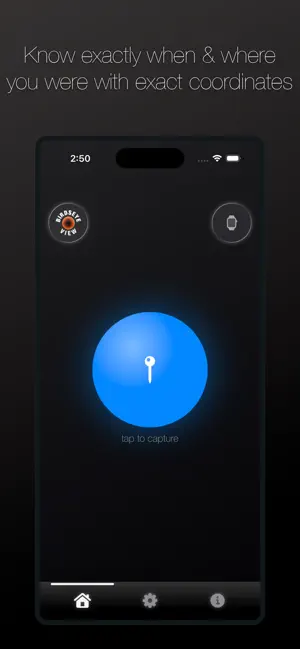
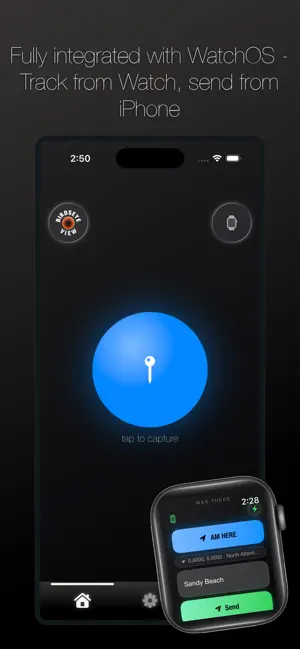
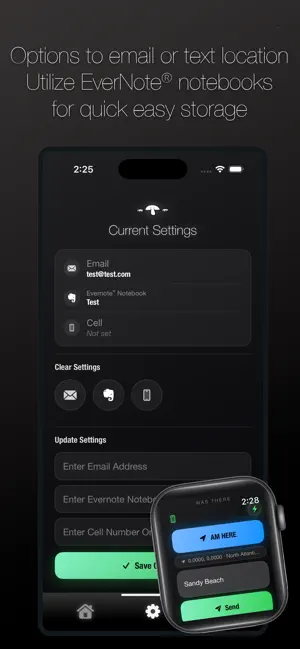
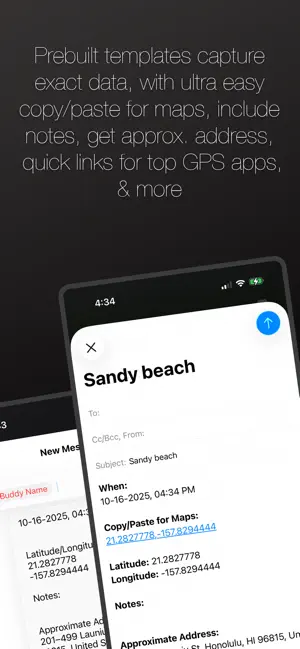
Was There is a location finding app that pulls the users precise latitude and longitude coordinates on demand and prepares the data to be sent to a user defined email address or text number. The app is designed to be used in conjunction with Evernote's organization and management platform, however using Evernote is optional. To use the app, press the blue orb from the main page. That function instantly grabs location coordinates. Users then have the option to include a subject line and additional notes within the body. These fields are not required, but intended to better identify the message and contents. Pressing the "Send" button activates either an email or text message and prepares the preformatted message. With the preferred sending option displayed, the user has access to the functionality included with Mail or Messages, including attaching a photo if desired. The final step is to send the mail or text as normal via the send button within Mail or Messages. The Birdseye View button provides an overhead look of the current location, and like any Maps view, can panned around and zoomed in or out. Please note: approximate address data is dependent on network bandwidth. If the address is not pulled in a timely manner, a note indicating such will display on the email or text message. Canceling the message and tapping the refresh button generally rectifies any delay in fetching data. A menu is included at the bottom. Three options include: Home - the main page, Settings - the user configuration page, and Info - includes basic usage instructions. The Settings page includes detail about the user's currently defined and saved data, mainly the email address or cell used to send messages, plus an option to include an Evernote Notebook name. If an Evernote Notebook is included, and a properly configured Evernote email address is saved, the notes will populate in the appropriate notebook on Evernote's platform. To do this, the email message subject is appended appropriately with the proper suffix and notebook name. If not included, the email subject will either be the user defined field from the main page, or blank. The Clear Settings section allows the user to remove/delete either or all of the saved email address, the Evernote Notebook name, or the cell number. Similarly, the Update Settings section allows the user to redefine and save any of those saved settings. Clear field buttons activate once cursor is placed in any field, and the green "Disk" button saves the updated data to the iPhone's database. The Update Send Option Setting allows the user to toggle back and forth between sending email or text. And watch notification and access setting is available for toggle as well. The Additional Information page provides instructions for setting up Apple ID email and locating an Evernote account email address. Likewise additional app tips are displayed, plus contact information for the developer is provided.
What’s new
Version 9.1.1 · Updated September 7, 2026
Corrected on screen keyboard issue.
App privacy
The developer, JAM Productions LLC, reported these privacy practices to Apple.
Data Not Collected
The developer does not collect any data from this app.
Alternatives to Was There
Looking for apps like Was There? Here are 6 similar apps on the App Store. The highest rated is Karaoke Clsub (5.0/5), and 5 of the 6 are free to download.
-
 HiiPlay-Stream Drama & TV
-
 Slate: Movie Recommendation
4.5
Slate: Movie Recommendation
4.5
-
 Karaoke Clsub
5.0
Karaoke Clsub
5.0
-
 FindPath - Connect Points
5.0
FindPath - Connect Points
5.0
-
 Break Brick Out - Fun to break
3.4
Break Brick Out - Fun to break
3.4
-
 IPTVision Player
| App | Rating | Price | Last updated | Compare |
|---|---|---|---|---|
| Was There | – | Free | September 7, 2026 | |
| HiiPlay-Stream Drama & TV | – | Free | Sep 16, 2025 | Compare |
| Slate: Movie Recommendation | 4.5 / 5 (11) | Free | Sep 9, 2026 | Compare |
| Karaoke Clsub | 5.0 / 5 (1) | Free | Feb 21, 2026 | Compare |
| FindPath - Connect Points | 5.0 / 5 (2) | 9.99 USD | Oct 22, 2026 | Compare |
| Break Brick Out - Fun to break | 3.4 / 5 (19) | Free | Oct 23, 2026 | Compare |
| IPTVision Player | – | Free | Oct 27, 2026 | Compare |
Compare Was There with the top alternatives: ratings, updates, ASO score and keyword gaps →