

PassWords: Password Manager
Oleksiy Kudrya Utilities iPhoneiPadiPod touch
PassWords: Password Manager is a free Utilities app for iPhone and iPad by Oleksiy Kudrya. Requires iOS 15.5. Updated November 14, 2026.
- Price
- Free
- on the App Store
- Size
- 62 MB
- Age 4+
- Updated
- Nov 14
- 2026 · v2.0.0
Screenshots
Save to Pinterest


About PassWords: Password Manager
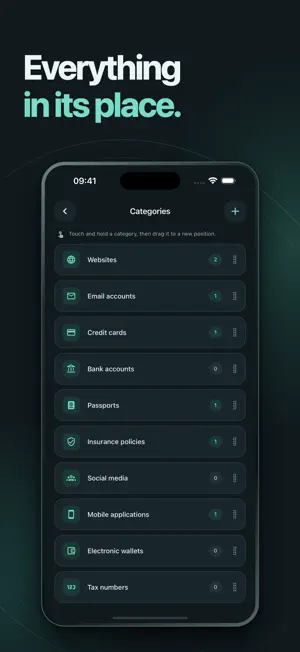
PassWords is a password manager and personal vault: keep passwords for websites, email and social media, bank card details, documents and other important information. Everything stays on your iPhone and is never sent to servers. No sign-up needed. AUTOFILL AND PASSWORD SAVING • Sign in to websites and supported apps with saved usernames and passwords, without copying them manually. • When the system offers to save a password, create a new login in PassWords or update an existing one. SECURITY • Entries are stored in an encrypted database (AES-256). • Unlock with your master password, Face ID or Touch ID. • Auto-lock when you leave the app. • Auto-erase after several wrong password attempts — in case your phone is lost or stolen. • A separate password for your most important entries. TEMPLATES AND CATEGORIES 25 ready-made templates: websites, email, bank cards and accounts, passports, driver's licenses, insurance, medical cards, SIM cards and more. Create your own categories, add fields and choose icons. SAFES Organize entries into safes — for example, personal, work and family. DOCUMENTS AND PHOTOS Attach photos, scans and PDFs to entries. View them and send them by email or messenger. REMINDERS The app reminds you when a card, passport or insurance policy is about to expire. SEARCH Quick search, filters by category and safe, favorites and archive. Deleted entries go to the trash, where you can restore them. BACKUPS Create backups protected by your master password so you don't lose your data or can move it to a new phone. CSV import and export are supported. MORE FEATURES • Password generator • Copy a password with one tap • Send an entry as PDF • Scan QR codes and barcodes • Light and dark theme FREE FOR 30 DAYS Use the password manager free for 30 days, then make a one-time Premium purchase — no subscription. SUPPORT https://passwords.mnemonicwords.app/en/support/
What’s new
Version 2.0.0 · Updated November 14, 2026
A big update: • AutoFill usernames and passwords on websites and in supported apps • Save new passwords and update existing logins (iOS 26.2+) • New design • Light, dark and system theme • Trash: restore deleted entries • CSV import with preview • Fixes and improvements
App privacy
The developer, Oleksiy Kudrya, reported these privacy practices to Apple.
Data Not Linked to You
The following data, which may be collected but is not linked to your identity, may be used for the following purposes:
- Identifiers: Device ID
- Usage Data: Product Interaction
- Diagnostics: Crash Data, Other Diagnostic Data
Used for: Analytics, App Functionality
Alternatives to PassWords: Password Manager
Looking for apps like PassWords: Password Manager? Here are 6 similar apps on the App Store. The highest rated is EasyPass: The Password Manager (5.0/5), and all 6 are free to download.
-
 Kin Pass
-
 Pass Secure - Data Manager
-
 NetKeys: password manager
-
 VaultNote - Password Manager
-
 EasyPass: The Password Manager
5.0
-
 K2CloudERP
| App | Rating | Price | Last updated | Compare |
|---|---|---|---|---|
| PassWords: Password Manager | – | Free | November 14, 2026 | |
| Kin Pass | – | Free | Jul 17, 2025 | Compare |
| Pass Secure - Data Manager | – | Free | Apr 21, 2025 | Compare |
| NetKeys: password manager | – | Free | Mar 7, 2026 | Compare |
| VaultNote - Password Manager | – | Free | Dec 2, 2025 | Compare |
| EasyPass: The Password Manager | 5.0 / 5 (3) | Free | Apr 24, 2026 | Compare |
| K2CloudERP | – | Free | Nov 9, 2026 | Compare |