

My Device Info
Samuel Blackburn Utilities iPhoneiPadiPod touch
My Device Info is a free Utilities app for iPhone and iPad by Samuel Blackburn. Rated 2.3/5 from 3 ratings. Requires iOS 16.0. Updated September 15, 2026.
- Rating
- 2.3
- 3 ratings
- Price
- Free
- on the App Store
- Size
- 19 MB
- Age 4+
- Updated
- Sep 15
- 2026 · v2.0.0
Screenshots
About My Device Info
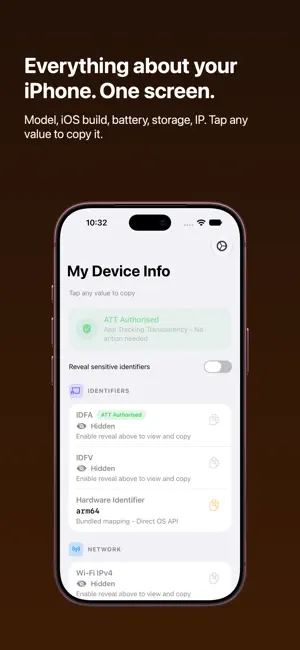
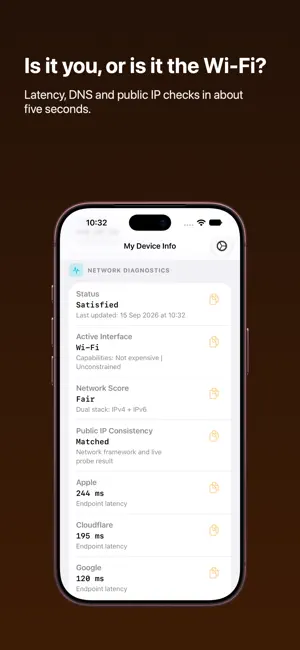
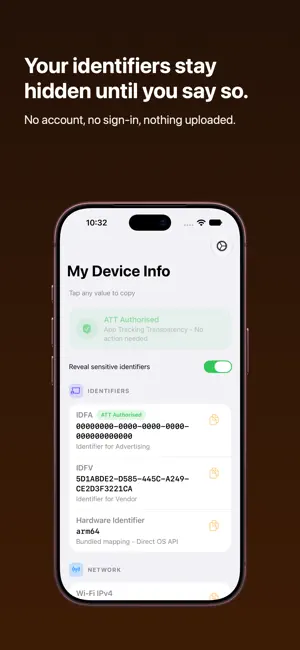
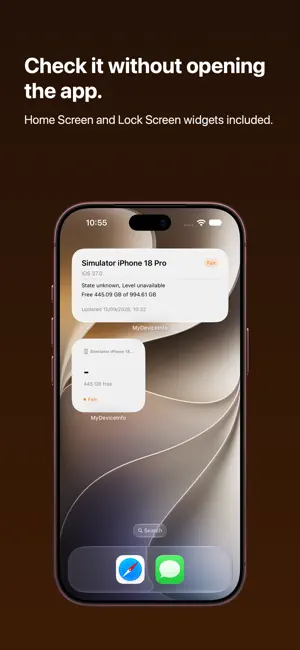
Ever been asked for your exact iPhone model, your iOS build number, or your IP address, and had no idea where to look? My Device Info puts all of it on one screen. Settings scatters this information across half a dozen menus, and some of it isn't in there at all. This app gathers it in one place, says what each value actually means, and lets you copy any of it with a single tap. WHAT YOU CAN SEE - The marketing name and the model identifier behind it, like iPhone17,1 and iPhone 16 Pro - iOS version, including the build number - Battery level, charging state, and whether Low Power Mode is on - Free space and total capacity - Wi-Fi IPv4 and IPv6 addresses, plus your cellular IP - Identifier for Vendor, and your advertising identifier if you allow tracking WHEN THE WI-FI IS BEING WEIRD Tap once and the app measures latency to Apple, Cloudflare and Google, times how long DNS lookups take, and checks whether two providers agree on your public IP. You get a Good, Fair or Poor score and the numbers behind it. Useful when everything is technically connected but nothing loads. PRIVACY YOU ACTUALLY CONTROL Identifiers and IP addresses stay hidden behind a toggle until you decide to show them. There is no account, no sign-in, and nothing is uploaded from the values on screen. My Device Info does not expose Apple's hardware UDID, because no app can. ON YOUR HOME SCREEN AND IN SIRI Add a widget to keep your device summary a glance away, on either the Home Screen or the Lock Screen. Or skip the app: ask Siri to run a quick connection check, or to copy your device model straight to the clipboard. WORTH TURNING ON Optional alerts can tell you when storage drops below a threshold you set, when connection quality degrades, or when your tracking permission changes. Dark, light and system appearance are all supported. One optional purchase removes ads permanently. Network checks contact public endpoints to measure your connection. Questions or feature requests? Reach us at [email protected]
What’s new
Version 2.0.0 · Updated September 15, 2026
Version 2.0.0 is a big one. - The home screen is rebuilt. Everything sits in clear, grouped cards instead of one endless list, and every value is still a single tap to copy. - A new app icon, with dark and tinted versions. - Home Screen and Lock Screen widgets. - New iPad specific design. - Added latest iPhone models. As well we fixed some bug fixes behind the scenes! Something not behaving? Settings has a Send feedback button and it comes straight to us.
App privacy
The developer, Samuel Blackburn, reported these privacy practices to Apple.
Data Used to Track You
The following data may be used to track you across apps and websites owned by other companies:
- Identifiers: Device ID
Data Not Linked to You
The following data, which may be collected but is not linked to your identity, may be used for the following purposes:
- Usage Data: Advertising Data, Product Interaction
- Diagnostics: Crash Data, Performance Data
- Identifiers: User ID, Device ID
Used for: Third-Party Advertising, Analytics, App Functionality
Alternatives to My Device Info
Looking for apps like My Device Info? Here are 6 similar apps on the App Store. The highest rated is HiddenApp Pro (3.6/5), and all 6 are free to download.
-
 HiddenApp Pro
3.6
HiddenApp Pro
3.6
-
 NetSafety ID
-
 NetSafety Device
1.0
NetSafety Device
1.0
-
 eSIM Manager
3.5
eSIM Manager
3.5
-
 IDFA & Device Info Viewer
-
 uPnP Mate
3.5
uPnP Mate
3.5
| App | Rating | Price | Last updated | Compare |
|---|---|---|---|---|
| My Device Info | 2.3 / 5 (3 ratings) | Free | September 15, 2026 | |
| HiddenApp Pro | 3.6 / 5 (11) | Free | Nov 21, 2023 | Compare |
| NetSafety ID | – | Free | Jul 29, 2026 | Compare |
| NetSafety Device | 1.0 / 5 (1) | Free | Aug 11, 2026 | Compare |
| eSIM Manager | 3.5 / 5 (2) | Free | Sep 28, 2026 | Compare |
| IDFA & Device Info Viewer | – | Free | Sep 2, 2026 | Compare |
| uPnP Mate | 3.5 / 5 (8) | Free | Jan 20, 2024 | Compare |
Compare My Device Info with the top alternatives: ratings, updates, ASO score and keyword gaps →