

Runalyzer
Chad Johnson Health & Fitness iPhoneiPadiPod touch
Runalyzer is a paid Health & Fitness app for iPhone and iPad by Chad Johnson. Rated 3.7/5 from 6 ratings. Requires iOS 26.2. Updated May 4, 2026.
- Rating
- 3.7
- 6 ratings
- Price
- 1.99 USD
- on the App Store
- Size
- 11 MB
- Age 4+
- Updated
- May 4
- 2026 · v2.0
Screenshots



About Runalyzer
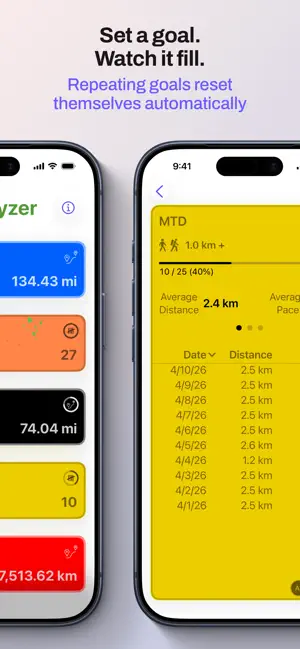
Stop digging through your fitness app to find the numbers that actually matter to you. Runalyzer pulls your workouts straight from Apple Health and puts the stats you care about on one screen — always up to date, exactly the way you want them. Build your own dashboard of workout tiles. Each one answers a specific question: How many miles have I run this month? How many 5Ks have I done this year? What's my weekly cycling distance? Tap + and tell Runalyzer what you want to track — it does the rest. Every tile is yours to configure Choose what to display (total distance or workout count), which activities to include (running, walking, hiking, or cycling), your time range, and your preferred units. Add a custom name and pick a color. Stack as many tiles as you want and drag them into the order that makes sense to you. Set a goal, watch it fill Add an optional goal to any tile and a progress ring appears. Hit it and Runalyzer celebrates. Set repeating goals and they reset automatically — your weekly mileage goal is ready again every Monday without you touching a thing. On your home screen Add a Runalyzer widget to your iPhone home screen and your metric is always visible — current value and goal progress, right there without opening the app. Add as many widgets as you like, one for each metric you want at a glance. Dig into any metric Tap a tile to see the full story: your total front and center, average distance, average pace or speed, and a complete list of every workout that went into the number. Sort by date, distance, or pace. Group by day, week, month, or year to see how your training adds up over time. Two charts — distance and pace or speed — show how you're trending. Only count what qualifies Distance filters let you tell Runalyzer exactly which workouts belong in a tile. Count only your 5K efforts, only your long runs, only your rides over 30 km — you set the rules. Pace or speed, your call Running and walking metrics show pace. Cycling metrics show speed. Or override any tile to display whichever you prefer. Your data stays on your phone Runalyzer reads directly from Apple Health and does everything locally. No account. No server. No ads. Apple Health's own permissions control what the app can see. Available in English, Spanish, French, and Brazilian Portuguese.
Ratings & reviews
3.7
6 ratings
What’s new
Version 2.0 · Updated May 4, 2026
• Home screen widgets — see your metric and goal progress without opening the app • Cycling support: add rides to any metric, with speed (km/h or mph) in place of pace • New glass effect design and zoom transitions throughout • Better charts, faster grouping and sorting • Spanish, French, and Brazilian Portuguese • Hitting a goal gets a proper celebration!
App privacy
The developer, Chad Johnson, reported these privacy practices to Apple.
Data Not Collected
The developer does not collect any data from this app.
Alternatives to Runalyzer
Looking for apps like Runalyzer? Here are 6 similar apps on the App Store. The highest rated is Intervals.icu Companion (4.8/5), and 5 of the 6 are free to download.
-
 Tempo: Run Log & Insights
4.7
-
 HealthFit
4.6
-
 FitnessSyncer
2.6
-
 Intervals.icu Companion
4.8
-
 RunGap - Workout Data Manager
4.8
-
 Health Sync by appyhapps
4.3
| App | Rating | Price | Last updated | Compare |
|---|---|---|---|---|
| Runalyzer | 3.7 / 5 (6 ratings) | 1.99 USD | May 4, 2026 | |
| Tempo: Run Log & Insights | 4.7 / 5 (1,034) | Free | Feb 16, 2025 | Compare |
| HealthFit | 4.6 / 5 (913) | 6.99 USD | Oct 27, 2026 | Compare |
| FitnessSyncer | 2.6 / 5 (23) | Free | Oct 29, 2026 | Compare |
| Intervals.icu Companion | 4.8 / 5 (39) | Free | Oct 21, 2026 | Compare |
| RunGap - Workout Data Manager | 4.8 / 5 (5,937) | Free | Oct 29, 2026 | Compare |
| Health Sync by appyhapps | 4.3 / 5 (121) | Free | Oct 27, 2026 | Compare |
Compare Runalyzer with the top alternatives: ratings, updates, ASO score and keyword gaps →