

ivySCI
Nanjing IvyScience Information Technology Co., Ltd. Productivity iPhoneiPadiPod touch
ivySCI is a free Productivity app for iPhone and iPad by Nanjing IvyScience Information Technology Co., Ltd. Rated 4.6/5 from 9 ratings. Requires iOS 15.5.
- Rating
- 4.6
- 9 ratings
- Price
- Free
- on the App Store
- Size
- 66 MB
- Age 4+
- Updated
- Sep 30
- 2026 · v4.2.0
Screenshots

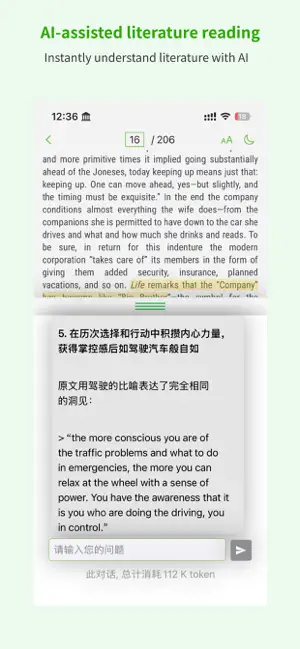


About ivySCI
ivySCI is dedicated to providing thoughtful and intelligent literature reading and management tools for researchers, helping them save valuable time and focus more effectively on their research, rather than getting bogged down in time-consuming literature management, especially the tedious task of formatting references for graduate theses. As your helpful assistant, ivySCI offers a comprehensive range of services from the outset, including: 1. After you import PDF documents, we automatically identify the metadata of each paper, including titles, authors, abstracts, DOIs, journals, and important journal impact factors (CiteScore). 2. For each document, we provide built-in translation and dictionary lookup to overcome language barriers. 3. We offer AI-assisted reading for each document, providing quick answers to your questions. In the Mac version, we also provide AI proofreading and translation functions. 4. We analyze each document so that you can access references directly when needed, without flipping to the end of the paper. After viewing the references, you can decide whether to download them. You can customize the download engine to provide more channels to help you find the required literature faster. 5. We extract images from papers and provide side-by-side text and image viewing when necessary. You can zoom in or out on images to focus on specific details. 6. We analyze the PDF structure and present it in an outline format. Thumbnails are also available for viewing. 7. You can create notes on any device, and these notes are shared via the cloud for easy access anytime, anywhere. 8. Your literature and notes are associated with your account, so you can use them on any device (including iPhone, iPad, and Mac) after logging in. 9. When writing in Word or WPS, you can cite literature and notes at any time using the ivyCite plugin provided by ivySCI. This ensures that your thought process remains uninterrupted. ivySCI offers various client options tailored to research needs, including Mac and PC, iPad, and iPhone. Each device serves a different purpose, with desktop versions offering comprehensive management capabilities, iPad versions focused on reading and basic operations, and iPhone versions providing basic information access. Depending on the intelligence analysis capabilities and the limitations of different PDF formats, some features may not be available, but we continuously optimize the engine.
Ratings & reviews
4.6
9 ratings
What’s new
Version 4.2.0 · Updated September 30, 2026
1. You can now mark papers as unread, so unfinished reading is easy to find and resume. 2. Fixed an issue where WeChat login could get stuck.
App privacy
The developer, Nanjing IvyScience Information Technology Co., Ltd., reported these privacy practices to Apple.
Data Not Linked to You
The following data, which may be collected but is not linked to your identity, may be used for the following purposes:
- Diagnostics: Crash Data, Performance Data, Other Diagnostic Data
Used for: App Functionality
Alternatives to ivySCI
Looking for apps like ivySCI? Here are 6 similar apps on the App Store. The highest rated is GUGA-Hyperboard (4.6/5), and all 6 are free to download.
-
 CAJ阅读器-caj云阅读浏览转换
4.3
CAJ阅读器-caj云阅读浏览转换
4.3
-
 CAJ文献阅读器
-
 GUGA-Hyperboard
4.6
GUGA-Hyperboard
4.6
-
 CAJ Converter
-
 Papers by ReadCube
3.7
Papers by ReadCube
3.7
-
 CAJ转换器-CAJ云阅读浏览文献转换器
| App | Rating | Price | Last updated | Compare |
|---|---|---|---|---|
| ivySCI | 4.6 / 5 (9 ratings) | Free | September 30, 2026 | |
| CAJ阅读器-caj云阅读浏览转换 | 4.3 / 5 (11) | Free | Mar 7, 2024 | Compare |
| CAJ文献阅读器 | – | Free | May 10, 2026 | Compare |
| GUGA-Hyperboard | 4.6 / 5 (170) | Free | Oct 29, 2025 | Compare |
| CAJ Converter | – | Free | May 10, 2026 | Compare |
| Papers by ReadCube | 3.7 / 5 (556) | Free | Oct 14, 2026 | Compare |
| CAJ转换器-CAJ云阅读浏览文献转换器 | – | Free | Mar 7, 2024 | Compare |
Compare ivySCI with the top alternatives: ratings, updates, ASO score and keyword gaps →