

Moleskine Planner
Moleskine Srl Productivity iPhoneiPadiPod touchMac
Moleskine Planner is a free Productivity app for iPhone and iPad by Moleskine Srl. Rated 4.5/5 from 518 ratings. Requires iOS 17.0. Updated November 5, 2026.
- Rating
- 4.5
- 518 ratings
- Price
- Free
- on the App Store
- Size
- 158 MB
- Age 4+
- Updated
- Nov 5
- 2026 · v3.1.764
Screenshots
About Moleskine Planner
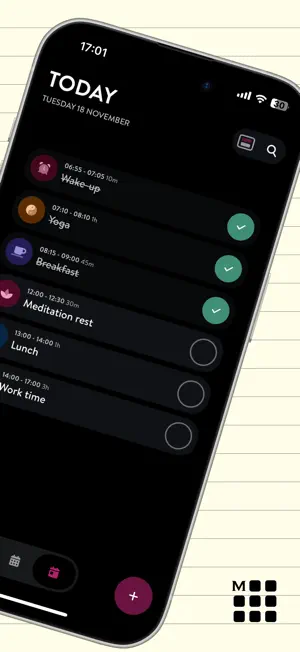
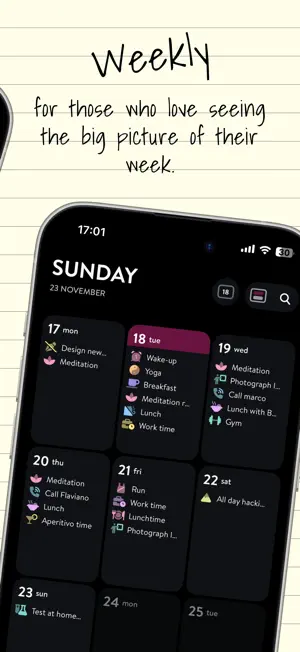
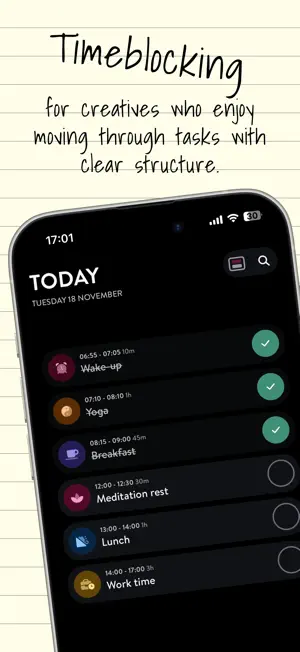
The Moleskine Planner App (previously Moleskine Balance) combines minimalistic design with powerful functionality, offering you a seamless way to manage your calendars and tasks all in one place. Whether you're a student or a professional, Moleskine Planner allows you to visually organize your day with all the details you need to ensure nothing is forgotten. Effortlessly create reminders, to-do lists, and view calendars, all customizable with icons, colors, subtasks, and notes. The Moleskine Planner App is your perfect companion for managing personal and professional activities, ensuring you stay on top of your schedule with style and ease. Features: WEEKLY OVERVIEW Effortlessly capture the big picture with a comprehensive view of all your appointments and tasks for the week. FOCUS ON TODAY Transform your day with a beautifully organized visual timeline. Experience clarity with a seamless view of your schedules and tasks. CALENDAR INTEGRATION AND CUSTOMIZATION Empower your planning by marking tasks as completed and adding a personal touch with customizable icons, colors, subtasks, and notes. THEMATIC LISTS Create stunning thematic lists to beautifully organize your personal and professional tasks with style and ease. Terms of Service: https://www.moleskineeveryday.com/terms
Ratings & reviews
4.5
518 ratings
What’s new
Version 3.1.764 · Updated November 5, 2026
What's New: - Enjoy new view options and improved layouts for wider screens, with clearer weekly views and better use of space on iPad and Mac. - We've redesigned the lists section to make your tasks easier to browse. - You can now show free time between activities in the weekly time block view. - Copy tasks to another date with the new "Copy To" action. - Find the right icon more easily with the improved icon picker. - Descriptions from external calendar events now appear directly in the app's description field. - We've improved scrolling, date navigation, calendar syncing, and task editing, and fixed issues with moving and duplicating tasks and opening Focus Mode from Live Activities. - Various other fixes and stability improvements. Let us know what you think!
App privacy
The developer, Moleskine Srl, reported these privacy practices to Apple.
Data Used to Track You
The following data may be used to track you across apps and websites owned by other companies:
- Identifiers: User ID
Data Not Linked to You
The following data, which may be collected but is not linked to your identity, may be used for the following purposes:
- Identifiers: User ID
- Usage Data: Product Interaction, Other Usage Data
- Diagnostics: Crash Data
Used for: Developer’s Advertising or Marketing, Analytics, App Functionality
Alternatives to Moleskine Planner
Looking for apps like Moleskine Planner? Here are 6 similar apps on the App Store. The highest rated is NotePlan - To-Do List & Notes (4.8/5), and all 6 are free to download.
-
 Timepage: Calendar Planner
4.6
-
 Actions: To Do List Organizer
4.6
-
 NoteCircle: To-Do List
4.6
-
 NotePlan - To-Do List & Notes
4.8
-
 Bullet: Habit Tracker, Journal
4.7
-
 Superlist: To Do List & Notes
4.5
| App | Rating | Price | Last updated | Compare |
|---|---|---|---|---|
| Moleskine Planner | 4.5 / 5 (518 ratings) | Free | November 5, 2026 | |
| Timepage: Calendar Planner | 4.6 / 5 (15,453) | Free | Nov 13, 2026 | Compare |
| Actions: To Do List Organizer | 4.6 / 5 (9,783) | Free | Nov 13, 2026 | Compare |
| NoteCircle: To-Do List | 4.6 / 5 (1,247) | Free | Nov 14, 2026 | Compare |
| NotePlan - To-Do List & Notes | 4.8 / 5 (1,525) | Free | Oct 23, 2026 | Compare |
| Bullet: Habit Tracker, Journal | 4.7 / 5 (324) | Free | Nov 7, 2026 | Compare |
| Superlist: To Do List & Notes | 4.5 / 5 (467) | Free | Nov 13, 2026 | Compare |
Compare Moleskine Planner with the top alternatives: ratings, updates, ASO score and keyword gaps →