

Spelling Bee Training
MyCloudVIP Corporation Education iPhoneiPadiPod touch
Spelling Bee Training is a free Education app for iPhone and iPad by MyCloudVIP Corporation. Requires iOS 16.4. Updated September 28, 2026.
- Price
- Free
- on the App Store
- Size
- 49 MB
- Age 4+
- Updated
- Sep 28
- 2026 · v2.0.1
Screenshots


About Spelling Bee Training
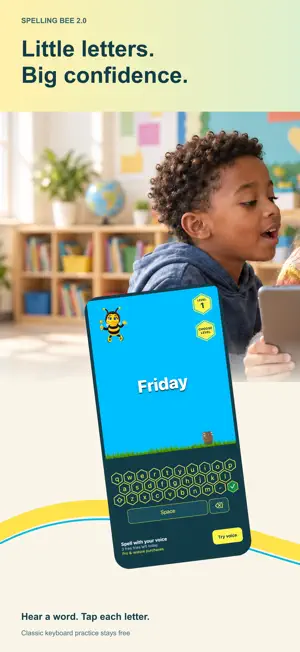
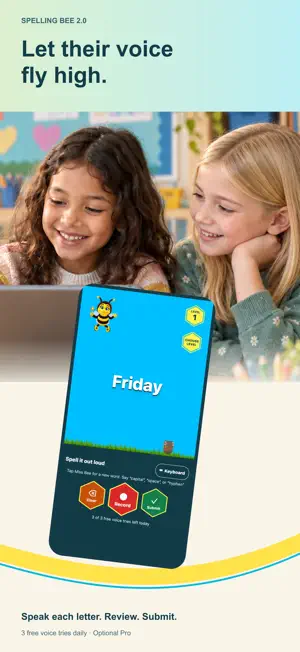
Let their voice fly high! Spelling Bee 2.0 brings a major refresh to the classic spelling game, with two ways to practice: the familiar keyboard and new on-device voice recognition. Listen to a word, spell it your way, and keep learning one letter at a time. TWO WAYS TO SPELL • Classic keyboard: tap the bright honeycomb keys to build your answer. • Voice practice: say each letter aloud, review the letters on screen, then tap Submit. • Switch between keyboard and voice whenever you like. • Say “capital” before any letter, “space” between words, or “hyphen” when needed. A LITTLE HELP FROM FRIENDS • Tap Miss Bee to hear a new word from your chosen level. • Tap the wooden keg for a friendly peek at the expected spelling. • Choose from six levels and practice at your own pace. • Enjoy animated characters, encouraging audio, and confetti for correct answers. • A refreshed interface fits iPhone and iPad. VOICE PRIVACY BY DESIGN Voice spelling uses native on-device speech recognition. Your microphone audio is processed on your device; the app does not save voice recordings or send your voice or spoken spelling to our servers or a cloud speech service. Voice practice requires supported on-device English recognition. If unavailable, you can keep playing with the keyboard. FREE CLASSIC PLAY. OPTIONAL PRO VOICE. Classic keyboard practice stays free. Everyone gets 3 submitted voice tries each day. Optional Monthly Pro and Annual Pro subscriptions unlock unlimited voice spelling while active. Parents and grown-ups can purchase, manage, or restore Pro in the app. Internet access is needed to load game content and audio and to manage purchases. On-device speech processing does not mean the entire game works offline. Subscriptions renew automatically unless canceled at least 24 hours before the current period ends. Payment is charged to your Apple Account. Manage or cancel subscriptions in your App Store account settings. Privacy Policy: https://mycloudvip.com/PrivacyPolicy Terms of Use: https://mycloudvip.com/TOS
What’s new
Version 2.0.1 · Updated September 28, 2026
• Improvements to voice spelling and audio feedback. • Improved subscription and purchase-flow reliability. • Added usage analytics to help us improve practice and understand subscription issues. Voice recordings and spoken spellings are not sent to analytics.
App privacy
The developer, MyCloudVIP Corporation, reported these privacy practices to Apple.
Data Not Linked to You
The following data, which may be collected but is not linked to your identity, may be used for the following purposes:
- Purchases: Purchase History
- Identifiers: User ID, Device ID
- Usage Data: Product Interaction
- Diagnostics: Other Diagnostic Data
Used for: Analytics, App Functionality
Alternatives to Spelling Bee Training
Looking for apps like Spelling Bee Training? Here are 6 similar apps on the App Store. The highest rated is Spelling Bee: English Words (4.6/5), and 5 of the 6 are free to download.
-
 A+ Spelling Bee English Words
4.1
A+ Spelling Bee English Words
4.1
-
 Spelling Bee - 900+ Words
3.8
Spelling Bee - 900+ Words
3.8
-
 WordsTrain - Spelling Bee Game
4.4
WordsTrain - Spelling Bee Game
4.4
-
 Spelling Bee: Custom words
1.0
Spelling Bee: Custom words
1.0
-
 Spelling Bee: English Words
4.6
Spelling Bee: English Words
4.6
-
 Spelling Bee: Practice & Games
4.5
Spelling Bee: Practice & Games
4.5
| App | Rating | Price | Last updated | Compare |
|---|---|---|---|---|
| Spelling Bee Training | – | Free | September 28, 2026 | |
| A+ Spelling Bee English Words | 4.1 / 5 (2,341) | Free | Oct 28, 2026 | Compare |
| Spelling Bee - 900+ Words | 3.8 / 5 (4) | Free | May 26, 2026 | Compare |
| WordsTrain - Spelling Bee Game | 4.4 / 5 (114) | Free | Sep 9, 2024 | Compare |
| Spelling Bee: Custom words | 1.0 / 5 (1) | 1.99 USD | Nov 19, 2023 | Compare |
| Spelling Bee: English Words | 4.6 / 5 (1,910) | Free | Sep 11, 2026 | Compare |
| Spelling Bee: Practice & Games | 4.5 / 5 (270) | Free | Oct 27, 2026 | Compare |