

Active Log: Design Your Time
Yasushi Oda Lifestyle iPhoneiPadiPod touch
Active Log: Design Your Time is a free Lifestyle app for iPhone and iPad by Yasushi Oda. Requires iOS 17.6. Updated October 10, 2026.
- Price
- Free
- on the App Store
- Size
- 23 MB
- Age 4+
- Updated
- Oct 10
- 2026 · v1.8.7
Screenshots

About Active Log: Design Your Time
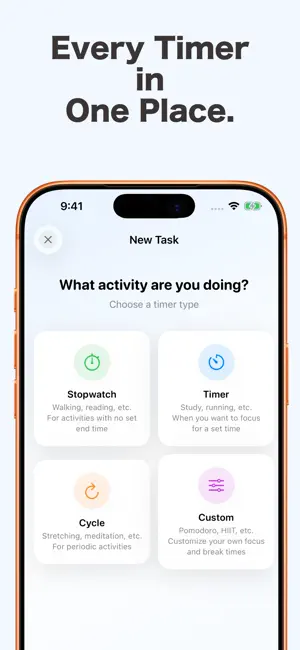
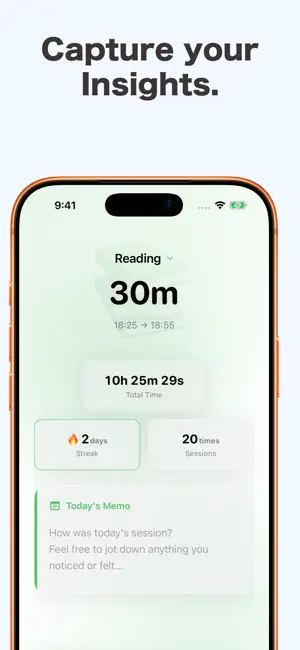
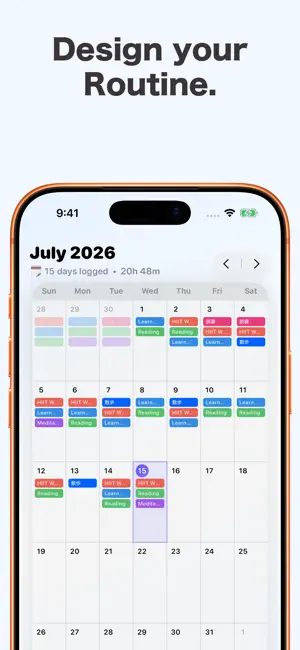
【Make Every Minute Count. Turn Your Time Into Progress.】 With ActiveLog, your effort is automatically tracked just by using a timer. Are you still switching between a timer and a tracking app? With Active Log, you can measure, log, and review your daily activities in one seamless flow! Visualize your progress in fitness, studying, reading, or Pomodoro sessions, and see your hard work pay off. Key Features ① 4 Timer Modes for Any Task Choose the perfect timer to match your daily routine: ・Stopwatch: Perfect for walks or open-ended tasks when you just want to start without a time limit. ・Timer: A classic countdown for studying, reading, cooking, and more. ・Interval Timer: Repeat active and rest intervals. Great for stretching, meditation, or quick breaks. ・Custom Timer: Fully customizable for HIIT (e.g., 20s work, 10s rest for 8 sets) or Pomodoro (e.g., 25m focus, 5m break for 4 sets). ② Instant Start Save your favorite timer durations and modes. Once set up, just tap to start. No more wasting time configuring settings every single time. ③ Automatic Logging & Insights Your progress is saved automatically the moment you stop the timer. Look back at your growth in two intuitive ways: ・Calendar View: Track your daily consistency month by month. See exactly what you did with a visual daily timeline. Watch your blank calendar fill up with your personal colors—the ultimate motivation to keep going! ・Stats & Progress: View your total lifetime hours, current streaks, and total sessions for each task on a single screen. (Unlock detailed weekly graphs and interactive 4-month heatmaps with Premium!) Plus, write down quick thoughts, mood notes, or reflections on the session screen immediately after finishing a timer. ④ Flexible Habit Goals Set weekly targets and choose your own execution pace (e.g., every day, once every 2 days) for each task. Life happens—our flexible pace setting helps you adjust your days so you never have to worry about breaking your streak! ⑤ Seamless Routines Chain multiple timers together to create your ultimate daily routine. The app automatically transitions to the next step and keeps you updated with background notifications. You can even set custom buffer/break times between timers so you never feel rushed! Smart Add-ons Quick-Start Widgets: Start your favorite timers with a single tap directly from your Home Screen. If-Then Widget: Cultivate habits scientifically! Display "If [Trigger], Then [Action]" prompts on your screen so you never forget to take action. 100% Offline Support: No internet connection required. All features work completely offline, protecting your privacy. Go Premium Upgrade to our monthly or annual subscription to unlock the full power of Activity Log: ・Remove all ads ・Set unlimited active goals ・Create unlimited custom routines ・Unlock detailed weekly graphs and heatmaps ・Change your timer completion sounds to your favorite Apple Music tracks Pricing Monthly Plan: $2.99 / month (or local equivalent) Annual Plan: $29.99 / year (Save ~17%) (Pricing may vary by region. Subscriptions automatically renew unless canceled at least 24 hours before the end of the current period. Manage your subscription or restore purchases anytime in the app settings.) Terms of Service: https://activelog-web.activelog-ios.workers.dev/#/terms
What’s new
Version 1.8.7 · Updated October 10, 2026
Thanks for using ActiveLog! This update adds a new feature to help when you forget to record. What's New • Added "Redo Points" and manual records If you forgot to start a timer, you can now add that record afterward. Use the "Add Record" button on the calendar, or "Add Record" in Settings. - Adding or editing one record costs 1 redo point - You start with 2 points, and earn 1 point back for every 7 days you're active - You can hold up to 2 points (4 for Premium) - Premium members get 2 bonus redo points when they join (existing Premium members will receive them once with this update) - For a limited time, you can add records from up to six months ago Improvements • Manually added records now show up in the calendar, statistics, and widgets • iCloud backup now includes manual records and your redo points • Refreshed the calendar tab — tap the Calendar tab again to jump back to the current month • Other stability improvements If you have any thoughts or requests after trying it, please reach out through Settings in the app. I read every message sent through the form too, so please don't hesitate to write. It means a lot to me!
App privacy
The developer, Yasushi Oda, reported these privacy practices to Apple.
Data Used to Track You
The following data may be used to track you across apps and websites owned by other companies:
- Identifiers: Device ID
Data Linked to You
The following data, which may be collected and linked to your identity, may be used for the following purposes:
- Location: Coarse Location
- Identifiers: Device ID
- Usage Data: Product Interaction, Advertising Data
Used for: Third-Party Advertising, Analytics
Data Not Linked to You
The following data, which may be collected but is not linked to your identity, may be used for the following purposes:
- Diagnostics: Crash Data, Performance Data
- Usage Data: Product Interaction
Used for: Third-Party Advertising, Analytics, App Functionality
Alternatives to Active Log: Design Your Time
Looking for apps like Active Log: Design Your Time? Here are 6 similar apps on the App Store.
-
 Daily Space Journey
-
 Day Count – Days Until & Since
-
 KASANE - Gratitude Journal
-
 Satto | 読書管理アプリ
-
 Yarnie - Knitting Row Counter
-
 Watch Log & Collection - Crown
| App | Rating | Price | Last updated | Compare |
|---|---|---|---|---|
| Active Log: Design Your Time | – | Free | October 10, 2026 | |
| Daily Space Journey | – | Free | Dec 10, 2025 | Compare |
| Day Count – Days Until & Since | – | Free | Oct 3, 2026 | Compare |
| KASANE - Gratitude Journal | – | Free | Aug 16, 2026 | Compare |
| Satto | 読書管理アプリ | – | Free | Apr 2, 2026 | Compare |
| Yarnie - Knitting Row Counter | – | Free | Jun 24, 2026 | Compare |
| Watch Log & Collection - Crown | – | Free | Jul 4, 2026 | Compare |