

LoveMusic Player - Local Play
煦 张 Music iPhoneiPadiPod touchMac
LoveMusic Player - Local Play is a free Music app for iPhone and iPad by 煦 张. Rated 3.8/5 from 5 ratings. Requires iOS 15.0. Updated October 29, 2024.
- Rating
- 3.8
- 5 ratings
- Price
- Free
- on the App Store
- Size
- 8 MB
- Age 4+
- Updated
- Oct 29
- 2024 · v2.5
Screenshots


About LoveMusic Player - Local Play
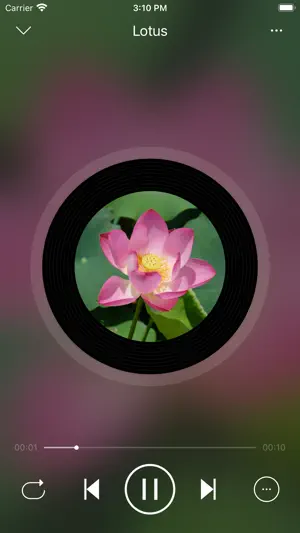
LoveMusic is a local music player / offline music player. Support multiple music libraries, iCloud synchronization of different devices, information editing, ID3 Tag editing, Lyrics editing ... [Supported Formats] - AAC, AIFF, CAF, FLAC, MP3, M4A, WAV - M4V, MP4, MOV [Management Method] 1, Can be managed by LoveMusic application 2, You can manage files through the Files application that comes with the device 2.1, Files > My Device > LoveMusic Folder : Can manage local files 2.2, Files > iCloud Drive > LoveMusic Folder : Manage iCloud Drive files, support synchronization between different devices Note: If a file exists in a user-defined playlist, moving the file through the Files application may cause a link error to the playlist file [iCloud] - Support iCloud file backup and optionally download part of the file to the device - Through iCloud, resources can be shared on multiple devices such as iPad, iPhone, etc.; (For example, music files on Mac, you can directly drag and drop them to iCloud Drive> LoveMusic > My Music, iPhone, iPad can see the related files and choose whether to download them) [Document Organization] - Multiple music libraries can be established, and each music library can manage different categories of materials. For example, build the following music library: my music, my poetry, children's music. - Independent management of each music library - You can browse files in the library by song, artist, album, folder, etc. - Playlist management [File Import] - Files import - WiFi transport (HTTP) - Airdrop - Mac import - Photo import [Information Edited] - Support editing information of some files ( m4a, mp3, mov, mp4, m4v) - Edit lyrics 1, If the software supports embedded lyrics in the corresponding audio file and the LRC file does not exist, the lyrics will be saved in the audio file 2, If the software supports embedded lyrics in the corresponding audio file and the LRC file exists at the same time, the lyrics will be saved in both the audio file and the LRC file 3, If the software does not support the embedded lyrics of the corresponding audio file, an LRC file with the same name will be created and the lyrics will be saved [Play Style] - Image - Vinyl Records - CD - Photo pictures [Play Functions] - Timing: time/number of songs - Double speed: click the time on the right of the progress bar to display the shortcut of this function - Fast forward and fast backward: click the time on the left of the progress bar to display the shortcut operation of this function [Purchase] - This program can be downloaded for free to experience, preview - Some built-in functions need to be purchased to use - All current purchases are one-time purchases and lifetime use.
Ratings & reviews
3.8
5 ratings
What’s new
Version 2.5 · Updated October 29, 2024
- Support iOS 18
App privacy
The developer, 煦 张, reported these privacy practices to Apple.
Data Not Collected
The developer does not collect any data from this app.
Alternatives to LoveMusic Player - Local Play
Looking for apps like LoveMusic Player - Local Play? Here are 6 similar apps on the App Store. The highest rated is Meuli Player: Offline Media (5.0/5), and all 6 are free to download.
-
 Meuli Player: Offline Media
5.0
Meuli Player: Offline Media
5.0
-
 AMPod Music Player
4.7
AMPod Music Player
4.7
-
 Light Player - Local & Cloud
4.6
Light Player - Local & Cloud
4.6
-
 Power Player Music Player
4.4
Power Player Music Player
4.4
-
 SirenX - Hi-Res Music Player
5.0
SirenX - Hi-Res Music Player
5.0
-
 Tempo-live
1.0
Tempo-live
1.0
| App | Rating | Price | Last updated | Compare |
|---|---|---|---|---|
| LoveMusic Player - Local Play | 3.8 / 5 (5 ratings) | Free | October 29, 2024 | |
| Meuli Player: Offline Media | 5.0 / 5 (1) | Free | Jul 24, 2024 | Compare |
| AMPod Music Player | 4.7 / 5 (31) | Free | Sep 21, 2026 | Compare |
| Light Player - Local & Cloud | 4.6 / 5 (70) | Free | Sep 24, 2026 | Compare |
| Power Player Music Player | 4.4 / 5 (29) | Free | Sep 19, 2026 | Compare |
| SirenX - Hi-Res Music Player | 5.0 / 5 (1) | Free | Sep 16, 2026 | Compare |
| Tempo-live | 1.0 / 5 (1) | Free | Jul 21, 2025 | Compare |