

Fortified Central Command
Fortified Health Security Productivity iPhoneiPadiPod touch
Fortified Central Command is a free Productivity app for iPhone and iPad by Fortified Health Security. Rated 5.0/5 from 5 ratings. Requires iOS 15.4.
- Rating
- 5.0
- 5 ratings
- Price
- Free
- on the App Store
- Size
- 50 MB
- Age 4+
- Updated
- Jul 22
- 2026 · v2.1.1
Screenshots
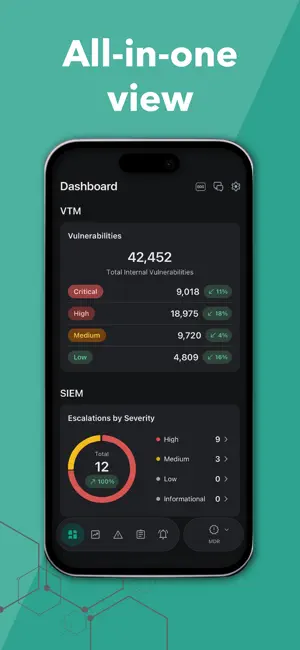

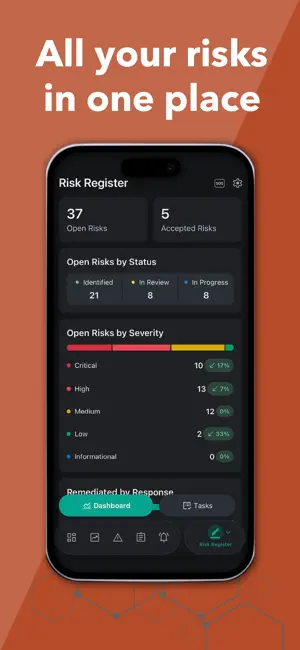
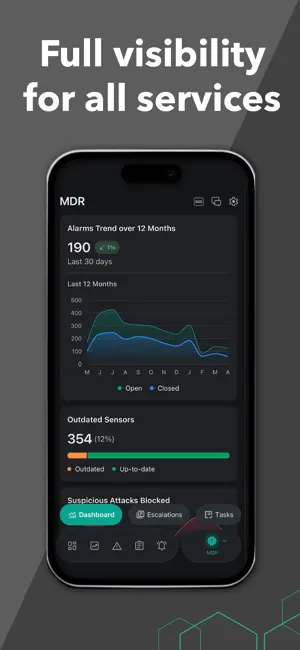
About Fortified Central Command
Fortified Central Command simplifies the management of your healthcare cybersecurity program. With an all-in-one view of each managed service of your organization’s cybersecurity program, you can more efficiently identify and track risks, monitor threats, respond quickly to incidents, and communicate in real-time with Fortified.
Ratings & reviews
5.0
5 ratings
What’s new
Version 2.1.1 · Updated July 22, 2026
This release focuses on mobile app stability and usability improvements. We've addressed responsive design issues on smaller screens, improved notification handling and cross-device sync, enhanced chat and messaging reliability, and resolved numerous UI/UX bugs across the platform. • Resolved Issues • Fixed text overflow in escalation remediation actions that was pushing content outside its container. • Corrected rendering issue where text in VTM communication threads was displaying upside down or backward. • Fixed a layout issue where the note text at the bottom of Risk Register assignment notifications was being pushed off-screen and became unreadable. • Updated Leader Workbench to display "Fortified Service Assignments" instead of "My Fortified Service Assignments" to match web platform terminology. • Resolved scrolling and layout issues on smaller screens that prevented users from viewing all content, including the module switcher and dashboard charts. • Corrected typing indicator alignment and appearance in dark mode. • Resolved auto-scroll behavior when the keyboard is active so messages and typing indicators remain visible. • Enhanced OS notification content to display more descriptive text beyond the single-line banner. • Resolved unread count synchronization across multiple devices. • Resolved notification badge font size shrinking when switching between tenants. • Resolved misalignment of light theme toggle in the appearance menu during dark mode. • Resolved the blank white screen rendering when the dark theme is enabled, and related items are opened. • Reduced blank screen duration on app startup. • Resolved screen flicker issues when using the back button to navigate from detail screens (escalations, tasks, etc.). • Platform • Bug fixes, performance improvements, infrastructure updates, and code to support future features and functionality.
App privacy
The developer, Fortified Health Security, reported these privacy practices to Apple.
Data Linked to You
The following data, which may be collected and linked to your identity, may be used for the following purposes:
- Identifiers: User ID
- Usage Data: Product Interaction
- Diagnostics: Crash Data
Used for: Analytics, App Functionality
Alternatives to Fortified Central Command
Looking for apps like Fortified Central Command? Here are 6 similar apps on the App Store. The highest rated is SkyHelm TITAN (5.0/5), and 5 of the 6 are free to download.
-
 CRPL — Text Expander
-
 SkyHelm TITAN
5.0
SkyHelm TITAN
5.0
-
 Nexus AI Builder: Multi-Agent
-
 Jamf Mobile Assist
-
 Elite Technical Job Search
5.0
Elite Technical Job Search
5.0
-
 Loop CRM
5.0
Loop CRM
5.0
| App | Rating | Price | Last updated | Compare |
|---|---|---|---|---|
| Fortified Central Command | 5.0 / 5 (5 ratings) | Free | July 22, 2026 | |
| CRPL — Text Expander | – | 1.99 USD | Apr 29, 2026 | Compare |
| SkyHelm TITAN | 5.0 / 5 (7) | Free | Oct 1, 2026 | Compare |
| Nexus AI Builder: Multi-Agent | – | Free | Mar 17, 2026 | Compare |
| Jamf Mobile Assist | – | Free | Jul 1, 2026 | Compare |
| Elite Technical Job Search | 5.0 / 5 (6) | Free | Jul 16, 2025 | Compare |
| Loop CRM | 5.0 / 5 (1) | Free | Sep 7, 2026 | Compare |