

Sleek: To-Do & Task Manager
Kapps LLC Productivity iPhoneiPadiPod touch
Sleek: To-Do & Task Manager is a free Productivity app for iPhone and iPad by Kapps LLC. Rated 5.0/5 from 6 ratings. Requires iOS 17.0.
- Rating
- 5.0
- 6 ratings
- Price
- Free
- on the App Store
- Size
- 23 MB
- Age 4+
- Updated
- Jul 15
- 2026 · v2.0.2
Screenshots
About Sleek: To-Do & Task Manager
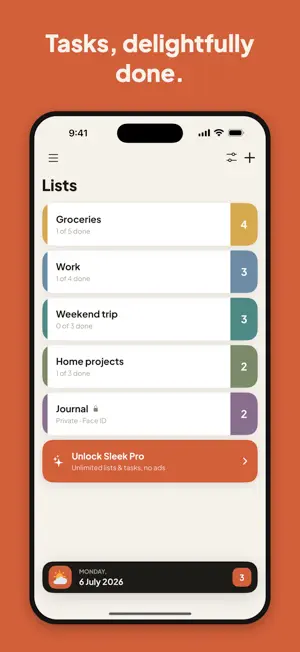
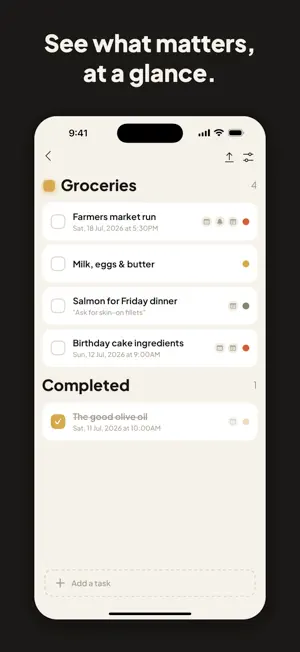
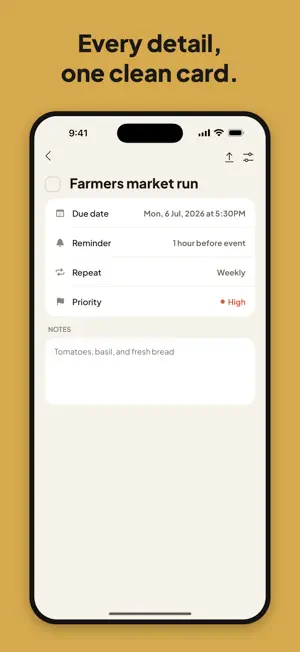
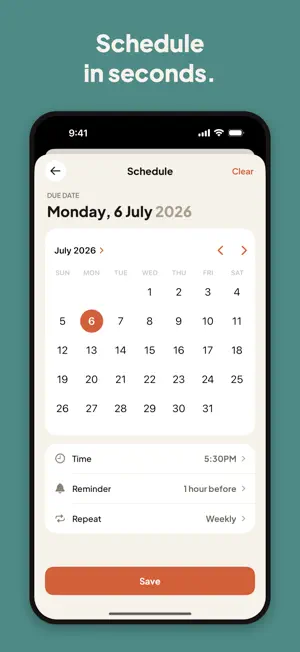
## Description Sleek helps you manage tasks with clarity and style. Organize everything into color-coded lists, set priorities, due dates, and reminders - then get notified right on time. GET THINGS DONE • Create lists for work, personal, shopping, anything • Set High, Medium, or Low priority for every task • Pick due dates on a beautiful built-in calendar • Attach notes to tasks for extra context • Quick Tasks: swipe to instantly capture ideas NEVER FORGET • Smart reminders: at time, 15 min, 1 hour, or 1 day before • Repeating reminders: daily, weekly, monthly, or yearly • Home Screen widgets: due count, today's list, and a completion ring • Lock Screen widgets keep your day next to the clock • Complete tasks directly from notifications MAKE IT YOURS • Give every list its own color • Two hand-crafted looks: warm light and deep dark (or follow your system) • Lock private lists with Face ID or Touch ID SLEEK PRO Unlock unlimited lists and tasks, private lists, moving tasks between lists, and an ad-free experience. Choose monthly or yearly. Free users get up to 5 lists with 5 tasks each — plenty to get started. Terms of Use: https://www.apple.com/legal/internet-services/itunes/dev/stdeula/ Privacy Policy: https://kapps.us/privacy-policy
Ratings & reviews
5.0
6 ratings
What’s new
Version 2.0.2 · Updated July 15, 2026
Sleek 2.0 - a complete redesign. Every screen has been rebuilt from the ground up, with two carefully crafted looks: a warm, paper-like light mode and a deep, focused dark mode. Same fast Sleek, whole new feel. • All-new design across every screen — lists, tasks, settings, everything • Give every list its own color, picked right from the list header • New calendar-first scheduler: pick a date, time, reminder & repeat in one place • Redesigned task details with a cleaner notes card • All-new Home Screen widgets — due count, today's tasks with their list colors, and a completion ring • New Lock Screen widgets: your day next to the clock • Fresh empty states, new Today card, and a smoother first-run experience • Dozens of small fixes and refinements throughout
App privacy
The developer, Kapps LLC, reported these privacy practices to Apple.
Data Used to Track You
The following data may be used to track you across apps and websites owned by other companies:
- Identifiers: Device ID
Data Linked to You
The following data, which may be collected and linked to your identity, may be used for the following purposes:
- Identifiers: User ID
- Usage Data: Product Interaction, Other Usage Data
- Diagnostics: Crash Data
- Contact Info: Email Address, Name
- User Content: Other User Content
Used for: Analytics, Product Personalization, App Functionality
Data Not Linked to You
The following data, which may be collected but is not linked to your identity, may be used for the following purposes:
- Identifiers: Device ID
Used for: Third-Party Advertising
Alternatives to Sleek: To-Do & Task Manager
Looking for apps like Sleek: To-Do & Task Manager? Here are 6 similar apps on the App Store. The highest rated is Super: The Flow State App (5.0/5), and all 6 are free to download.
-
 Super: The Flow State App
5.0
Super: The Flow State App
5.0
-
 Organizly: Task & Notes
4.5
Organizly: Task & Notes
4.5
-
 SwiftoDo for todo.txt
4.7
SwiftoDo for todo.txt
4.7
-
 Airlist - Notes & Tasks
4.7
Airlist - Notes & Tasks
4.7
-
 Purelist: Notes & Tasks
4.6
Purelist: Notes & Tasks
4.6
-
 Agendus – day-to-day planner
4.9
Agendus – day-to-day planner
4.9
| App | Rating | Price | Last updated | Compare |
|---|---|---|---|---|
| Sleek: To-Do & Task Manager | 5.0 / 5 (6 ratings) | Free | July 15, 2026 | |
| Super: The Flow State App | 5.0 / 5 (10) | Free | Jun 17, 2026 | Compare |
| Organizly: Task & Notes | 4.5 / 5 (2) | Free | Oct 1, 2026 | Compare |
| SwiftoDo for todo.txt | 4.7 / 5 (295) | Free | May 1, 2024 | Compare |
| Airlist - Notes & Tasks | 4.7 / 5 (15) | Free | Mar 3, 2026 | Compare |
| Purelist: Notes & Tasks | 4.6 / 5 (41) | Free | Feb 12, 2024 | Compare |
| Agendus – day-to-day planner | 4.9 / 5 (19) | Free | Apr 22, 2026 | Compare |