

Nitro Photo
Gentlemen Coders Photo & Video iPhoneiPadiPod touchMac
Nitro Photo is a free Photo & Video app for iPhone and iPad by Gentlemen Coders. Rated 4.8/5 from 61 ratings. Requires iOS 16.4. Updated September 24, 2026.
- Rating
- 4.8
- 61 ratings
- Price
- Free
- on the App Store
- Size
- 299 MB
- Age 4+
- Updated
- Sep 24
- 2026 · v2026.08
Screenshots



About Nitro Photo
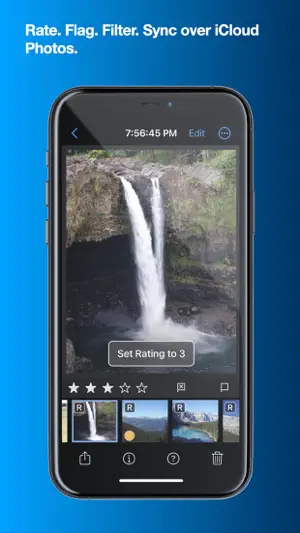
Introducing Nitro, the brand new photo editor and manager from the developer of RAW Power. Nitro is designed for every photographer and every photograph. Try Nitro for free for 7 days without any obligation. No subscription signup, no nonsense. Requires iOS 16 or later. Easy, Powerful, Fast. Built with the latest technologies, Nitro has exceptional integration with iOS, including the most control over Apple’s RAW decoder. Its combination of flexible storage options, camera support, and editing tools is unmatched by any app. If you liked Aperture or RAW Power, you’ll love Nitro. Flexible Storage Options * Store your images in Files.app, external storage, or use Apple’s Photo Library * Rate, flag, and filter your images by 11 criteria, including rating, orientation and file type * Add keywords to images in the file system, manually or with AI assistance * With Photos, ratings, edits, and smart albums sync over iCloud * With Files.app and external storage, ratings and edits are stored in XMP sidecars * Move originals, ratings, and edits between the Photo Library and Files.app * UGreen NAS is not compatible with Nitro (bug reported to UGreen) Thoughtful purchasing and trial options * Try the app with absolutely no obligation. No signup, no unexpected charges. * Buy the app once, or get an inexpensive monthly and annual plan * All purchases include all platforms: macOS, iPhone, and iPad! Stop waiting for camera support * Supports more cameras than Photos, Darkroom, or Photomator, including compressed Fujifilm, Nikon HE and GoPro RAWs * By far, the most control over Apple’s RAW decoder. Fine tune your RAWs with noise reduction, moire, ProRAW tone mapping, and more. Seeing is Believing * View detailed metadata side-by-side * Synchronized Pan and Zoom of up to 4 images at once (iPad only) * Comparison mode helps you pick your favorites from a burst * Light and Dark user interface modes Masking with AI * AI-generated masks to quickly isolate a subject or background * Linear and radial gradients with invert and control over the ramp * Brushes provide full control over your mask, including softness, strength, and size * Edge Aware brushes automatically follow contours * Fine tune AI and gradients with brushes for maximum control Quick Fixes * Remove objects using Generative AI * Clone * Spot/Wire Removal * Highlight Recovery * Auto Enhance 16 Professional Adjustments * Tone, Enhance, White Balance, RAW * Crop, Lens Correction, Perspective * Levels, Curves, HSL, Split Toning * Detail, Depth, Black and White, Vignette, Channel Mixer * Apply most adjustments to masks including Levels, Curves, Blur, HSL, and Fringe control Presets, LUTs, and Copy/Paste * Quickly enhance images with a large set of presets and LUTs * Import your own LUTs and make your own presets * Advanced Copy and Paste of adjustments * Camera presets let you apply adjustments automatically by camera model Do More with the Photo Library * Make Smart Albums with complex queries * Search by file name, file type (including RAW+JPEG), and more * Sync everything over iCloud * Edit inside Nitro or with the included Photo Editing Extension Do More with the File System * Rate, flag, and edit non-destructively * All data is stored in XMP sidecars next to your originals * Search by file name, camera, lens, ISO, and more Workflow the way you want * Batch processing of presets, rotation and export * Export with control over size, compression, format, and metadata * Launch other apps after export for custom workflows * Integrated watermarking with both images and text * RAW Power edits are 100% compatible with Nitro After the trial, you need to purchase the app or subscribe to use all the features. Privacy Policy: https://www.iubenda.com/privacy-policy/68647707 Terms of Use: http://www.apple.com/legal/itunes/appstore/dev/stdeula
Ratings & reviews
4.8
61 ratings
What’s new
Version 2026.08 · Updated September 24, 2026
NEW FEATURES: * RAW v9: Nitro now supports Apple's new RAW decoder (requires macOS 27, iOS 27, or iPadOS 27). * You can write captions in both the file system (XMP) and Photo Library. Photo Library captions require OS 27. * You can add keywords to the Photo Library on OS 27. * Support storing and reading ratings in the Photo Library when running OS 27. Because you may have existing ratings in Nitro, Nitro will detect when ratings are out of sync and help you resolve the issue. USABILITY: * Rearranged the Info Panel to improve readability and support editable captions. * Add Show Subfolders to the menu bar on the Mac. * Add "Unrated" to the list of filters that are easy to make (Quick Filter and in the menus). * Add alert when clicking the trash button in the window. If you hold down the option key on the Mac, it will not alert you. * Add preference to hide tool overlays. This does not affect point pickers like HSL Target mode, White Balance and Curves. * Add preference when single tapping on the image. On iOS, the default is to hide all panels. On macOS, the default is to do nothing. * Increase range of the RAW Sharpen and RAW Contrast sliders to improve their usefulness. BUG FIXES: * Work around OS bug when masking RAW images, in which the masked area would be rendered incorrectly when the same adjustment was used in both the mask and in the global sliders. * Fix bugs with color range masks on iPhone - now setting up a mask and picking the color works properly. * Fix Follow Edges for brushing when perspective has been applied. * Add preference to let people decide if ratings are synced to the Photo Library (it used to only be in the rating sync dialog box). * Fix bug with keywords, where the app would sometimes write the keywords to the wrong image. * Fix bug with Single File Editor showing the wrong buttons on the right side. * iOS 27 broke Move to Trash, so the error is detected, and the app will offer to delete the item immediately. * Fix bugs with key repeat and speed it up too. * Fix bug on iPhone when masking - the masking options in landscape screen orientation could not be scrolled so they were not accessible. * Fix bug where edits would not be saved if you had a filter for rating and changed the rating so that the image disappeared from view. * Fix bug where XMP files could be deleted when using Revert to Original, even if the preference to not delete them was set. CAMERA SUPPORT: * GoPro Mission 1
App privacy
The developer, Gentlemen Coders, reported these privacy practices to Apple.
Data Not Linked to You
The following data, which may be collected but is not linked to your identity, may be used for the following purposes:
- Purchases: Purchase History
- Usage Data: Product Interaction
- Diagnostics: Other Diagnostic Data
Used for: Analytics, App Functionality
Alternatives to Nitro Photo
Looking for apps like Nitro Photo? Here are 6 similar apps on the App Store. The highest rated is Camac (5.0/5), and all 6 are free to download.
-
 AI Photo Culling — PhotoPicker
4.5
AI Photo Culling — PhotoPicker
4.5
-
 ON1 Photo RAW for Mobile
4.5
ON1 Photo RAW for Mobile
4.5
-
 Photoscope: Best Photo Picker
4.6
Photoscope: Best Photo Picker
4.6
-
 65×24 PANORAMIC CAMERA
4.7
65×24 PANORAMIC CAMERA
4.7
-
 Bayer Cam
4.9
Bayer Cam
4.9
-
 Camac
5.0
Camac
5.0
| App | Rating | Price | Last updated | Compare |
|---|---|---|---|---|
| Nitro Photo | 4.8 / 5 (61 ratings) | Free | September 24, 2026 | |
| AI Photo Culling — PhotoPicker | 4.5 / 5 (74) | Free | Sep 17, 2026 | Compare |
| ON1 Photo RAW for Mobile | 4.5 / 5 (1,516) | Free | Sep 22, 2026 | Compare |
| Photoscope: Best Photo Picker | 4.6 / 5 (142) | Free | Sep 22, 2026 | Compare |
| 65×24 PANORAMIC CAMERA | 4.7 / 5 (26) | Free | Jun 2, 2026 | Compare |
| Bayer Cam | 4.9 / 5 (12) | Free | May 29, 2026 | Compare |
| Camac | 5.0 / 5 (11) | Free | Sep 25, 2026 | Compare |
Compare Nitro Photo with the top alternatives: ratings, updates, ASO score and keyword gaps →