

Construction Calculator A1
Binary And Bricks Pvt Ltd Productivity iPhoneiPadiPod touchApple Watch
Construction Calculator A1 is a free Productivity app for iPhone and iPad by Binary And Bricks Pvt Ltd. Rated 4.7/5 from 30 ratings. Requires iOS 15.0.
- Rating
- 4.7
- 30 ratings
- Price
- Free
- on the App Store
- Size
- 182 MB
- Age 4+
- Updated
- Nov 11
- 2026 · v2026.10.2
Screenshots


About Construction Calculator A1
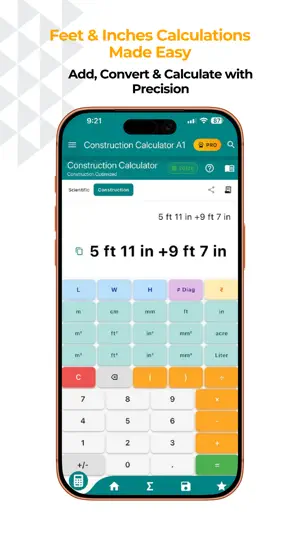
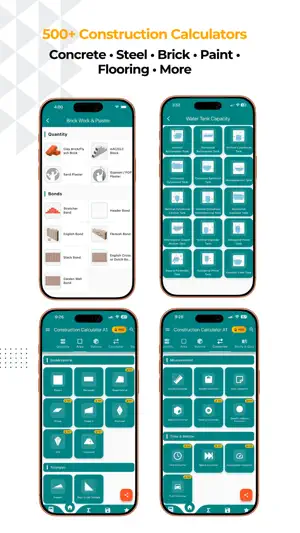
The #1 construction calculator trusted by 1M+ contractors, builders, and engineers worldwide. Construction Calculator A1 — the complete civil engineering toolkit for contractors, builders and engineers. 500+ calculators, from a single slab to a client-ready Bill of Quantities. CONCRETE CALCULATOR • Slabs, footings, columns, beams, stairs, walls & culverts • Instant material quantities: cement bags, sand, aggregate • Mix ratios and grade selection for any specification REBAR & STEEL CALCULATOR • Bar Bending Schedule (BBS) with shape codes and cutting lengths • Weight calculator for metric and US bar sizes (#3–#11) • Lap length, cover & spacing calculations • Steel tonnage for structural estimates FEET-INCHES CALCULATOR • Add, subtract, multiply, divide in feet-inches-fractions • No decimal conversion needed • Running tape you can review and reuse BILL OF QUANTITIES (BOQ) — NEW • Send any calculation straight to a BOQ • Organise by project, track total value and % priced • Professional report with your company header and signature • Export as PDF or Excel AUTOMATIC DRAWINGS — NEW • Calculators draw a dimensioned sketch of what you entered • Brickwork, steel shapes, concrete sections, excavation, stairs • Drawings and a DIMENSIONS panel included in every PDF MATERIAL PRICE LIBRARY — NEW • Store your own rates in your own currency • Rates auto-fill into cost fields across the app • Six regional presets with local materials and units APPLE WATCH APP — NEW • Converter, material weight, volume, diagonal and rebar on your wrist • Prices synced from iPhone, with full calculation history AREA & VOLUME • 50+ shapes: rectangle, circle, triangle, trapezoid, polygons, prisms, cones, spheres and more • Draw Shape and GPS Area for irregular plots • Room area, paint coverage, flooring and excavation volumes UNIT CONVERTER • Length, area, volume, weight, pressure, power, speed, density and more • Construction-specific units throughout LEARN — NEW • Civil engineering articles, checklists and reference charts • Topic quizzes with instant explanations • Daily streaks, XP and achievement badges PROFESSIONAL FEATURES • Save and organise calculations by project, with notes and photos • Share estimates with clients instantly • Construction cost estimator with breakdown charts and quotations • Company branding on every report • Google Drive and iCloud backup, cloud sync across devices • Metric and Imperial, 16 languages, light and dark themes • Works offline — calculations need no internet SUBSCRIPTION INFORMATION Construction Calculator Pro is available as a monthly or yearly auto-renewing subscription, or as a one-time Lifetime purchase. • Payment is charged to your Apple ID account at confirmation of purchase. • Subscriptions renew automatically unless auto-renew is turned off at least 24 hours before the end of the current period. • Your account is charged for renewal within 24 hours prior to the end of the current period, at the rate of your selected plan. • Manage or cancel your subscription in your App Store account settings after purchase. Privacy Policy: https://www.binaryandbricks.com/app/privacypolicy.html Terms of Use: https://www.apple.com/legal/internet-services/itunes/dev/stdeula/ Built for real job sites. Download now and estimate like a pro.
Ratings & reviews
4.7
30 ratings
What’s new
Version 2026.10.2 · Updated November 11, 2026
Meet Ask A1, your AI site assistant (beta) • Type or say what you need, like "concrete for a 12 x 10 ft slab, 5 inch thick", and get the answer from the app's own calculators. • Photo of a sketch or floor plan? Ask A1 reads the sizes for you (Pro). • Add answers to your BOQ, save them as notes, or share them as a PDF. • Free AI credits every month: 5 on the free plan and 20 with Pro. Monthly and yearly plans add 100 more, and credit packs are there when you need extra. New calculators • Interior, PEB and steel sheds, external works, demolition and debris, waterproofing and roofing. • Fire fighting and plumbing. Better every day • Search the whole app from the home screen: calculators, settings and study topics, even in site slang. • Draw Shape now measures angles and lets you pan around large drawings. • Daily Brick: one construction tip and a quick challenge every day. • Cleaner calculator pages, and PDF export fixes. Tell us how Ask A1 did: tap the thumbs-down on any answer to say what went wrong.
App privacy
The developer, Binary And Bricks Pvt Ltd, reported these privacy practices to Apple.
Data Used to Track You
The following data may be used to track you across apps and websites owned by other companies:
- Identifiers: Device ID
Data Linked to You
The following data, which may be collected and linked to your identity, may be used for the following purposes:
- Identifiers: Device ID
Used for: Third-Party Advertising
Alternatives to Construction Calculator A1
Looking for apps like Construction Calculator A1? Here are 6 similar apps on the App Store. The highest rated is Calculator Construction Pro (5.0/5), and all 6 are free to download.
-
 Construction Calc Pro 7
4.3
-
 Construction Calc - Civil Calc
-
 Building Material Calculator
3.3
-
 Auto RC: Structural Design
4.6
-
 Foundation Footing Calculator
3.6
-
 Calculator Construction Pro
5.0
| App | Rating | Price | Last updated | Compare |
|---|---|---|---|---|
| Construction Calculator A1 | 4.7 / 5 (30 ratings) | Free | November 11, 2026 | |
| Construction Calc Pro 7 | 4.3 / 5 (28) | Free | May 30, 2026 | Compare |
| Construction Calc - Civil Calc | – | Free | Nov 10, 2025 | Compare |
| Building Material Calculator | 3.3 / 5 (6) | Free | Sep 1, 2026 | Compare |
| Auto RC: Structural Design | 4.6 / 5 (7) | Free | Oct 30, 2026 | Compare |
| Foundation Footing Calculator | 3.6 / 5 (8) | Free | Jun 30, 2025 | Compare |
| Calculator Construction Pro | 5.0 / 5 (4) | Free | May 8, 2024 | Compare |