

Quick Replies - Paste Keyboard
Metromedya Digital Ad Agency Utilities iPhoneiPadiPod touch
Quick Replies - Paste Keyboard is a free Utilities app for iPhone and iPad by Metromedya Digital Ad Agency. Rated 4.8/5 from 14 ratings. Requires iOS 13.0.
- Rating
- 4.8
- 14 ratings
- Price
- Free
- on the App Store
- Size
- 53 MB
- Age 4+
- Updated
- Jun 18
- 2026 · v1.0.2
Screenshots



About Quick Replies - Paste Keyboard
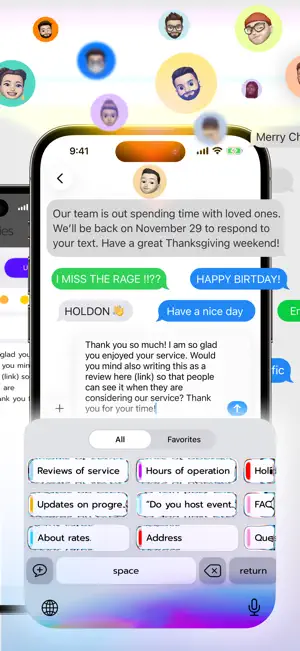
Save your replies once. Paste them anywhere with a single tap. Quick Replies is the fastest saved replies and canned responses keyboard for iPhone. Build your message library once, then send anything in seconds from any app, without switching screens or retyping. YOUR MESSAGES, ONE TAP AWAY Do you type the same replies over and over? Quick Replies keeps your most-used messages on the keyboard, ready to paste the moment you need them. No app switching, no hunting through notes. Just tap and send. TAP AND HOLD TO REPEAT Tap once to insert your message. Tap and hold to send it again and again. Fill a group chat, flood a comment section with kind words, or keep a conversation going at full speed. A feature you will not find in other keyboards. HOW IT WORKS 1. Create your saved replies and organize them into categories 2. Open any app where you type 3. Switch to the Quick Replies keyboard 4. Tap a message to insert it instantly WORKS EVERYWHERE Quick Replies works in any app with a text field. Chat apps, email, social media, support tools, SMS and more. Your message templates travel with you, always ready. FOR PROFESSIONALS - Customer support agents answering the same questions daily - Sales teams sending outreach and follow-up messages - Freelancers managing client communications - Social media managers posting across multiple platforms - E-commerce sellers responding to buyer inquiries FOR PERSONAL USE - Dating apps: save your best openers and replies - Group chats: drop your favorite messages with one tap - Social media: post comments and hashtags instantly - Online shopping: paste reviews and feedback quickly - Anywhere you want to save time typing FEATURES - Custom keyboard with all your saved message templates - One-tap paste from any app - Organize replies into categories - Tap once to insert, or tap and hold to repeat - Create unlimited templates with a subscription - Clean, simple interface built for speed Download Quick Replies and start saving time today. SUBSCRIPTIONS Quick Replies offers auto-renewing subscriptions for unlimited templates. Payment will be charged to your Apple ID account at confirmation of purchase. Subscription automatically renews unless canceled at least 24 hours before the end of the current period. You can manage and cancel subscriptions in your Apple ID account settings. Any unused portion of a free trial period will be forfeited when you purchase a subscription. Privacy Policy: https://quickreplies.app/en/privacy/ Terms of Use: https://quickreplies.app/en/terms/
Ratings & reviews
4.8
14 ratings
What’s new
Version 1.0.2 · Updated June 18, 2026
We keep Quick Replies updated and running smoothly for you. This release includes minor bug fixes and stability improvements.
App privacy
The developer, Metromedya Digital Ad Agency, reported these privacy practices to Apple.
Data Linked to You
The following data, which may be collected and linked to your identity, may be used for the following purposes:
- Purchases: Purchase History
Used for: Analytics, App Functionality
Data Not Linked to You
The following data, which may be collected but is not linked to your identity, may be used for the following purposes:
- Diagnostics: Crash Data
Used for: Analytics, App Functionality
Alternatives to Quick Replies - Paste Keyboard
Looking for apps like Quick Replies - Paste Keyboard? Here are 6 similar apps on the App Store. The highest rated is Fast Reply: Saved Replies (4.8/5), and all 6 are free to download.
-
 Fast Reply: Saved Replies
4.8
Fast Reply: Saved Replies
4.8
-
 AutoText - Scheduled Message
1.3
AutoText - Scheduled Message
1.3
-
 LazyBoard: Text Expander
4.4
LazyBoard: Text Expander
4.4
-
 Phraseboard - Paste Keyboard
4.5
Phraseboard - Paste Keyboard
4.5
-
 Copycatt - Auto Paste Keyboard
4.0
Copycatt - Auto Paste Keyboard
4.0
-
 AI Keyboard・ReplyAssistant
4.1
AI Keyboard・ReplyAssistant
4.1
| App | Rating | Price | Last updated | Compare |
|---|---|---|---|---|
| Quick Replies - Paste Keyboard | 4.8 / 5 (14 ratings) | Free | June 18, 2026 | |
| Fast Reply: Saved Replies | 4.8 / 5 (35) | Free | Oct 1, 2026 | Compare |
| AutoText - Scheduled Message | 1.3 / 5 (6) | Free | Jan 12, 2024 | Compare |
| LazyBoard: Text Expander | 4.4 / 5 (588) | Free | Oct 18, 2026 | Compare |
| Phraseboard - Paste Keyboard | 4.5 / 5 (20) | Free | Dec 25, 2023 | Compare |
| Copycatt - Auto Paste Keyboard | 4.0 / 5 (6) | Free | Dec 5, 2023 | Compare |
| AI Keyboard・ReplyAssistant | 4.1 / 5 (25) | Free | Oct 10, 2026 | Compare |