

Collage Maker MixCollage
PhotoJoiner Photo & Video iPhoneiPadiPod touch
Collage Maker MixCollage is a free Photo & Video app for iPhone and iPad by PhotoJoiner. Rated 4.4/5 from 265 ratings. Requires iOS 12.0.
- Rating
- 4.4
- 265 ratings
- Price
- Free
- on the App Store
- Size
- 122 MB
- Age 4+
- Updated
- Mar 18
- 2025 · v2.0.329
Screenshots



About Collage Maker MixCollage
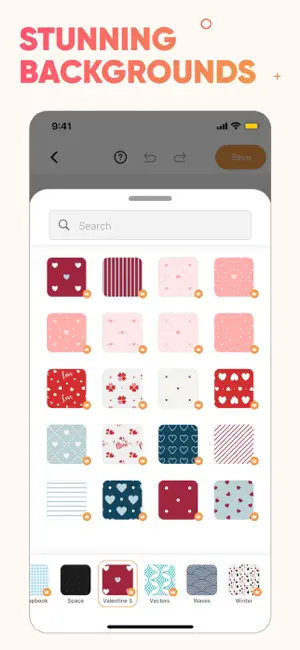
MixCollage app lets you easily create beautiful collages, before and after photo comparisons, and photo frames free of charge. Bring your collage to life with thousands of layouts, stickers, backgrounds, and fonts. Or simply add your photos to one of our beautifully designed templates. OUR FEATURES: - Add up to 20 photos! - 1000+ grids and layouts to choose from - Photo editor with photo filters, crop, rotate, brightness, and more. - Free Stickers, emojis, and backgrounds - Doodle on your collage to personalize it - Choose from 100s of stylish fonts - 1000+ GRIDS AND LAYOUTS Whether you are looking for a square grid or a heart-shaped one, we have the perfect layout for you to create the best collage. Plus, you can customize each layout by changing padding, border, and background. Are you a free spirit wanting to unleash the designer within? Use our freestyle layout to create a design that is truly yours. - 1000+ STICKERS Style your collages with thousands of Emojis and Stickers that fit any occasion or celebration. From cute hearts to colorful unicorns, you can find the perfect sticker to bring your design to life. - TEMPLATES We have hundreds of pre-made beautiful collage templates already styled with stickers, backgrounds, and fonts waiting for your photos! Quickly add your photos to create a professional-looking collage in seconds. Celebrate Valentine’s Day, birthdays, thanksgiving, Mother’s Day, and more! - ARTISTIC FONTS A collage is an expression. What's a better way to express yourself than words? Choose from hundreds of artistic font styles to bring your message to life. Adjust font color, shadows, background, curvature, and more! Now, you can even choose from hundreds of designer font presets. - ADD UP TO 20 PHOTOS Are you looking to create a collage with lots of photos? You've come to the right place. With the MixCollage app, you can select up to 20 pictures for your collage. You can even add these photos to shapes such as hearts, numbers, letters, chat bubbles…etc. - PHOTO FILTERS AND EDITS Need to crop your photo for a perfect fit? Or boost color & brightness for that extra kick? You can easily use our photo editor to apply photo filters, crop, rotate, or edit your pictures. - BACKGROUND PATTERNS Choose a stylish background pattern for your collage that captures the mode of your creation. Choose from 100+ free seamless backgrounds from pastel flowers, picnic blanket patterns, hearts, snowflakes, gift wrappers, and more! - CUTOUT PHOTOS Use the MixPanel app’s AI-powered photo cutout feature to remove the background from photos! Want to make a heart-shaped cutout from your image? You can cut out any shape by drawing a cutout line on the image. - DOODLE AND DRAW No sticker or emoji can match a handwritten doodle you made! Add a personal touch to your collage with a handwritten doodle in any size or color. - SIZE Fit your picture collage to any social platform pixel-perfectly. Easily switch between canvas sizes, such as 1:1 for Instagram posts or 9:16 for reels. Create collages for Facebook, Twitter, Pinterest, and more! - SIDE-BY-SIDE PHOTO Easily show two or more photos side by side in a collage. Excellent for YouTube thumbnails or to highlight Before & After effects in your social media posts (outfits, old vs. new) MixCollage is your one-stop app for photo collage, insta story layouts, pic stitch, or scrapbook ideas. Let your creativity flourish with an app that's built for the artist in you. Terms of Use: https://photojoiner.com/app-collage-maker-term-of-use.html Privacy Policy: https://www.photojoiner.com/app-collage-maker-privacy.html
Ratings & reviews
4.4
265 ratings
What’s new
Version 2.0.329 · Updated March 18, 2025
Holi Festival Special – Create vibrant and colorful collages with our new Holi-themed templates! Birthday & Graduation Templates – Celebrate special moments with customizable designs for birthdays and graduations! Now Available in Spanish! – We’ve localized the app for our Spanish-speaking users. ¡Disfruta!
App privacy
The developer, PhotoJoiner, reported these privacy practices to Apple.
Data Used to Track You
The following data may be used to track you across apps and websites owned by other companies:
- Identifiers: Device ID
Data Not Linked to You
The following data, which may be collected but is not linked to your identity, may be used for the following purposes:
- Identifiers: Device ID
- Diagnostics: Crash Data, Performance Data
Used for: Third-Party Advertising, Analytics, App Functionality
Alternatives to Collage Maker MixCollage
Looking for apps like Collage Maker MixCollage? Here are 6 similar apps on the App Store. The highest rated is Pic Collage Maker - Photo Grid (4.8/5), and all 6 are free to download.
-
 Pic Collage Maker Grid Layout
4.7
Pic Collage Maker Grid Layout
4.7
-
 Photo Collage Maker: PicMerger
4.5
Photo Collage Maker: PicMerger
4.5
-
 Pic Collage Maker - Photo Grid
4.8
Pic Collage Maker - Photo Grid
4.8
-
 Pic Collage Maker: EasyPic
4.6
Pic Collage Maker: EasyPic
4.6
-
 BeFunky
4.7
BeFunky
4.7
-
 Photo Collage Maker by PicGrid
4.4
Photo Collage Maker by PicGrid
4.4
| App | Rating | Price | Last updated | Compare |
|---|---|---|---|---|
| Collage Maker MixCollage | 4.4 / 5 (265 ratings) | Free | March 18, 2025 | |
| Pic Collage Maker Grid Layout | 4.7 / 5 (301) | Free | Apr 24, 2024 | Compare |
| Photo Collage Maker: PicMerger | 4.5 / 5 (4,321) | Free | Jul 29, 2026 | Compare |
| Pic Collage Maker - Photo Grid | 4.8 / 5 (4,344) | Free | Jul 23, 2024 | Compare |
| Pic Collage Maker: EasyPic | 4.6 / 5 (29,448) | Free | Oct 2, 2026 | Compare |
| BeFunky | 4.7 / 5 (10,984) | Free | Oct 2, 2026 | Compare |
| Photo Collage Maker by PicGrid | 4.4 / 5 (2,500) | Free | Oct 18, 2026 | Compare |