

Pomodoreau
Dennis Vermeulen Productivity iPhoneiPadiPod touchApple Watch
Pomodoreau is a paid Productivity app for iPhone and iPad by Dennis Vermeulen. Rated 5.0/5 from 1 ratings. Requires iOS 17.0. Updated April 15, 2026.
- Rating
- 5.0
- 1 ratings
- Price
- 2.99 USD
- on the App Store
- Size
- 4 MB
- Age 4+
- Updated
- Apr 15
- 2026 · v2.2
Screenshots


About Pomodoreau
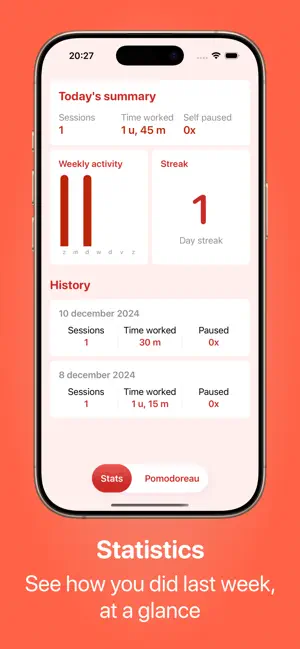
Pomodoreau - Focus, Your Way Do you get distracted easily and find it hard to finish your tasks? Pomodoreau helps you stay focused using the Pomodoro technique. This method is simple: you work for a set number of minutes, then take a short break. This way, you can concentrate for longer without getting tired. Whether you're working on a big project, studying for a test, or just want to use your time better, Pomodoreau is here to help. What can you do with it? • Customize your sessions: Choose how long you want to work and how long your breaks last. • Widgets on your Home Screen: Check your focus time, sessions, streak, or progress without opening the app. • Set a daily goal: Decide how many sessions you want to complete each day and see your progress with the widgets. • Start from Control Center: Begin a session with one tap, without opening the app (iOS 18+). • Apple Health: Your completed sessions are automatically saved as mindfulness minutes in the Health app. • View your statistics: See how much you've focused, keep track of your streaks, and follow your weekly goals. • Always visible: Follow your session on the Lock Screen or in the Dynamic Island. • Sync across devices: Use the app on both your iPhone and Apple Watch. Your data syncs automatically through iCloud. • Multiple languages: The app is available in English, Dutch, German, French, and more. Pomodoreau is easy to use and flexible. You can adjust everything to match the way you work. Why Pomodoreau? Pomodoreau is more than a timer. The app helps you build a good work routine. From your Home Screen to Control Center and Apple Health, you can see your progress everywhere. By switching between focus time and breaks, you stay productive all day without burning out. Want to learn to focus better? Download Pomodoreau and start today!
What’s new
Version 2.2 · Updated April 15, 2026
Pomodoreau is bringing you a new update, packed with some brand new functionalities! • Home Screen Widgets: add a small widget and pick what to display: focus time, sessions, streak, or daily progress. The medium widget shows a full dashboard with all your stats at a glance. • Control Center quick start (iOS 18 and later): start a focus session straight from Control Center. • Daily Goal: set a daily session target in Settings. Your progress is shown in the widgets, and you'll see a small celebration when you reach it. • Apple Health: completed sessions can now be saved as mindfulness minutes. Enable it in Settings. • Weekly goal tracking in the statistics tab, showing how many days this week you've reached your daily goal. Enjoy working with Pomodoreau!
App privacy
The developer, Dennis Vermeulen, reported these privacy practices to Apple.
Data Not Collected
The developer does not collect any data from this app.
Alternatives to Pomodoreau
Looking for apps like Pomodoreau? Here are 6 similar apps on the App Store. The highest rated is Spand (5.0/5), and 5 of the 6 are free to download.
-
 Super Fast Local Transcribe
-
 Year Mood Calendar
-
 Spand
5.0
Spand
5.0
-
 Anniversa
-
 App Blocker - Stickly
5.0
App Blocker - Stickly
5.0
-
 Muslim Habit Tracker: Nurmora
| App | Rating | Price | Last updated | Compare |
|---|---|---|---|---|
| Pomodoreau | 5.0 / 5 (1 rating) | 2.99 USD | April 15, 2026 | |
| Super Fast Local Transcribe | – | Free | Oct 6, 2026 | Compare |
| Year Mood Calendar | – | 1.99 USD | Jul 14, 2026 | Compare |
| Spand | 5.0 / 5 (1) | Free | Jul 4, 2026 | Compare |
| Anniversa | – | Free | May 4, 2026 | Compare |
| App Blocker - Stickly | 5.0 / 5 (1) | Free | Oct 10, 2026 | Compare |
| Muslim Habit Tracker: Nurmora | – | Free | Sep 25, 2026 | Compare |
Compare Pomodoreau with the top alternatives: ratings, updates, ASO score and keyword gaps →