

Calc4Key
Khang Le Utilities iPhoneiPadiPod touch
Calc4Key is a free Utilities app for iPhone and iPad by Khang Le. Rated 4.6/5 from 832 ratings. Requires iOS 16.0. Updated November 20, 2026.
- Rating
- 4.6
- 832 ratings
- Price
- Free
- on the App Store
- Size
- 1 MB
- Age 4+
- Updated
- Nov 20
- 2026 · v2.0
Screenshots
Save to Pinterest


About Calc4Key
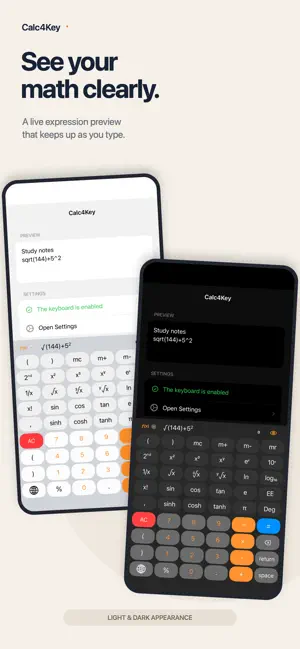
Use calculator directly on keyboard anywhere, anytime. No switch apps, no copy and paste results anymore! You must enable the keyboard under system settings, then select it in your keyboard, using the globe button. 1. Open the settings app 2. Go General > Keyboard > Keyboards > Add New Keyboard 3. Add Calc4Key 4. Start typing in any app 5. Press "globe" icon to switch to the Key4Cal keyboard 6. Enjoy
Ratings & reviews
4.6
832 ratings
What’s new
Version 2.0 · Updated November 20, 2026
Fixed minor bug
App privacy
The developer, Khang Le, reported these privacy practices to Apple.
Data Not Collected
The developer does not collect any data from this app.
Alternatives to Calc4Key
Looking for apps like Calc4Key? Here are 6 similar apps on the App Store. The highest rated is WiFi Tools & Analyzer (4.5/5), and 2 of the 6 are free to download.
-
 WiFi Tools & Analyzer
4.5
-
 ALink Remote
3.7
-
 ComposePrint
-
 RGB Keyboard - LED Neon
4.5
-
 Geo Trace: Traceroute App
4.3
-
 Site Checker: Down Detector
3.4
| App | Rating | Price | Last updated | Compare |
|---|---|---|---|---|
| Calc4Key | 4.6 / 5 (832 ratings) | Free | November 20, 2026 | |
| WiFi Tools & Analyzer | 4.5 / 5 (51) | 2.9 USD | Oct 29, 2026 | Compare |
| ALink Remote | 3.7 / 5 (3) | Free | Nov 23, 2026 | Compare |
| ComposePrint | – | Free | Nov 12, 2026 | Compare |
| RGB Keyboard - LED Neon | 4.5 / 5 (538) | 0.99 USD | May 10, 2026 | Compare |
| Geo Trace: Traceroute App | 4.3 / 5 (11) | 1.9 USD | Oct 30, 2026 | Compare |
| Site Checker: Down Detector | 3.4 / 5 (12) | 1.9 USD | Oct 30, 2026 | Compare |
Compare Calc4Key with the top alternatives: ratings, updates, ASO score and keyword gaps →