

PayClock
Lathem Time Corporation Business iPhoneiPadiPod touch
PayClock is a free Business app for iPhone and iPad by Lathem Time Corporation. Rated 2.1/5 from 56 ratings. Requires iOS 15.0. Updated September 28, 2026.
- Rating
- 2.1
- 56 ratings
- Price
- Free
- on the App Store
- Size
- 50 MB
- Age 4+
- Updated
- Sep 28
- 2026 · v2.5.2
Screenshots


About PayClock
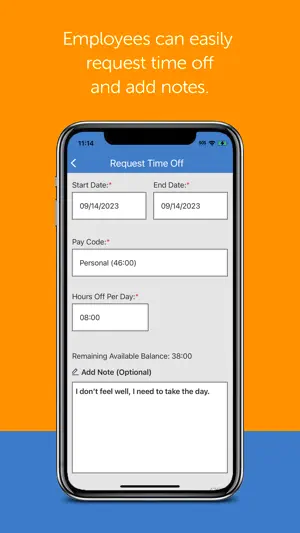
PayClock Mobile is part of Lathem’s PayClock Online Time and Attendance System. Companies using PayClock Online can easily track their employees’ hours using their mobile device, while employees benefit from tracking their work in office, remotely, or on the go. FEATURES • Easily clock in and out with 1-touch • GPS tracking of transaction locations • Transfer departments with department level validation per employee • View total hours worked by pay code in the current and prior pay periods • View punches for today • View up to date benefit time balances • Continuous operation even when offline • Supervisors can view their employees’ punches, total hours, and benefit time balances • PayClock Online Administrators can easily control what parts of the app they would like their employees to have access to SIGN UP • This app requires a PayClock Online account, with mobile access enabled for each employee • Employees must have a validated email address and password WHAT IS PAYCLOCK ONLINE • PayClock Online is comprehensive online cloud-based time and attendance system • Automatically calculates worked hours, including overtime, based on customizable work rules • Employees can clock in and out from their computer, a physical time clock (sold separately), or using this mobile app on their smartphone or tablet • Integrates hours with the most popular payroll providers and applications such as ADP®, Paychex®, QuickBooks®, and more • Powerful employee scheduling • Comprehensive reporting capabilities, including exports to Excel or PDF • Easy to use benefit time accruals SUPPORT • Free customer support is available to all PayClock Online users
Ratings & reviews
2.1
56 ratings
What’s new
Version 2.5.2 · Updated September 28, 2026
One email, all your companies Work for more than one company that uses PayClock Online? Your email address now works across all of them. • Use the same email address and password no matter which company you are clocking in for • Choose your company when you sign in • The app opens back to the company you used last, so you go straight to your timecard If you only work for one company, nothing changes about how you sign
App privacy
The developer, Lathem Time Corporation, reported these privacy practices to Apple.
Data Linked to You
The following data, which may be collected and linked to your identity, may be used for the following purposes:
- Diagnostics: Crash Data
- Location: Precise Location, Coarse Location
- Identifiers: Device ID
Used for: Analytics, App Functionality, Other Purposes
Data Not Linked to You
The following data, which may be collected but is not linked to your identity, may be used for the following purposes:
- Usage Data: Product Interaction
- Diagnostics: Performance Data, Other Diagnostic Data
Used for: Analytics
Alternatives to PayClock
Looking for apps like PayClock? Here are 6 similar apps on the App Store. The highest rated is Asure Mobile (3.6/5), and all 6 are free to download.
-
 Asure Mobile
3.6
Asure Mobile
3.6
-
 NetClient CS
1.9
NetClient CS
1.9
-
 Timerack
2.4
Timerack
2.4
-
 MiSVb Trahado
2.0
MiSVb Trahado
2.0
-
 FieldEdge Mobile 1.0 by Xplor
1.8
FieldEdge Mobile 1.0 by Xplor
1.8
-
 Chase Mobile Checkout
2.6
Chase Mobile Checkout
2.6
| App | Rating | Price | Last updated | Compare |
|---|---|---|---|---|
| PayClock | 2.1 / 5 (56 ratings) | Free | September 28, 2026 | |
| Asure Mobile | 3.6 / 5 (26) | Free | May 30, 2025 | Compare |
| NetClient CS | 1.9 / 5 (319) | Free | Aug 14, 2025 | Compare |
| Timerack | 2.4 / 5 (25) | Free | Oct 28, 2026 | Compare |
| MiSVb Trahado | 2.0 / 5 (12) | Free | Oct 10, 2026 | Compare |
| FieldEdge Mobile 1.0 by Xplor | 1.8 / 5 (425) | Free | Oct 16, 2026 | Compare |
| Chase Mobile Checkout | 2.6 / 5 (298) | Free | Oct 26, 2026 | Compare |
Compare PayClock with the top alternatives: ratings, updates, ASO score and keyword gaps →