

Incomes
Hiromu Nakano Finance iPhoneiPadiPod touchApple Watch
Incomes is a free Finance app for iPhone and iPad by Hiromu Nakano. Requires iOS 18.0. Updated October 25, 2026.
- Price
- Free
- on the App Store
- Size
- 27 MB
- Age 4+
- Updated
- Oct 25
- 2026 · v6.1
Screenshots


About Incomes
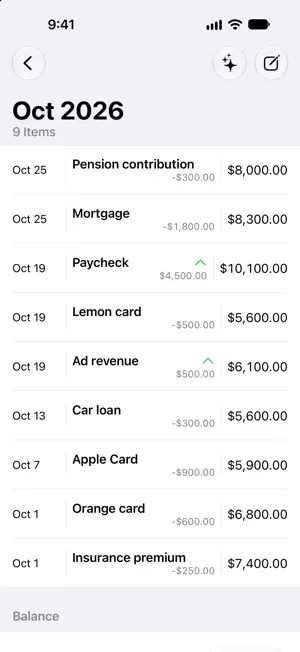
Incomes is a budget planner that helps you look ahead at your balance and decide your budget. Enter your planned income and outgo to see how your balance is expected to change. Plan around monthly payments and larger purchases before they arrive. LOOK AHEAD AT YOUR BALANCE Explore the balance chart based on the income and outgo you enter. Consider your plans for this month and beyond. PLAN RECURRING PAYMENTS Set up recurring income and payments alongside individual items to see what is coming. UNDERSTAND WHAT CHANGES YOUR BALANCE Use monthly and yearly views, categories, and search to find the items behind a change. Update your plan as your schedule changes. ON-DEVICE MONTHLY SUMMARIES Generate a short summary of a month’s income and outgo, with comparisons to the previous month. Generated text never changes your saved records. Monthly summaries require iOS 26 or later, a compatible device, and Apple Intelligence enabled and ready in a supported language. Check generated text against your records. ORGANIZE SEPARATE PLANS With the Monthly Plan, create multiple ledgers with separate items and balances. Plan different purposes side by side. KEEP YOUR RECORDS PORTABLE Export records to an Incomes file. Before importing, review the changes and choose how to apply them. CHECK YOUR PLANS WHEN YOU NEED THEM Use widgets and Apple Watch to check your balance and upcoming payments. Projections are based on the income and outgo you enter. Keep your plans up to date as new items and changes arise. The Monthly Plan includes multiple ledgers, iCloud sync, and removal of ads. Additional ledgers remain available to view and export after the plan expires; editing them requires an active plan. Terms of Use: https://www.apple.com/legal/internet-services/itunes/dev/stdeula/
What’s new
Version 6.1 · Updated October 25, 2026
Incomes 6.1 makes your plans easier to browse and manage. - Move between years, months, and item details more easily. - View lists and details more clearly on larger displays, including iPhone Duo. - See balances more clearly when there is only one item, and read chart labels more easily at larger text sizes. - Rename the default ledger and restore its default name whenever you need to.
App privacy
The developer, Hiromu Nakano, reported these privacy practices to Apple.
Data Linked to You
The following data, which may be collected and linked to your identity, may be used for the following purposes:
- Location: Coarse Location
- Identifiers: Device ID
- Usage Data: Product Interaction, Advertising Data
Used for: Third-Party Advertising, Developer’s Advertising or Marketing, Analytics, App Functionality
Data Not Linked to You
The following data, which may be collected but is not linked to your identity, may be used for the following purposes:
- Diagnostics: Performance Data, Other Diagnostic Data, Crash Data
Used for: Third-Party Advertising, Developer’s Advertising or Marketing, Analytics, App Functionality
Alternatives to Incomes
Looking for apps like Incomes? Here are 6 similar apps on the App Store. The highest rated is Budgetwise (1.0/5), and all 6 are free to download.
-
 Karmash: Expense Tracker
-
 FlowRate: Income Insights
-
 Settlify - Split group bills
-
 Piggy Expense tracker
-
 Kakeibo Cream - Budget Tracker
-
 Budgetwise
1.0
Budgetwise
1.0
| App | Rating | Price | Last updated | Compare |
|---|---|---|---|---|
| Incomes | – | Free | October 25, 2026 | |
| Karmash: Expense Tracker | – | Free | Oct 11, 2026 | Compare |
| FlowRate: Income Insights | – | Free | Jul 16, 2026 | Compare |
| Settlify - Split group bills | – | Free | Apr 23, 2026 | Compare |
| Piggy Expense tracker | – | Free | Sep 4, 2026 | Compare |
| Kakeibo Cream - Budget Tracker | – | Free | Aug 16, 2026 | Compare |
| Budgetwise | 1.0 / 5 (2) | Free | Oct 28, 2026 | Compare |
Compare Incomes with the top alternatives: ratings, updates, ASO score and keyword gaps →