

Docker Manager GUI - WhaleDeck
Florian Seida Developer Tools iPhoneiPadiPod touchMac
Docker Manager GUI - WhaleDeck is a free Developer Tools app for iPhone and iPad by Florian Seida. Rated 4.3/5 from 37 ratings. Requires iOS 17.0.
- Rating
- 4.3
- 37 ratings
- Price
- Free
- on the App Store
- Size
- 24 MB
- Age 4+
- Updated
- Oct 30
- 2026 · v3.4.1
Screenshots



About Docker Manager GUI - WhaleDeck
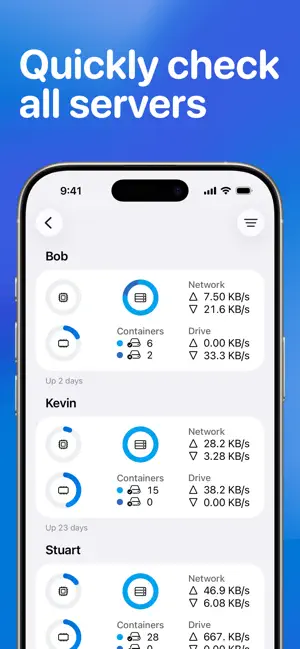
WhaleDeck is your all-in-one Docker environment manager. Monitor server performance, manage your containers, and use the built-in SSH terminal to run commands on your servers or inside Docker containers. Performance metrics, container logs, and actions across multiple servers are all in one place. Whether you’re just starting with Docker or you’re an experienced professional, WhaleDeck helps you work more efficiently. Easily monitor your entire environment, gain insights into containers, networks, and volumes, and quickly address issues as they arise. WhaleDeck’s intuitive interface puts you in control, letting you tailor the tool to fit your workflow. Start for free to: · Add your Linux server and instantly visualize CPU, memory, drive, and network usage · Access container logs, details, and insights to quickly identify and resolve issues · Take direct action on containers – start, stop, or pause them individually or in bulk · Use Split View to see multiple parts of your environment side by side · Secure your setup with biometric authentication Upgrade to WhaleDeck Pro to: · Manage unlimited servers and maintain all your environments in one place · Gain deeper insights into container resource usage · Use iCloud syncing for seamless cross-device access · Open server and container shells and run commands in the built-in terminal · Enhance your workflow with home and lock screen widgets, plus custom refresh rates · Dive deeper with detailed network and volume information WhaleDeck Pro is available as a monthly or annual subscription, or as a one-time lifetime purchase. For feedback or help, contact [email protected] or use the built-in form. Terms of Use: https://whaledeck.app/termsandconditions
Ratings & reviews
4.3
37 ratings
What’s new
Version 3.4.1 · Updated October 30, 2026
Thanks for using WhaleDeck. If you like the app, please consider rating it or writing a review in the App Store. This would help me a lot. What has changed in this version? - An issue that caused the container's list to be empty has been fixed In case something is wrong, please let me know by using the contact form, joining the WhaleDeck Discord server, or sending me a message to [email protected]. – Florian
App privacy
The developer, Florian Seida, reported these privacy practices to Apple.
Data Not Linked to You
The following data, which may be collected but is not linked to your identity, may be used for the following purposes:
- Usage Data: Product Interaction
- Diagnostics: Crash Data, Performance Data
Used for: Analytics, App Functionality
Alternatives to Docker Manager GUI - WhaleDeck
Looking for apps like Docker Manager GUI - WhaleDeck? Here are 6 similar apps on the App Store. The highest rated is Yomo: Docker & Portainer (4.8/5), and all 6 are free to download.
-
 Docker Management
3.0
Docker Management
3.0
-
 Docker Server Admin
4.7
Docker Server Admin
4.7
-
 Yomo: Docker & Portainer
4.8
Yomo: Docker & Portainer
4.8
-
 NeoServer SSH Mosh Terminal
4.8
NeoServer SSH Mosh Terminal
4.8
-
 Uptime Kuma Manager
4.3
Uptime Kuma Manager
4.3
-
 Portainer & Docker: Pourtainer
4.1
Portainer & Docker: Pourtainer
4.1
| App | Rating | Price | Last updated | Compare |
|---|---|---|---|---|
| Docker Manager GUI - WhaleDeck | 4.3 / 5 (37 ratings) | Free | October 30, 2026 | |
| Docker Management | 3.0 / 5 (3) | Free | Sep 17, 2026 | Compare |
| Docker Server Admin | 4.7 / 5 (145) | Free | Apr 20, 2026 | Compare |
| Yomo: Docker & Portainer | 4.8 / 5 (52) | Free | Oct 2, 2026 | Compare |
| NeoServer SSH Mosh Terminal | 4.8 / 5 (298) | Free | Oct 7, 2026 | Compare |
| Uptime Kuma Manager | 4.3 / 5 (43) | Free | Jan 2, 2026 | Compare |
| Portainer & Docker: Pourtainer | 4.1 / 5 (7) | Free | Sep 8, 2026 | Compare |