

Speedy Note Editor / iNote
Koichiro Umemiya Productivity iPhoneiPadiPod touch
Speedy Note Editor / iNote is a free Productivity app for iPhone and iPad by Koichiro Umemiya. Requires iOS 15.0. Updated October 23, 2026.
- Price
- Free
- on the App Store
- Size
- 43 MB
- Age 17+
- Updated
- Oct 23
- 2026 · v1.6
Screenshots


About Speedy Note Editor / iNote
Overview iNote is a fast, folder-organized notepad app built for people who write quickly and manage a lot of notes. It was born from real frustrations: "I want to batch-replace a word across multiple notes" and "I just want to open the app and start typing immediately." Great for: - Anyone who needs to edit many notes at once (batch find & replace) - Anyone who copies, pastes, and duplicates notes often - Anyone who wants notes organized into folders (binders) - Anyone who wants full control over their data (plain text files) Features - Batch text find & replace - Easy copy, paste, and duplicate - Organize notes into folders (binders) - All data saved as plain text (.txt), viewable directly in the Files app - Built-in browser - Passcode lock We're keeping iNote simple while continuously adding the small conveniences that make note-taking faster.
What’s new
Version 1.6 · Updated October 23, 2026
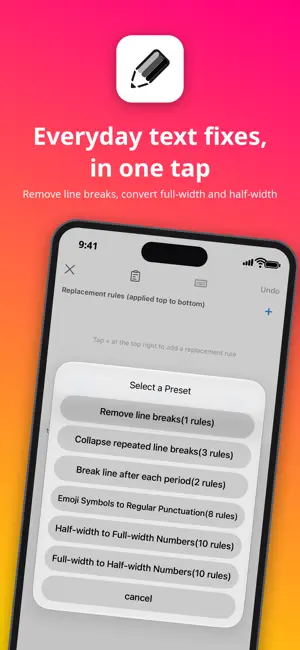
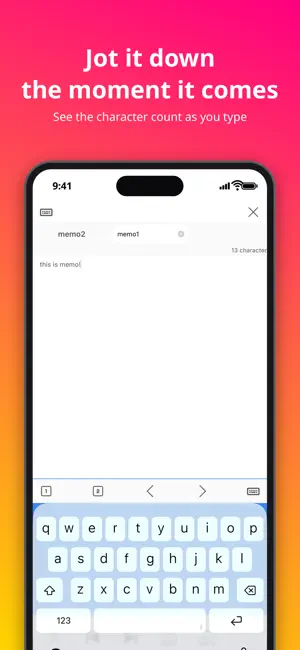
- Redesigned the Settings screen: items are organized and searchable (you can switch back to the previous design at the bottom of Settings). - Rebuilt the batch replace screen: line up replacement rules and apply them all at once from top to bottom, and see how many matches will be replaced before you run it. It also supports saving and loading your favorite rules, presets such as removing line breaks or converting full-width and half-width characters, applying a saved set to multiple notes at once, and undoing as many steps as you need. - Added the ability to share a note as a file (AirDrop, email attachment, etc.). - Added a pin feature to keep frequently used notes at the top of the list. - Deleting a note now moves it to Trash instead of deleting it permanently. You can restore it within 30 days. - You can now adjust the font size from a slider in Settings, or with a pinch gesture inside the editor. - Added a live character count while editing. - Added a setting to always open links in the same tab instead of a new one (on by default). - Fixed an issue where searching the folder list froze for a few seconds after every character typed. - Fixed a crash that occurred immediately on launch when you had existing notes saved. - Improved a memory-related crash that could occur when handling a large number of notes. - Fixed display errors in English and some other languages.
App privacy
The developer, Koichiro Umemiya, reported these privacy practices to Apple.
Data Used to Track You
The following data may be used to track you across apps and websites owned by other companies:
- Identifiers: Device ID
Data Not Linked to You
The following data, which may be collected but is not linked to your identity, may be used for the following purposes:
- Identifiers: Device ID
Used for: Third-Party Advertising, Analytics
Alternatives to Speedy Note Editor / iNote
Looking for apps like Speedy Note Editor / iNote? Here are 6 similar apps on the App Store. The highest rated is Split Notes (4.9/5), and all 6 are free to download.
-
 シンプルなメモ帳 検索、置換、文字数カウントができる
-
 コピペメモ
コピペメモ
-
 Wrix 2 - Ultra Text Editor
4.5
Wrix 2 - Ultra Text Editor
4.5
-
 Split Notes
4.9
Split Notes
4.9
-
 CopyPasteClip
-
 すぐノート - ノート・メモ帳・日記
| App | Rating | Price | Last updated | Compare |
|---|---|---|---|---|
| Speedy Note Editor / iNote | – | Free | October 23, 2026 | |
| シンプルなメモ帳 検索、置換、文字数カウントができる | – | Free | Jan 28, 2026 | Compare |
| コピペメモ | – | Free | Apr 30, 2026 | Compare |
| Wrix 2 - Ultra Text Editor | 4.5 / 5 (2) | Free | Dec 20, 2025 | Compare |
| Split Notes | 4.9 / 5 (13) | Free | Aug 18, 2026 | Compare |
| CopyPasteClip | – | Free | Apr 5, 2025 | Compare |
| すぐノート - ノート・メモ帳・日記 | – | Free | Jan 15, 2024 | Compare |