

Work Log - Shift Tracker
AR Productions Inc Utilities iPhoneiPadiPod touch
Work Log - Shift Tracker is a free Utilities app for iPhone and iPad by AR Productions Inc. Rated 4.8/5 from 4,460 ratings. Requires iOS 15.0.
- Rating
- 4.8
- 4.4K ratings
- Price
- Free
- on the App Store
- Size
- 90 MB
- Age 4+
- Updated
- Oct 3
- 2026 · v2.9.4
Screenshots



About Work Log - Shift Tracker
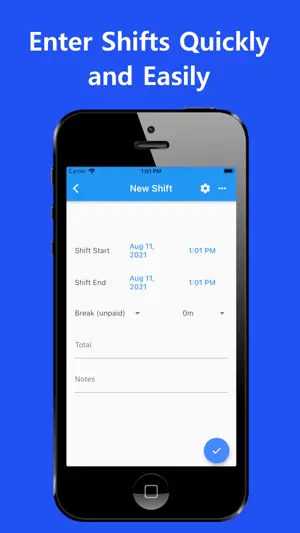
Work Log is a shift and hours tracker for hourly workers, salaried staff and contractors. Log every shift, and see your hours, overtime, time off and estimated pay for each pay period, or turn them into a PDF timesheet for your employer or an invoice for your client. Punch in and out, or add shifts by hand. Work Log adds up your hours and works out your pay for every shift, week, month and pay period. KNOW YOUR PAY • Pay periods that match your paycheck: weekly, every two weeks, twice a month, monthly or your own schedule • Overtime by shift, week or pay period, up to three tiers, as a fixed rate or a multiplier like 1.5× • Premium and shift-differential rates for nights, weekends and holidays • A clear paycheck breakdown: regular hours, overtime, premium pay and the estimated total • Tips, sales, expenses, mileage, per diem, bonuses, deductions, raises and holiday pay TRACK YOUR TIME • Punch in and out with one tap, or enter shifts manually • Home Screen widget: punch in without opening the app • Reminders to punch out, end a break or take one • Quick Shifts, automatic breaks and rounding • Notes on any shift • Time zones per job, so your records stay right when you travel TIME OFF AND INVOICES • Time off: log vacation, sick and personal days, and see your balances with accrual, carry-over and yearly resets • PDF invoices: bill clients straight from your shifts, with invoice numbers, payment terms and tax (Pro) • Timesheets and spreadsheets: export any period as PDF or XLSX (Pro) • Your shifts online: view, edit and export them from any computer at worklogdashboard.com (Pro) SEE IT YOUR WAY • View your shifts by day, week, month, pay period or year • A Home Screen panel you can customize: today, this week, your pay period, year to date and time off • Light and dark themes, and your own date, time and currency formats • Available in 23 languages KEEP IT SAFE • Free cloud backup and sync across your devices (sign-in required) • Local backups you can restore at any time WORK LOG PRO Upgrade to remove ads and get: • Multiple jobs, each with its own rates and settings • Spreadsheet and PDF exports, including timesheets and invoices • Your shifts online at worklogdashboard.com Does your employer use Work Log? Link to your employer in the app and Pro is included. FOR EMPLOYERS Work Log - Dashboard shows your team's hours in one place: a team overview, a page for each employee, scheduled email reports for your bookkeeper, and shared access for an office manager.
Ratings & reviews
4.8
4.4K ratings
What’s new
Version 2.9.4 · Updated October 3, 2026
- Time-off tracking: Log paid and unpaid time off, including vacation and sick leave, and track your balances. Enable it in your job’s settings. - PDF invoices: Create professional client invoices from your shifts, with invoice numbers, payment terms, tax and payment instructions. - Improved PDF reports: Clearer layouts, better page breaks and previews of your timesheets and invoices. - Overtime multipliers: Set overtime to 1.5×, 2× or another multiplier that follows your hourly wage. - Clearer paycheck breakdowns: See regular hours, overtime and premium hours with more detailed calculations. - Time-zone settings: Set a time zone for each job to keep your records consistent when you travel or change time zones. Find it in your job’s settings. - Bug fixes: Improved syncing, exports and stability.
App privacy
The developer, AR Productions Inc, reported these privacy practices to Apple.
Data Used to Track You
The following data may be used to track you across apps and websites owned by other companies:
- Location: Coarse Location
- Identifiers: Device ID
- Usage Data: Product Interaction, Advertising Data
- Diagnostics: Crash Data, Performance Data
Data Linked to You
The following data, which may be collected and linked to your identity, may be used for the following purposes:
- Location: Coarse Location
- Identifiers: Device ID, User ID
- Usage Data: Product Interaction, Advertising Data
- Diagnostics: Performance Data
- Contact Info: Name
- User Content: Photos or Videos, Other User Content
Used for: Third-Party Advertising, Analytics, App Functionality
Data Not Linked to You
The following data, which may be collected but is not linked to your identity, may be used for the following purposes:
- Diagnostics: Crash Data
Used for: Third-Party Advertising, Analytics, App Functionality
Alternatives to Work Log - Shift Tracker
Looking for apps like Work Log - Shift Tracker? Here are 6 similar apps on the App Store. The highest rated is Orquest (4.8/5), and all 6 are free to download.
-
 Hours Tracker: Time Calculator
4.7
-
 Work Hours Calculator
4.7
-
 Orquest
4.8
-
 Time Calculator - Work Hours
4.7
-
 TimeCalc: Time Calculator
4.5
-
 Hours Minutes Calculator Lite
4.6
| App | Rating | Price | Last updated | Compare |
|---|---|---|---|---|
| Work Log - Shift Tracker | 4.8 / 5 (4,460 ratings) | Free | October 3, 2026 | |
| Hours Tracker: Time Calculator | 4.7 / 5 (83,263) | Free | Sep 2, 2024 | Compare |
| Work Hours Calculator | 4.7 / 5 (697) | Free | Jul 24, 2025 | Compare |
| Orquest | 4.8 / 5 (801) | Free | Oct 7, 2026 | Compare |
| Time Calculator - Work Hours | 4.7 / 5 (2,911) | Free | Jun 22, 2026 | Compare |
| TimeCalc: Time Calculator | 4.5 / 5 (89) | Free | Aug 10, 2026 | Compare |
| Hours Minutes Calculator Lite | 4.6 / 5 (2,954) | Free | Oct 28, 2025 | Compare |