

PixelLab: AI Photo Editor
PIYUSH SHIYANI Photo & Video iPhoneiPadiPod touch
PixelLab: AI Photo Editor is a free Photo & Video app for iPhone and iPad by PIYUSH SHIYANI. Rated 4.8/5 from 110 ratings. Requires iOS 15.6.
- Rating
- 4.8
- 110 ratings
- Price
- Free
- on the App Store
- Size
- 166 MB
- Age 4+
- Updated
- Oct 15
- 2026 · v20.0
Screenshots

About PixelLab: AI Photo Editor
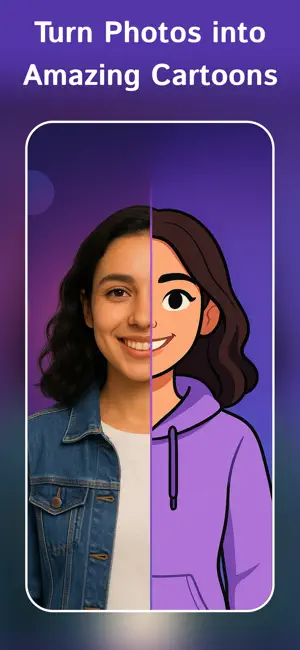
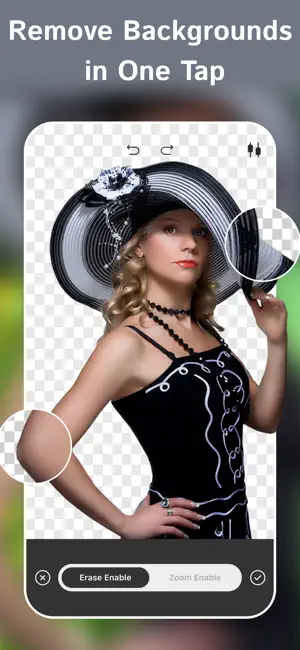
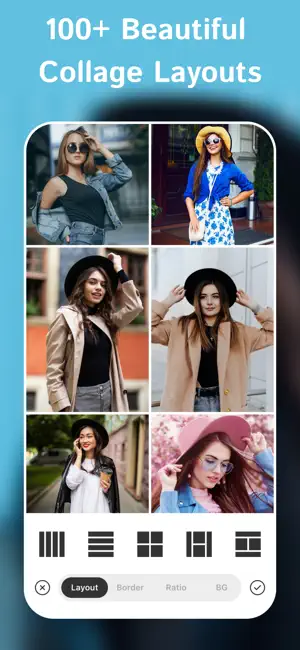
Create stunning photos, social posts, stories, thumbnails and creative designs with PixelLab. Turn ordinary photos into eye-catching creations using powerful AI tools, creative effects and an advanced text studio. Cartoon yourself with AI, remove backgrounds in one tap, build collages from 100+ layouts, and create amazing designs with 1000+ fonts, 3D text, curved text and gradient text. Core editing is free. Unlock every AI tool, premium effect and exclusive asset with PixelLab Pro. Try it free for 3 days. ■ AI TOOLS (Pro) • AI Cartoon — Turn selfies into cartoon, sketch or manga-style artwork. • Background Remover — Remove backgrounds with clean, accurate edges in one tap. • Magic Eraser — Remove unwanted objects and people effortlessly. • AI Retouch & Face Glow — Smooth skin and enhance portraits naturally. • AI Enhance — Upscale low-quality photos to crisp HD quality. • Auto Blur — Blur backgrounds automatically with adjustable intensity. • AI Mosaic Art — Transform photos into beautiful mosaic artwork. ■ ADVANCED TEXT STUDIO • 1000+ fonts with spacing, shadow, gradient and stroke controls. • 3D Text with depth, lighting and perspective for thumbnails, posters and social posts. • Curved text (360°), lettering packs and editable quote styles. ■ COLLAGE MAKER • 100+ grid and freestyle layouts for 2–9 photos. • Customize borders, spacing and colorful backgrounds. • Edit every photo individually and drag to rearrange instantly. ■ EFFECTS & OVERLAYS • Drip, Neon and Spiral effects in one tap. • Double Exposure with professional blend modes. • Smoke, light leaks, dust overlays and 10,000+ stickers. ■ EVERYDAY PHOTO EDITING (Free) • Crop, rotate and flip photos. • Adjust brightness, contrast, saturation, warmth, highlights, shadows, sharpness, vibrance and tint. • Layer-based editing with undo history. • Pixel Camera with vintage overlays. • Save in HD, share anywhere, create profile grids and export collages to PDF (Pro). Built-in tutorials help you get started quickly and make the most of every editing tool. ■ PIXELLAB PRO Unlock all AI tools, premium effects, advanced text features, fonts and exclusive assets with PixelLab Pro. • 3-day FREE trial • Weekly, Monthly and Yearly subscription plans • Core editing features always remain free Subscription Details • Payment is charged to your Apple Account at confirmation of purchase. • Subscriptions automatically renew unless auto-renew is turned off at least 24 hours before the end of the current billing period. • Your account will be charged for renewal within 24 hours before the current subscription period ends. • Manage or cancel your subscription anytime in your Apple Account Settings. • Any unused portion of a free trial will be forfeited when a subscription is purchased. Terms of Use: https://release.law.blog/2026/01/29/terms-and-conditions-2 Privacy Policy: http://release.law.blog/2019/08/23/pixellab-text-on-pictures-privacy-policy
Ratings & reviews
4.8
110 ratings
What’s new
Version 20.0 · Updated October 15, 2026
• Special Effects in the Editor: Neon Glow, Glitch, Color Pop, Action Blur, Speed Lines, Sticker and Vignette, each with a strength slider • Performance Improvements – Faster and smoother editing for an improved experience. • Updated UI – A cleaner, more intuitive design for seamless usability. Enjoying PixelLab? We’d love your feedback—leave us a review and help shape future updates.
App privacy
The developer, PIYUSH SHIYANI, reported these privacy practices to Apple.
Data Used to Track You
The following data may be used to track you across apps and websites owned by other companies:
- Usage Data: Advertising Data
Data Linked to You
The following data, which may be collected and linked to your identity, may be used for the following purposes:
- Usage Data: Advertising Data
Used for: Third-Party Advertising
Data Not Linked to You
The following data, which may be collected but is not linked to your identity, may be used for the following purposes:
- Diagnostics: Performance Data, Crash Data
- Usage Data: Product Interaction
- User Content: Photos or Videos
- Identifiers: Device ID
Used for: Third-Party Advertising, Analytics, App Functionality
Alternatives to PixelLab: AI Photo Editor
Looking for apps like PixelLab: AI Photo Editor? Here are 6 similar apps on the App Store. The highest rated is 3D Text-AI Word Art Font Maker (4.8/5), and all 6 are free to download.
-
 PixelLab: Drip & Text on Photo
4.3
PixelLab: Drip & Text on Photo
4.3
-
 Pixel Lab:Photo & Video Editor
4.3
Pixel Lab:Photo & Video Editor
4.3
-
 PixelLab: Text Photo Editor
4.4
PixelLab: Text Photo Editor
4.4
-
 PixelLab - Short Video Editor
4.3
PixelLab - Short Video Editor
4.3
-
 Filter Lab Photo Editor
4.3
Filter Lab Photo Editor
4.3
-
 3D Text-AI Word Art Font Maker
4.8
3D Text-AI Word Art Font Maker
4.8
| App | Rating | Price | Last updated | Compare |
|---|---|---|---|---|
| PixelLab: AI Photo Editor | 4.8 / 5 (110 ratings) | Free | October 15, 2026 | |
| PixelLab: Drip & Text on Photo | 4.3 / 5 (204) | Free | Aug 20, 2026 | Compare |
| Pixel Lab:Photo & Video Editor | 4.3 / 5 (3,542) | Free | Sep 1, 2026 | Compare |
| PixelLab: Text Photo Editor | 4.4 / 5 (937) | Free | Oct 14, 2026 | Compare |
| PixelLab - Short Video Editor | 4.3 / 5 (23) | Free | Sep 12, 2026 | Compare |
| Filter Lab Photo Editor | 4.3 / 5 (97) | Free | Jan 18, 2024 | Compare |
| 3D Text-AI Word Art Font Maker | 4.8 / 5 (5,221) | Free | Sep 22, 2026 | Compare |