

Photo to Painting Art Filters
Entertainment Apps MCHJ Photo & Video iPhoneiPadiPod touch
Photo to Painting Art Filters is a free Photo & Video app for iPhone and iPad by Entertainment Apps MCHJ. Rated 4.5/5 from 94 ratings. Requires iOS 15.1.
- Rating
- 4.5
- 94 ratings
- Price
- Free
- on the App Store
- Size
- 60 MB
- Age 4+
- Updated
- Jun 24
- 2026 · v6.1.2
Screenshots


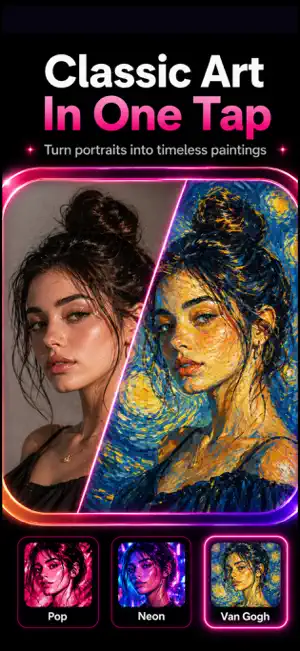

About Photo to Painting Art Filters
Turn photos into paintings, cartoons, sketches and AI art with Art Filters. Choose from 400+ art filters to transform portraits, selfies, pets, product shots and everyday photos into oil painting, watercolor, pencil sketch, charcoal, comic and anime-style artwork. Use the background remover, collage maker and editing controls to finish every image in one place. What you can make: - Photo to painting: oil paint, watercolor, acrylic, ink and fine art looks - Cartoon portraits: create cartoon, comic and anime-style profile images - Sketch effects: pencil drawing, line art, charcoal and black-and-white styles - Background remover: remove or replace backgrounds for clean cutouts - Collages: combine edited photos with layouts, frames, stickers and text - Photo editor tools: brightness, contrast, saturation, shadows, temperature, sharpness and clarity How it works: 1. Open a photo from your camera or gallery. 2. Choose an AI art filter, cartoon effect, painting style or sketch filter. 3. Adjust the image and remove the background if needed. 4. Save in HD or share your finished artwork. Art Filters Pro unlocks premium filters, removes ads, enables Ultra HD export and adds unlimited background removals. Subscriptions renew through your App Store account and can be managed or canceled in your account settings. Some AI styles require an internet connection. Many standard art filters work on device.
Ratings & reviews
4.5
94 ratings
What’s new
Version 6.1.2 · Updated June 24, 2026
Big update to your AI art filter & photo editor! Remove backgrounds on-device and create stunning photo collages. What's new: • AI background remover — no upload needed • Add custom or artistic backgrounds to any photo • Photo collage maker with multiple layouts • Move, zoom, and adjust images freely Improved art filters & editor experience. Watercolor, oil painting, and all 400+ art filters feel smoother than ever. Performance improvements and bug fixes.
App privacy
The developer, Entertainment Apps MCHJ, reported these privacy practices to Apple.
Data Used to Track You
The following data may be used to track you across apps and websites owned by other companies:
- Usage Data: Advertising Data
- Diagnostics: Crash Data
Data Linked to You
The following data, which may be collected and linked to your identity, may be used for the following purposes:
- Usage Data: Advertising Data
- Diagnostics: Crash Data
Used for: Third-Party Advertising, Analytics
Alternatives to Photo to Painting Art Filters
Looking for apps like Photo to Painting Art Filters? Here are 6 similar apps on the App Store. The highest rated is Photo to Painting: Oilbrush (4.9/5), and all 6 are free to download.
-
 ArtCard - Quick Art
4.8
-
 Paintation: Famous Art Filters
4.8
-
 Abstract You - Pop Art Effects
3.0
-
 PaintSnap: Photo to Painting
4.7
-
 Photo to Painting: Oilbrush
4.9
-
 SDFX Art AI Image Generator
4.4
| App | Rating | Price | Last updated | Compare |
|---|---|---|---|---|
| Photo to Painting Art Filters | 4.5 / 5 (94 ratings) | Free | June 24, 2026 | |
| ArtCard - Quick Art | 4.8 / 5 (3,940) | Free | Oct 30, 2025 | Compare |
| Paintation: Famous Art Filters | 4.8 / 5 (490) | Free | Aug 9, 2026 | Compare |
| Abstract You - Pop Art Effects | 3.0 / 5 (7) | Free | Sep 11, 2025 | Compare |
| PaintSnap: Photo to Painting | 4.7 / 5 (345) | Free | Oct 12, 2026 | Compare |
| Photo to Painting: Oilbrush | 4.9 / 5 (1,426) | Free | Oct 6, 2026 | Compare |
| SDFX Art AI Image Generator | 4.4 / 5 (44) | Free | Oct 7, 2026 | Compare |