

Andiamo Places
Tom Giammarresi Travel iPhoneiPadiPod touch
Andiamo Places is a free Travel app for iPhone and iPad by Tom Giammarresi. Requires iOS 15.1. Updated October 10, 2026.
- Price
- Free
- on the App Store
- Size
- 69 MB
- Age 4+
- Updated
- Oct 10
- 2026 · v4.8.55
Screenshots


About Andiamo Places
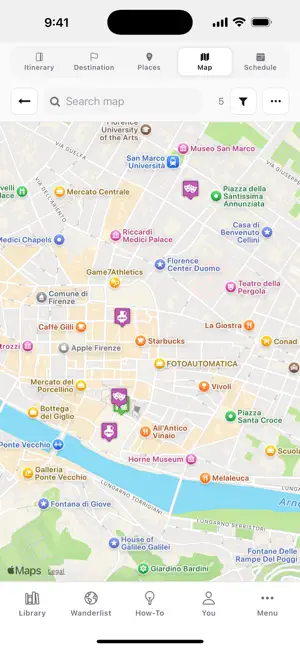
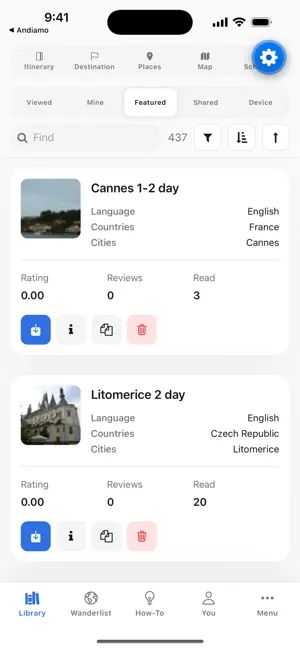
Andiamo Places is completely free, and builds your schedule around real opening hours — so your itinerary never sends you to a closed museum. It assists travelers in all aspects of a trip — planning, traveling, remembering, collaborating and sharing. PLANNING - Overview. - Build a trip. - Create a trip using AI which is tailored to your criteria. - Use AI to create interesting walks, hikes or bicycle routes with directions on Google Maps. - Find trails and paths and add them to the guide. - Add walking or driving directions into the guide. - Use and personalize any of the hundreds of existing guides for your trip. - Export/Import a trip from a JSON or CSV file. - See events on a schedule or in an itinerary. - Add information for your trip using text, images, audio, video, PDFs, and URLs with the built-in HTML editor. - Import from KML, KMZ, GPX, and TCX files. - Import Google Maps List (export from Google Maps or takeout.google.com). - Import Google Timeline (export from Google Maps or takeout.google.com). - Automatically get stock photos and Wikipedia info for places on your trip. - Search for places using AI, Google, Flickr, or Wikipedia. - Group and categorize places for easy searching and decluttering. - Maintain a bucket list of future trips or places. - Add POIs directly from those displayed on Google Maps. - Tag the must-see places. - Make a checklist of items to bring on your trip. - Use "Recalculate schedule" when things change. - Get open/close times for the places on your trip. - Your schedule highlights the events with places that are closed. - Store travel documents. - Automatically extract destinations from a pasted confirmation email, a PDF, or a photo of one. - Import places or schedules from other guides. - Get real-time updates on your trip. - Collaborate by commenting on the guide, places and events. - Collaborate by asking and answering questions about the trip. - Create trip from voice input. TRAVELING - Follow the itinerary or schedule. - Get directions between places in your trip from Google Maps. - Get directions for walks, hikes and cycling routes in your trip from Google Maps. - Get answers to common travel questions using AI. - Get weather and climate information for any place. - Center the map to your location and track your location. - Get web resources for places on your trip — articles, videos, photos. - Easily modify your schedule by moving events, days, start date, etc. - Tag places as visited or as favorites. - Filter to see places not yet visited. - Filter by numerous criteria: visited, favorites, schedule, days, groups, categories, today's events, and more. - Display icons or photos in map markers. - Get flight status. - Quick links to web resources for all places in your trip e.g. images, videos, articles, street view and Google Maps. - Get the information that you need today by pressing one button. - Take your trip offline with Organic Maps, a free offline-maps app. - Expense tracking. REMEMBERING - Automatically create a photo journal from your trip photos. - Automatically replace stock photos with your own trip photos. - Add more of your photos to places. - See statistics on places, countries, and continents visited. - You can replay your trip. - Link a place to a path and the path to a video, and cause the video to start playing at the moment you passed the place. - Track your trip with a GPS tracker app like Gaia GPS or Organic Maps and import the path directly into Andiamo Places. COLLABORATING AND SHARING - Collaborate by modifying the same guide. - Send a link to your trip or travel journal. - Export your trip as HTML or PDF. - In the web version you can export your trip as a Video. - Export your trip as a Video from mobile by launching the web version. - Export your trip as JSON or CSV.
What’s new
Version 4.8.55 · Updated October 10, 2026
Comment on trip, places or events. Polls for shared trips Safer collaboration on same guide: see and merge changes when someone else saved first Expense tracking with trip members and balances Ask the Travel Wizard and AI Search anything in your own words Create Trip with AI now suggests backup places Photo uploads fixed: the upload button no longer disappears Many other fixes and improvements
App privacy
The developer, Tom Giammarresi, reported these privacy practices to Apple.
Data Not Collected
The developer does not collect any data from this app.