

Photo to Pdf Converter -PicDoc
Zeeshan Ahmad Productivity iPhoneiPadiPod touch
Photo to Pdf Converter -PicDoc is a free Productivity app for iPhone and iPad by Zeeshan Ahmad. Rated 4.6/5 from 11 ratings. Requires iOS 14.1.
- Rating
- 4.6
- 11 ratings
- Price
- Free
- on the App Store
- Size
- 23 MB
- Age 4+
- Updated
- Aug 8
- 2026 · v1.26
Screenshots


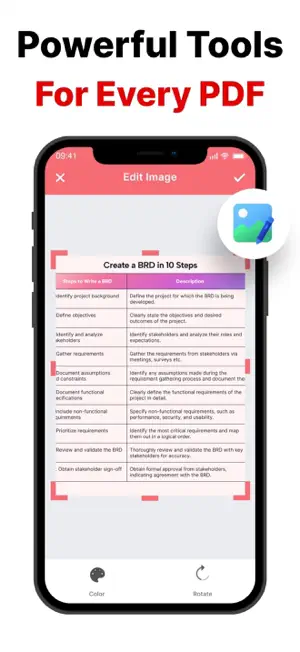
About Photo to Pdf Converter -PicDoc
Photo to PDF in 3 Simple Steps: 1. Open the App 2. Select Photos or Take New Pictures 3. Tap “Convert to PDF” — Done! With Photo to PDF Converter, creating high-quality PDF documents has never been easier. Forget complicated apps filled with unnecessary features. PicDoc is built for simplicity, speed, and productivity — so you can focus on your work, not on figuring out how to convert files. Key Features: -Simple & Intuitive Convert any photo to PDF quickly with our easy-to-use interface. No technical knowledge needed — just select your files and convert. -Powerful Editing Options Crop, rotate, or apply filters before converting your photos to PDF. Whether you need a fast basic conversion or advanced editing, PicDoc adapts to your needs. -Fast & Secure Conversion All conversions are done directly on your device. Your files stay private and secure — no internet connection required, and no data leaves your phone. -Stay Organized Manage all your PDFs effortlessly with folders and custom file names. Keep your documents neat and easy to find, even when you have many files. -Sign Documents Easily Add your signature directly to any PDF. Sign contracts, agreements, or forms in seconds without needing to print. -Share with a Tap Export your PDFs instantly by email, cloud storage, or messaging apps. Sharing your documents has never been this easy. Experience the easiest way to convert photos to PDF — fast, secure, and completely in your control. You can get unlimited access to all the advanced functionality by subscribing to a monthly or a yearly plan inside the app. There's also a free 3 day trial period to get a taste of what PicDoc Premium has to offer. Once expired, the trial period automatically changes to a paid yearly subscription. Payment will be charged to iTunes Account at confirmation of purchase. Subscription automatically renews unless auto-renew is turned off at least 24-hours before the end of the current period. Account will be charged for renewal within 24-hours prior to the end of the current period, and identify the cost of the renewal. Subscriptions may be managed by the user and auto-renewal may be turned off by going to the user's Account Settings after purchase. Any unused portion of a free trial period, if offered, will be forfeited when the user purchases a subscription to that publication, where applicable. Privacy Policy : https://sites.google.com/view/picdocprivacypolicy Terms of Use : https://sites.google.com/view/picdoctermsandconditions
Ratings & reviews
4.6
11 ratings
What’s new
Version 1.26 · Updated August 8, 2026
- Updated the app to use the standard iOS interface for a cleaner and more consistent experience. - Improved stability and overall performance.
App privacy
The developer, Zeeshan Ahmad, reported these privacy practices to Apple.
Data Not Collected
The developer does not collect any data from this app.
Alternatives to Photo to Pdf Converter -PicDoc
Looking for apps like Photo to Pdf Converter -PicDoc? Here are 6 similar apps on the App Store. The highest rated is AI Paraphraser: Rephrase App (4.8/5), and all 6 are free to download.
-
 Picture to PDF Converter JPEG
4.6
Picture to PDF Converter JPEG
4.6
-
 AI Paraphraser: Rephrase App
4.8
AI Paraphraser: Rephrase App
4.8
-
 AI Email Writer: Letter Writer
3.2
AI Email Writer: Letter Writer
3.2
-
 Convert Photo to PDF | Scan
4.7
Convert Photo to PDF | Scan
4.7
-
 AI Note Taker: Audio Converter
4.5
AI Note Taker: Audio Converter
4.5
-
 PDF Converter - PDF Scanner
4.5
PDF Converter - PDF Scanner
4.5
| App | Rating | Price | Last updated | Compare |
|---|---|---|---|---|
| Photo to Pdf Converter -PicDoc | 4.6 / 5 (11 ratings) | Free | August 8, 2026 | |
| Picture to PDF Converter JPEG | 4.6 / 5 (32) | Free | Sep 21, 2025 | Compare |
| AI Paraphraser: Rephrase App | 4.8 / 5 (23) | Free | Jun 29, 2025 | Compare |
| AI Email Writer: Letter Writer | 3.3 / 5 (4) | Free | Apr 11, 2025 | Compare |
| Convert Photo to PDF | Scan | 4.7 / 5 (23) | Free | Apr 1, 2025 | Compare |
| AI Note Taker: Audio Converter | 4.5 / 5 (26) | Free | Apr 5, 2025 | Compare |
| PDF Converter - PDF Scanner | 4.5 / 5 (35) | Free | Aug 31, 2026 | Compare |