

Screenseer
Christopher Benjamin Utilities iPhoneiPadiPod touch
Screenseer is a free Utilities app for iPhone and iPad by Christopher Benjamin. Rated 5.0/5 from 2 ratings. Requires iOS 15.1. Updated December 30, 2025.
- Rating
- 5.0
- 2 ratings
- Price
- Free
- on the App Store
- Size
- 49 MB
- Age 4+
- Updated
- Dec 30
- 2025 · v1.4.1
Screenshots

About Screenseer
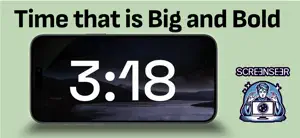
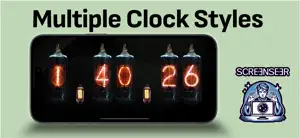
Do you have a modern phone or tablet that lies idle when you're at home or work? Or perhaps you have an old device gathering dust in a drawer? Give them a new purpose with Screenseer—the endlessly-on, fully-customizable clock app you never knew you needed (but now won’t live without). What it does: Turns any screen into a stylish clock—because time waits for no one, but your screen definitely can. Runs 24/7 so your device finally has something productive to do (unlike you during meetings). Works well on modern devices and lots of "vintage" models. Why it’s awesome: Comes with multiple clock faces—analog, digital, maybe even existential (we’re working on it). Customize colors, fonts, and backgrounds like a true design diva. Use solid colors, your favorite static image, or even a moody video background. Use Screenseer to: Add flair to your desk, nightstand, kitchen counter, or shrine of obsolete gadgets. Give new life to your old hardware instead of tossing it into the eternal drawer of tech shame. So go ahead, install Screenseer. It’s free, it’s fabulous, and it makes your screen look like it actually belongs in 2025. It's meant to be run on a device that it permanently powered and it's a perfect use for an older phone or tablet! Current clock channels: Basic clock - It's anything but basic! Maximize the screen with the time and a ton of customizable options Countdown - Countdown a number of minutes or to a specific date and time in style Dementia clock - A simplified clock meant for senior citizens Flip clock - An animated clock in the style of retro flip clock (also known as a split flap). Meeting schedule - Countdown to upcoming meetings and events from your calendar Nixie clock - Show the time using glowing nixie (cold cathode display) tubes Pomodoro timer - A customizable pomodoro timer to keep you productive in a visually appealing way Radial clock - A classic and customizable round clock Slot wheel clock - An animated display that mimics the look of rotating vertical dials We also have a new slide show channel that can combine your photos and cloud photos together in an endless display of images.
What’s new
Version 1.4.1 · Updated December 30, 2025
Fixes for screen rotation and content fitting in pomodoro and countdown timers.
App privacy
The developer, Christopher Benjamin, reported these privacy practices to Apple.
Data Not Collected
The developer does not collect any data from this app.
Alternatives to Screenseer
Looking for apps like Screenseer? Here are 6 similar apps on the App Store. The highest rated is A Flip Clock (5.0/5), and all 6 are free to download.
-
 World-Digital-Clock
-
 Amaze Clock
-
 NiteTime Clock
4.0
NiteTime Clock
4.0
-
 Digital Clock - Advance Time
4.2
Digital Clock - Advance Time
4.2
-
 A Flip Clock
5.0
A Flip Clock
5.0
-
 Digital Clock Ultra
4.8
Digital Clock Ultra
4.8
| App | Rating | Price | Last updated | Compare |
|---|---|---|---|---|
| Screenseer | 5.0 / 5 (2 ratings) | Free | December 30, 2025 | |
| World-Digital-Clock | – | Free | Oct 2, 2025 | Compare |
| Amaze Clock | – | Free | Feb 25, 2024 | Compare |
| NiteTime Clock | 4.0 / 5 (2) | Free | Jul 6, 2026 | Compare |
| Digital Clock - Advance Time | 4.2 / 5 (6) | Free | Apr 8, 2025 | Compare |
| A Flip Clock | 5.0 / 5 (2) | Free | Feb 16, 2026 | Compare |
| Digital Clock Ultra | 4.8 / 5 (8) | Free | Jan 31, 2024 | Compare |
Compare Screenseer with the top alternatives: ratings, updates, ASO score and keyword gaps →