

Safe Page – Web Browser
Wios Utilities iPhoneiPadiPod touch
Safe Page – Web Browser is a free Utilities app for iPhone and iPad by Wios. Rated 4.6/5 from 196 ratings. Requires iOS 13.0. Updated September 27, 2026.
- Rating
- 4.6
- 196 ratings
- Price
- Free
- on the App Store
- Size
- 5 MB
- Age 17+
- Updated
- Sep 27
- 2026 · v1.3.2
Screenshots


About Safe Page – Web Browser
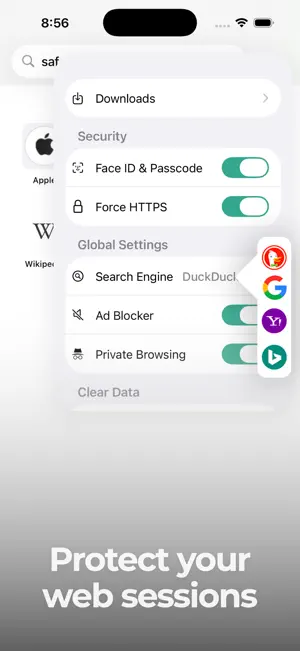
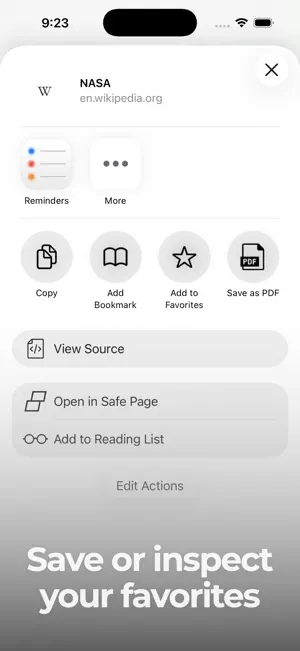
Experience fast, private, and secure browsing with Safe Page Web Browser, a lightweight private web browser designed to help keep your online activity protected. Browse the web with built-in ad blocking, private browsing, biometric or passcode protection, and easy tools to manage your browsing data. Safe Page puts your privacy first with Private Browsing Mode, which helps keep your browsing activity private on your device. When you close tabs opened during private sessions, cookies, cache, and other website data are automatically removed. For an additional layer of security, you can protect Safe Page with a biometric or passcode lock, helping prevent unwanted access to your browser and browsing activity. Enjoy a cleaner and faster web experience with Safe Page’s built-in ad blocker. With an easy one-tap switch, you can block known advertisements and many trackers associated with them. By preventing unnecessary ad-related content and resources from loading, the ad blocker can help pages load faster while providing a cleaner, less distracting browsing experience. Safe Page is designed to be a lightweight web browser that uses minimal device resources for smooth and efficient performance. You can also set Safe Page as your default browser, making it easy to open websites and links whenever you browse the web. Managing your browsing data is simple with Safe Page. One-tap controls let you clear cookies, browsing history, cache, and other website data whenever you want. If you prefer regular browsing instead of private browsing, you can quickly remove stored browsing activity directly from the browser. For developers, students, and curious users, Safe Page includes a View Source feature that lets you inspect the HTML code of any web page. Explore how websites are structured and better understand the code behind the pages you visit. Features • Private browsing mode • Biometric and passcode lock • Built-in ad and tracker blocker • Fast and lightweight • View HTML source code Whether you want a fast web browser, a private web browser, or an easy way to control your browsing data, Safe Page gives you useful privacy, security, and performance tools for everyday web browsing. Browse faster, browse privately, and stay in control with Safe Page Web Browser.
Ratings & reviews
4.6
196 ratings
What’s new
Version 1.3.2 · Updated September 27, 2026
Bug fixes and improvements.
App privacy
The developer, Wios, reported these privacy practices to Apple.
Data Not Linked to You
The following data, which may be collected but is not linked to your identity, may be used for the following purposes:
- Identifiers: Device ID
- Usage Data: Product Interaction
Used for: Analytics, App Functionality
Alternatives to Safe Page – Web Browser
Looking for apps like Safe Page – Web Browser? Here are 6 similar apps on the App Store. The highest rated is Broearn Browser for Web3.0 (4.8/5), and all 6 are free to download.
-
 Private Web Incognito Browser
4.5
Private Web Incognito Browser
4.5
-
 Private Browser • Brovacy
4.6
Private Browser • Brovacy
4.6
-
 Pure Web Browser
4.3
Pure Web Browser
4.3
-
 Broearn Browser for Web3.0
4.8
Broearn Browser for Web3.0
4.8
-
 eBrowser: Private Web & Files
4.4
eBrowser: Private Web & Files
4.4
-
 Go Browser: Private,Pure,Fast
4.7
Go Browser: Private,Pure,Fast
4.7
| App | Rating | Price | Last updated | Compare |
|---|---|---|---|---|
| Safe Page – Web Browser | 4.6 / 5 (196 ratings) | Free | September 27, 2026 | |
| Private Web Incognito Browser | 4.5 / 5 (210) | Free | Apr 8, 2026 | Compare |
| Private Browser • Brovacy | 4.6 / 5 (233) | Free | Oct 23, 2026 | Compare |
| Pure Web Browser | 4.3 / 5 (62) | Free | Feb 4, 2025 | Compare |
| Broearn Browser for Web3.0 | 4.8 / 5 (41) | Free | Dec 24, 2025 | Compare |
| eBrowser: Private Web & Files | 4.4 / 5 (18) | Free | Jun 20, 2026 | Compare |
| Go Browser: Private,Pure,Fast | 4.7 / 5 (528) | Free | Jan 23, 2026 | Compare |