

Docusy: PDF Editor & Scanner
WhiteLake Productivity iPhoneiPadiPod touch
Docusy: PDF Editor & Scanner is a free Productivity app for iPhone and iPad by WhiteLake. Rated 4.0/5 from 4 ratings. Requires iOS 18.6.
- Rating
- 4.0
- 4 ratings
- Price
- Free
- on the App Store
- Size
- 75 MB
- Age 4+
- Updated
- Oct 11
- 2026 · v5.4.0
Screenshots


About Docusy: PDF Editor & Scanner
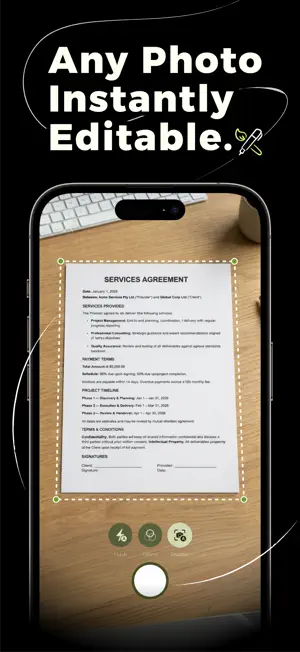
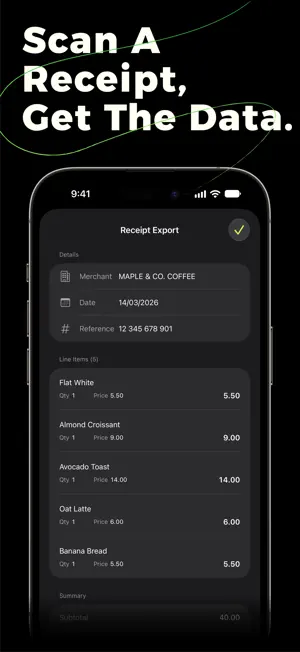
Docusy is the iPhone scanner that edits what it reads. Tap any word in a scanned document and change it — in 17 languages. Sign, merge, search, share. Nothing leaves your device. EDIT SCANNED TEXT Scan a document and Docusy detects every word. Tap to correct, replace, or rewrite. Edits match your document's font and colour so changes look native, not pasted on. Works in every supported language, including Arabic and Persian right-to-left. READ THE DETAILS Scan a receipt, invoice, business card, or ID and Docusy pulls out the details — totals, dates, names, and numbers. Export them as CSV, or as Word and Excel documents where detected tables become real rows. Docusy tells a receipt from an invoice and sorts your library by type, so the document you need is one tap away. Add a detected date straight to your calendar. TRANSLATE ON THE PAGE Read a document in another language. Docusy translates the text into any language your device supports, right where it sits, and flips between the original and the translation with a tap. On your device, private as ever. SIGN AND SEND Draw your signature once. Place it on any PDF in seconds. Save multiple signatures for personal and business use. PROTECT WHAT MATTERS Lock Docusy with Face ID or your passcode, and export password-protected, encrypted PDFs. Your documents stay yours — stored safely on your device, by design. SCAN ANYTHING Scan paper documents with your camera, or import PDFs and photos from Files and Photos. Merge up to 6 PDFs into one in a single tap. Export as PDF, image, Word, Excel, CSV, or ZIP — print, AirDrop, email, or share with any app. BUILT INTO FILES Sign or edit any PDF straight from the iOS Files share sheet — no need to open the app first. Docusy adds "Add Signature" and "Edit as PDF" as one-tap actions wherever your documents live. SPOTLIGHT, SIRI & SHORTCUTS Find any scanned document from your home screen — Spotlight searches the text inside every scan. Open, search, or scan with Siri or a Shortcut. Build your own document automations. SEARCH EVERY DOCUMENT Find a name, a date, an address — Docusy searches the text inside every scanned PDF, instantly, offline. Pin the documents you reach for most. iPHONE, iPAD, MAC, APPLE VISION One purchase, every Apple device. A redesigned iPad and Mac layout — with a sidebar and a rethought PDF editor — makes the most of the bigger screen. PRIVATE BY DESIGN Everything stays on your device. No accounts. No servers. No internet required. We can't see your documents because we don't have them. NO ADS. NO WATERMARKS. Export clean PDFs. No "Made with Docusy" stamp on your scans. 17 LANGUAGES Arabic, Chinese (Simplified and Traditional), Dutch, English, French, German, Hindi, Italian, Japanese, Korean, Persian, Portuguese, Russian, Spanish, Turkish, Ukrainian. Full right-to-left layout for Arabic and Persian. Scan a receipt. Sign a tenancy agreement. Fix a typo in a form. Archive a contract. Docusy handles documents the way Apple apps should — on your device, in your language, respecting your privacy.
What’s new
Version 5.4.0 · Updated October 11, 2026
Docusy 5.4 picks up right where you left off — and now works with Siri, Spotlight and Shortcuts. PICK UP WHERE YOU LEFT OFF • Closed the app mid-scan? Your pages are kept — resume the scan from Home, or discard it. • Docusy reopens the document you were reading, on the page you were on — even after your iPhone closes the app in the background. SIRI, SPOTLIGHT & SHORTCUTS • Find and open any document by name with Siri or Spotlight. • Export a document with Siri or a Shortcut (Premium). SIGN, FILL & EDIT • A new Fill & Sign quick strip stays out of your way, so you can place checkmarks, dates and initials across a form without covering it. • Edit Text corrections now fully cover the original words, a larger font no longer clips the line below, and your edits are saved when you leave the page or switch apps. • Translations now stay in place for text near the edge of a page. • Form auto-fill carries on straight after you upgrade, asks before discarding your edits, and points out the tick boxes left for you to finish. A CLEARER UPGRADE • The plan you're choosing always sits right next to the button you tap, with the best-value plan first. • Manage your subscription straight from Settings. • Give a friend a free week of Premium — and get one for yourself. iPAD & MAC • The Reader now opens beside the page, so you can read the clean text without losing sight of the original. • See a page and its translation side by side — choose “Show beside the page” when you translate (Premium). • Documents and sheets stay open when you resize Docusy or use Split View. • Settings now sits at a comfortable reading width. EASIER TO READ • Larger text sizes now apply throughout the upgrade screens and getting started. • Higher-contrast text on green buttons, in light and dark mode. FEWER INTERRUPTIONS • We'll never pop up a prompt while you're working in a tool. ALSO NEW • Getting started is smoother: sign over your own scan, and retake a page without starting over. • A cleaner, more consistent look across sheets — from signatures to QR codes. • More reliable iCloud Sync. Still on your device — and, when you turn it on, synced privately through your own iCloud, never ours.
App privacy
The developer, WhiteLake, reported these privacy practices to Apple.
Data Not Linked to You
The following data, which may be collected but is not linked to your identity, may be used for the following purposes:
- Purchases: Purchase History
- Identifiers: User ID
- Usage Data: Product Interaction
- Diagnostics: Crash Data, Performance Data
Used for: Analytics, App Functionality
Alternatives to Docusy: PDF Editor & Scanner
Looking for apps like Docusy: PDF Editor & Scanner? Here are 6 similar apps on the App Store. The highest rated is Ephemera: Expiring Bookmarks (5.0/5), and all 6 are free to download.
-
 Ephemera: Expiring Bookmarks
5.0
Ephemera: Expiring Bookmarks
5.0
-
 Manage bookmark with images
5.0
Manage bookmark with images
5.0
-
 Readminds
-
 NotesNChat
5.0
NotesNChat
5.0
-
 PDF Scanner: Document CAM Scan
4.5
PDF Scanner: Document CAM Scan
4.5
-
 QuickScan:PDF OCR Text Scanner
4.9
QuickScan:PDF OCR Text Scanner
4.9
| App | Rating | Price | Last updated | Compare |
|---|---|---|---|---|
| Docusy: PDF Editor & Scanner | 4.0 / 5 (4 ratings) | Free | October 11, 2026 | |
| Ephemera: Expiring Bookmarks | 5.0 / 5 (6) | Free | Sep 21, 2024 | Compare |
| Manage bookmark with images | 5.0 / 5 (3) | Free | Mar 10, 2025 | Compare |
| Readminds | – | Free | Dec 30, 2024 | Compare |
| NotesNChat | 5.0 / 5 (2) | Free | Oct 22, 2026 | Compare |
| PDF Scanner: Document CAM Scan | 4.5 / 5 (13) | Free | Mar 1, 2026 | Compare |
| QuickScan:PDF OCR Text Scanner | 4.9 / 5 (4,071) | Free | Oct 20, 2026 | Compare |