

Video Analysis: Rough Cut
南星 廖 Utilities iPhoneiPadiPod touch
Video Analysis: Rough Cut is a free Utilities app for iPhone and iPad by 南星 廖. Requires iOS 16.6. Updated April 10, 2026.
- Price
- Free
- on the App Store
- Size
- 36 MB
- Age 12+
- Updated
- Apr 10
- 2026 · v1.1.4
Screenshots


About Video Analysis: Rough Cut
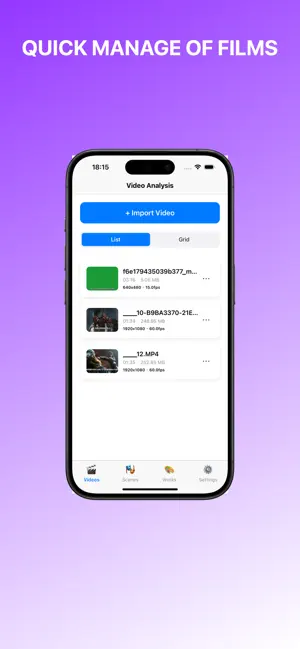
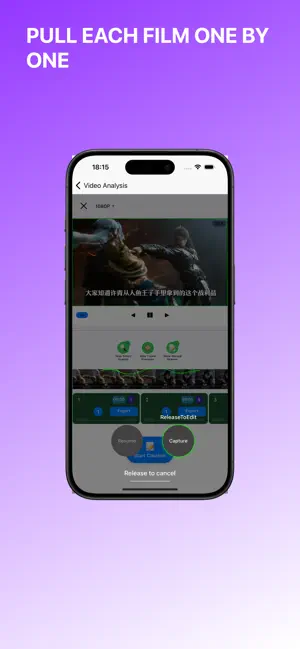
Video analysis assistant - make every frame count The "Video Analysis Assistant" is specifically designed for film and television creators, secondary creators, commentators, and teaching researchers, offering a comprehensive solution for managing video clips. Whether you need to repeatedly analyze film details or quickly organize materials for rough cuts, this tool can significantly enhance your work efficiency. Overview of core functions 1. Intelligent scene management Precise frame-by-frame timeline control: Play frame by frame, easily mark key frames, and never miss any details. Intelligent Scenario and Manual Segmentation: Quickly establish logical scenarios based on time ranges, breaking down long videos into manageable segments. Scene description and tagging: Add textual descriptions to each scene, establish a structured video content library, and simplify retrieval. II. Smart subtitle association SRT subtitle import: Supports the simultaneous management of multiple subtitle files, suitable for multiple versions of commentary scripts. Automatic time matching: Intelligently associate subtitles with video scenes according to time segments, eliminating the need for manual alignment. Association editing: Flexibly adjust the correspondence between subtitles and scenes, supporting deletion of associations and re-matching. III. Multi-scene stitching output WYSIWYG (What You See Is What You Get) stitching preview: Combine multiple scenes in sequence and preview the effect in real time. Flexible sequencing: Drag and adjust the order of scenes to quickly build the storyline. One-click export: Output the splicing result as a complete video, supporting multiple parameter settings. IV. Professional-level export control for scene clips Custom resolution: 1080P, 720P, 480P, freely selectable. Fine parameter adjustment: Customize frame rate and bit rate to meet the upload requirements of different platforms. Local quick save: You can choose to directly store the exported video in the device's photo album for easy sharing at any time. V. Fully localized, safeguarding privacy Offline work: All processing is completed locally on the device, without requiring a network connection. Data security: Video and subtitle files are exclusively stored on your device, eliminating the risk of privacy leakage. No advertising interference: A pure working environment allows you to focus on creation. VI. Applicable population Video and film secondary creation commentator: Quickly review the film, mark the highlights, match the subtitles, and accelerate the rough cutting process. Video teaching staff: When creating courses, it is easy to break down knowledge points, facilitating students' segmented learning. Video analysis researchers: Conduct in-depth analysis of videos, recording details frame by frame. Content creator: Efficiently manage the material library and access the required clips at any time. Why choose Video Analysis Assistant? 1. Frame-accurate clip management surpasses the coarse cutting capabilities of general-purpose editors. 2. Localized processing is safer and more stable than cloud-based tools. 3. Focus on fragment management and association, address core pain points, and avoid mere accumulation of functions. Download now and experience unprecedented efficiency in video analysis!
What’s new
Version 1.1.4 · Updated April 10, 2026
1. Performance optimization and bug fixes.
App privacy
The developer, 南星 廖, reported these privacy practices to Apple.
Data Not Linked to You
The following data, which may be collected but is not linked to your identity, may be used for the following purposes:
- User Content: Photos or Videos
- Diagnostics: Other Diagnostic Data
- Other Data: Other Data Types
Used for: App Functionality
Alternatives to Video Analysis: Rough Cut
Looking for apps like Video Analysis: Rough Cut? Here are 6 similar apps on the App Store. The highest rated is CalmDown‑Anger Pause Helper (5.0/5), and 5 of the 6 are free to download.
-
 shotbreak
-
 VidFind: Search Inside Videos
-
 Glimpse Vision AI
3.0
Glimpse Vision AI
3.0
-
 CalmDown‑Anger Pause Helper
5.0
CalmDown‑Anger Pause Helper
5.0
-
 藏趣 - 我的收藏宇宙
-
 Smart Video Clipper
| App | Rating | Price | Last updated | Compare |
|---|---|---|---|---|
| Video Analysis: Rough Cut | – | Free | April 10, 2026 | |
| shotbreak | – | Free | Mar 12, 2026 | Compare |
| VidFind: Search Inside Videos | – | Free | Aug 11, 2026 | Compare |
| Glimpse Vision AI | 3.0 / 5 (2) | Free | Oct 17, 2026 | Compare |
| CalmDown‑Anger Pause Helper | 5.0 / 5 (1) | Free | Sep 17, 2026 | Compare |
| 藏趣 - 我的收藏宇宙 | – | Free | Jun 22, 2026 | Compare |
| Smart Video Clipper | – | 0.99 USD | Mar 23, 2026 | Compare |