
FileNook
荣 周 Utilities iPhoneiPadiPod touch
FileNook is a free Utilities app for iPhone and iPad by 荣 周. Rated 4.7/5 from 7 ratings. Requires iOS 26.0. Updated October 5, 2026.
- Rating
- 4.7
- 7 ratings
- Price
- Free
- on the App Store
- Size
- 61 MB
- Age 4+
- Updated
- Oct 5
- 2026 · v3.0.3
Screenshots

About FileNook
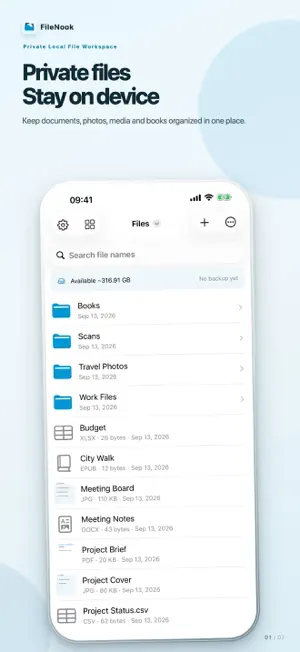
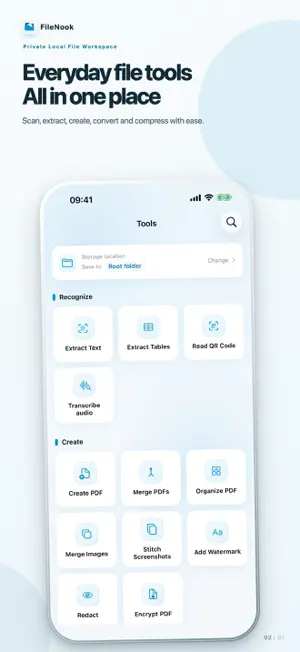
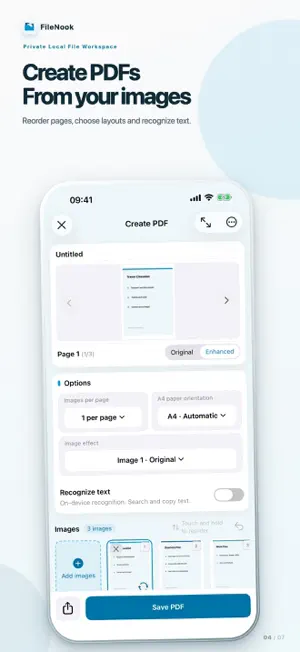
FileNook is a private local file workspace for iPhone and iPad. Organize files, read documents and prepare materials without a cloud-drive account. Files and document processing stay on your device unless you choose to share them. FILE WORKSPACE • Create folders; browse, rename, move, duplicate, sort and search files. • Use favorites, recent files and a recoverable trash. • Import from Files, Photos, AirDrop and the share sheet. • Transfer files from a computer over local Wi-Fi—no account or upload to a cloud service. • Search supported document content and inspect detailed file information. SCAN & RECOGNIZE • Scan ID cards with optional purpose watermarks and image enhancement. • Extract editable text from photos and PDFs. • Extract tables with cell review and export to Excel. • Recognize QR codes without automatically opening links. • Transcribe local audio with selectable ranges and TXT or SRT export. PDF TOOLS • Create searchable or standard PDFs from photos and document scans. • Merge PDFs; organize, reorder, rotate, insert, remove and extract pages. • Split PDFs by page, fixed groups or custom groups. • Crop page margins, compress PDFs and password-protect PDF copies. • Convert PDFs to images or editable Word documents. • Export TXT and Markdown to PDF; add optional covers, contents and page numbers. • Combine photos, scans and selected PDF pages; set a consistent A4 or Letter page size. PHOTO & PRIVACY TOOLS • Convert image formats, crop or resize to exact dimensions, and save reusable material presets. • Compress photos, combine images and stitch long screenshots. • Add text watermarks to images or PDFs. • Permanently redact selected areas of images and PDFs before sharing. VIDEO & AUDIO TOOLS • Compress compatible videos and preview the result before saving. • Extract an audio track or selected time range from a video. READ & PLAY • Read PDF, EPUB, DRM-free MOBI, TXT and Markdown files. • Play local video and audio, including supported HDR video, subtitles, picture in picture and seek-preview thumbnails. LOCAL PROTECTION • Protect app access with an independent passcode and optional biometrics. • Create password-encrypted backups and password-protected ZIP archives. • App Lock protects access to the app; it cannot protect copies after you export or share them. Basic file operations, reading and standard playback are free. Selected recognition, conversion and batch tools share one free use each day. Optional rewarded ads provide two extra uses. Pro is a one-time purchase that removes all ads and daily tool usage limits. File-size, page-count and batch safety limits still apply. No new monthly or annual subscription is offered. Privacy Policy: https://apps.vanto.space/en/app/folder/privacy/ Terms of Use: https://apps.vanto.space/en/app/folder/terms/
Ratings & reviews
4.7
7 ratings
What’s new
Version 3.0.3 · Updated October 5, 2026
• Improved tool inputs, file selection, and naming. • Fixed PDF page navigation, splitting, and page number input, plus text reading position and Markdown preview issues. • Improved audio and video playback, seeking, and accessibility.
App privacy
The developer, 荣 周, reported these privacy practices to Apple.
Data Used to Track You
The following data may be used to track you across apps and websites owned by other companies:
- Identifiers: Device ID
Data Linked to You
The following data, which may be collected and linked to your identity, may be used for the following purposes:
- Location: Coarse Location
- Identifiers: Device ID
- Usage Data: Product Interaction, Advertising Data
Used for: Third-Party Advertising, Developer’s Advertising or Marketing, Analytics
Data Not Linked to You
The following data, which may be collected but is not linked to your identity, may be used for the following purposes:
- Diagnostics: Performance Data, Other Diagnostic Data, Crash Data
Used for: Third-Party Advertising, Developer’s Advertising or Marketing, Analytics, App Functionality
Alternatives to FileNook
Looking for apps like FileNook? Here are 6 similar apps on the App Store. The highest rated is File Manager - Files Explorer (4.9/5), and all 6 are free to download.
-
 FileBox - Mobile File Manager
4.8
FileBox - Mobile File Manager
4.8
-
 FileHub: File Manager
4.4
FileHub: File Manager
4.4
-
 File Manager - Files Explorer
4.9
File Manager - Files Explorer
4.9
-
 File Manager: Vault & Explorer
3.9
File Manager: Vault & Explorer
3.9
-
 AirBox-Your File Manager
3.3
AirBox-Your File Manager
3.3
-
 File Explorer-File Manager Zip
3.9
File Explorer-File Manager Zip
3.9
| App | Rating | Price | Last updated | Compare |
|---|---|---|---|---|
| FileNook | 4.7 / 5 (7 ratings) | Free | October 5, 2026 | |
| FileBox - Mobile File Manager | 4.8 / 5 (14) | Free | Sep 15, 2026 | Compare |
| FileHub: File Manager | 4.4 / 5 (150) | Free | Sep 13, 2026 | Compare |
| File Manager - Files Explorer | 4.9 / 5 (7) | Free | Mar 25, 2025 | Compare |
| File Manager: Vault & Explorer | 3.9 / 5 (7) | Free | Jul 8, 2025 | Compare |
| AirBox-Your File Manager | 3.3 / 5 (15) | Free | Jan 18, 2026 | Compare |
| File Explorer-File Manager Zip | 3.9 / 5 (79) | Free | Apr 16, 2026 | Compare |
Compare FileNook with the top alternatives: ratings, updates, ASO score and keyword gaps →