

Inventory with barcode
emmanuel orvain Productivity iPhoneiPadiPod touch
Inventory with barcode is a free Productivity app for iPhone and iPad by emmanuel orvain. Rated 4.7/5 from 223 ratings. Requires iOS 16.0.
- Rating
- 4.7
- 223 ratings
- Price
- Free
- on the App Store
- Size
- 40 MB
- Age 4+
- Updated
- Oct 19
- 2026 · v8.3.0
Screenshots


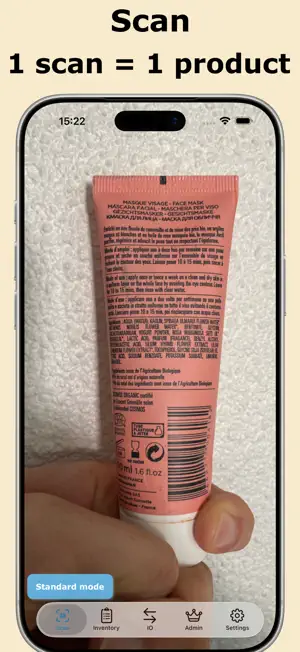

About Inventory with barcode
Inventory With BarCode: Professional Inventory Management & High-Performance Barcode Scanner Turn your iPhone into a powerful tool for real-time stock management! Perfect for shops, restaurants, libraries, warehouses, and manufacturers, this app lets you automate and simplify the management of your physical inventory with an ultra-fast barcode scanner and comprehensive features. IWBC is the ideal mobile app for managing your store’s inventory. With our built-in barcode detector, easily find product sheets and save time to focus on what truly matters for your business. Why Choose Inventory With Barcode? Save Time: Scan products in an instant to update quantities or add new items. - Accuracy: Reduce human errors with automatic barcode detection. - Flexibility: Use the app in-store, in the warehouse, or on the go. - Collaboration: Sync your data with Dropbox for multi-user workflows. - Efficiency: Scan barcodes quickly and access product information instantly. - Data Export: Export your inventory as a file for in-depth analysis. - Compute margin, margin rate, markup rate Key Tools for Optimal Management Smart Scanner - Instantly detect new products via their barcodes. - Check-in/Check-out modes to track stock movements. - Flash: Scan even in low-light conditions. - Compatible with Bluetooth scanners (e.g., NETUM NT-1228BC). - Bluetooth scanner manufacturers: Contact us to integrate your device! - Centralized Product Management Edit product details (name, quantity, photo, public price, etc.). - Create new product types by scanning their barcodes. Multi-Format Import/Export - Import data from a CSV file. Our tool lets you update your product database quickly and efficiently, reducing errors and saving valuable time. - Export your database in the following formats: Excel (XLSX) with photos PDF, CSV, SQLite ZIP archive for photos Advanced Features - Supplier Management: Organize and track your partners. - Multi-Inventory: Create, clone, or rename inventories as needed. - Customization: Adjust scan filters to optimize barcode detection. Supported Barcodes - Codabar, Code 39/93/128, EAN-8/13, ITF, UPC-A/E, Aztec, Data Matrix, PDF417, QR Code, and many more! Links: - Site web : https://occirama.com/inventory-barcode/ - FAQ : https://occirama.com/inventory-barcode/en/faq.html - Terms Of Use : https://occirama.com/inventory-barcode/terms-of-use/ - Privacy Policy : https://occirama.com/inventory-barcode/privacy/
Ratings & reviews
4.7
223 ratings
What’s new
Version 8.3.0 · Updated October 19, 2026
In this new version of Inventory with Barcode, we improve user experience.
App privacy
The developer, emmanuel orvain, reported these privacy practices to Apple.
Data Not Collected
The developer does not collect any data from this app.
Alternatives to Inventory with barcode
Looking for apps like Inventory with barcode? Here are 6 similar apps on the App Store. The highest rated is Photo Inventory Retinelle (4.9/5), and all 6 are free to download.
-
 Inventory Control with Scanner
4.4
Inventory Control with Scanner
4.4
-
 Stockroom Inventory
4.8
Stockroom Inventory
4.8
-
 Barcode Scanner - Orca Scan
4.7
Barcode Scanner - Orca Scan
4.7
-
 Scan to Sheets - QR & Barcode
4.4
Scan to Sheets - QR & Barcode
4.4
-
 Scan to Excel
3.3
Scan to Excel
3.3
-
 Photo Inventory Retinelle
4.9
Photo Inventory Retinelle
4.9
| App | Rating | Price | Last updated | Compare |
|---|---|---|---|---|
| Inventory with barcode | 4.7 / 5 (223 ratings) | Free | October 19, 2026 | |
| Inventory Control with Scanner | 4.4 / 5 (608) | Free | Oct 13, 2026 | Compare |
| Stockroom Inventory | 4.8 / 5 (1,468) | Free | Jan 15, 2025 | Compare |
| Barcode Scanner - Orca Scan | 4.7 / 5 (1,867) | Free | Oct 29, 2026 | Compare |
| Scan to Sheets - QR & Barcode | 4.4 / 5 (270) | Free | Jun 5, 2025 | Compare |
| Scan to Excel | 3.3 / 5 (14) | Free | Jul 14, 2025 | Compare |
| Photo Inventory Retinelle | 4.9 / 5 (312) | Free | Oct 29, 2026 | Compare |