

StraboField
The University of Kansas Utilities iPhoneiPadiPod touch
StraboField is a free Utilities app for iPhone and iPad by The University of Kansas. Rated 4.6/5 from 22 ratings. Requires iOS 17.0.
- Rating
- 4.6
- 22 ratings
- Price
- Free
- on the App Store
- Size
- 89 MB
- Age 4+
- Updated
- Oct 14
- 2026 · v2.31.8
Screenshots

About StraboField
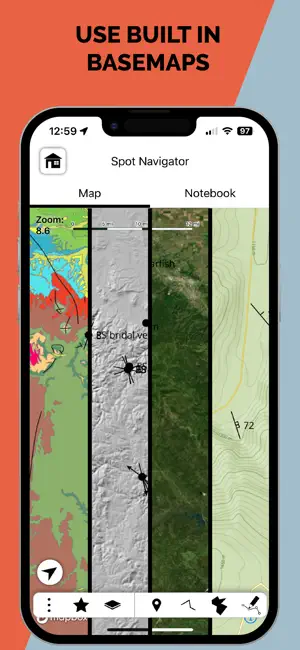
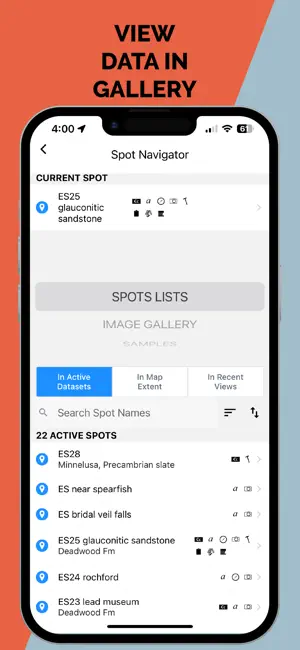
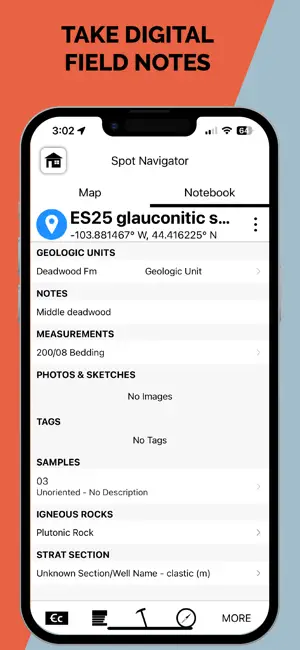
StraboField is a powerful, all-in-one mobile app designed to streamline your geological fieldwork. Record observations, capture photos and sketches, collect orientation data, create geologic maps and stratigraphic sections — all from a single, map-centered platform. Easily collect spatially referenced data using point, line, or polygon-based Spots. Work across multiple scales using nested Spots and high-resolution image basemaps. Designed by geologists, for geologists, StraboField supports workflows across subdisciplines including structural geology, sedimentology, petrology, volcanology, and geomorphology. ** Key Features: ** * Capture field data with photos, sketches, and notes * Collect georeferenced orientation and spatial data * Use custom or built-in basemaps offline * Create multi-scale observations with nested Spots * Organize and back up data locally or to StraboSpot.org * StraboField is fully functional offline, making it ideal for remote fieldwork. Once online, your data can be synced to the StraboSpot digital data system at StraboSpot.org — an open- source platform supported by the National Science Foundation.
Ratings & reviews
4.6
22 ratings
What’s new
Version 2.31.8 · Updated October 14, 2026
PHOTOS • Taking photos on iPad: taking photos, especially several in a row, no longer crashes the app MEASUREMENTS • Steady compass for lineations: trend and plunge are always taken along the top of the screen, which now stays in portrait while the compass is open, instead of sometimes reading 90° or 180° off depending on how the device was held. The live strike/dip and trend/plunge are shown under the compass NOTEBOOK & NAVIGATION • Zoom to Spot: zooming to a Spot opened from the Spot Navigator no longer crashes or reopens the navigator • Notebook tab on phones: the Notebook tab no longer goes blank after opening a project • Notebook from the image viewer: the Notebook button opens the Notebook instead of a second map PHOTOS & BACKUPS • Photo resize errors: a photo that fails to resize shows an error instead of closing the app • Re-importing backups: images already on the device are copied correctly when a backup is imported again MAPS & SIGN-IN • Downloaded custom maps: a custom map without an id no longer stops a downloaded project's custom maps from loading • Forgot password: when the reset link can't be opened, the sign-in screen tells you where to reset it Thanks for using StraboSpot!
App privacy
The developer, The University of Kansas, reported these privacy practices to Apple.
Data Linked to You
The following data, which may be collected and linked to your identity, may be used for the following purposes:
- Location: Precise Location, Coarse Location
- Contact Info: Email Address, Name
- User Content: Photos or Videos
- Identifiers: User ID
- Other Data: Other Data Types
Used for: App Functionality
Data Not Linked to You
The following data, which may be collected but is not linked to your identity, may be used for the following purposes:
- Diagnostics: Crash Data
Used for: App Functionality
Alternatives to StraboField
Looking for apps like StraboField? Here are 6 similar apps on the App Store. The highest rated is Lambert (5.0/5), and all 6 are free to download.



| App | Rating | Price | Last updated | Compare |
|---|---|---|---|---|
| StraboField | 4.6 / 5 (22 ratings) | Free | October 14, 2026 | |
| Emlid Flow | 3.9 / 5 (35) | Free | Oct 14, 2026 | Compare |
| CrowdMag | 4.3 / 5 (25) | Free | Aug 14, 2026 | Compare |
| Outcropedia | – | Free | Jul 10, 2025 | Compare |
| Lambert | 5.0 / 5 (4) | Free | Oct 1, 2026 | Compare |
| VuSitu | 4.9 / 5 (16) | Free | Oct 13, 2026 | Compare |
| Bad Elf Flex | 3.6 / 5 (14) | Free | Sep 25, 2026 | Compare |
Compare StraboField with the top alternatives: ratings, updates, ASO score and keyword gaps →