

ByDesign: ToDo List & Calendar
IdealistApp Productivity iPhoneiPadiPod touch
ByDesign: ToDo List & Calendar is a free Productivity app for iPhone and iPad by IdealistApp. Rated 4.9/5 from 108 ratings. Requires iOS 17.6.
- Rating
- 4.9
- 108 ratings
- Price
- Free
- on the App Store
- Size
- 339 MB
- Age 4+
- Updated
- Sep 3
- 2026 · v6.1.2
Screenshots



About ByDesign: ToDo List & Calendar
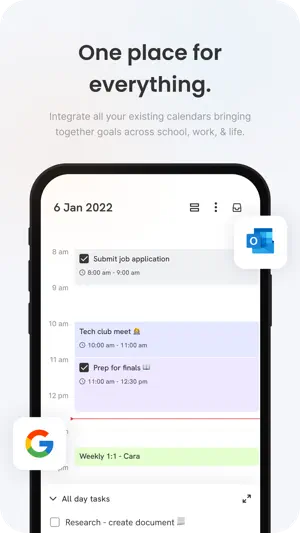
Plan your day, manage your to-do list, and organize your whole life in one app. ByDesign brings your tasks, daily planner, calendar, and notes together — synced across all your devices. Features: Calendar - Connect as many calendars you want - personal, work or school. - Manage and time box the tasks from ByDesign in the same calendar. - Use colors to organize your calendar. - Create all-day events and tasks and drag them to a specific time to plan efficiently. Powerful note-taking - Add attachments - PDFs, photos, audio, web links, and more. - Create checklists. Make a grocery list, a wish list, or a to-do list, then tap to check off items as you go. - Apply different text styles, such as heading or body, bulleted lists, and more. - Add tables to quickly organize information. Organize and search - Search for text in notes, your tasks, and tables. - Link from one page to another to connect ideas, content, or any information. Try typing “/” for a shortcut to add links and pages while writing in your pages. - Keep your notes in pages and folders, and sort them in the order you prefer. - Use drag and drop as a fast and flexible way to categorize and organize your pages. Collaborate - Collaborate on entire pages or sub pages. - Mention friends to notify them of important updates. - Select and add comments on a particular text and have a full conversation in the thread. - Use page comments to discuss anything related to that page. - See what others updated in a shared page while you were away with alerts.
Ratings & reviews
4.9
108 ratings
What’s new
Version 6.1.2 · Updated September 3, 2026
This update includes bug fixes and minor improvements to enhance your experience.
App privacy
The developer, IdealistApp, reported these privacy practices to Apple.
Data Used to Track You
The following data may be used to track you across apps and websites owned by other companies:
- Contact Info: Name
Data Linked to You
The following data, which may be collected and linked to your identity, may be used for the following purposes:
- Contact Info: Email Address, Name
- User Content: Photos or Videos
- Identifiers: User ID, Device ID
- Usage Data: Product Interaction
- Diagnostics: Crash Data, Performance Data
Used for: Third-Party Advertising, Developer’s Advertising or Marketing, Analytics, Product Personalization, App Functionality
Data Not Linked to You
The following data, which may be collected but is not linked to your identity, may be used for the following purposes:
- Usage Data: Advertising Data
Used for: Third-Party Advertising, Developer’s Advertising or Marketing, Analytics, Product Personalization, App Functionality
Alternatives to ByDesign: ToDo List & Calendar
Looking for apps like ByDesign: ToDo List & Calendar? Here are 6 similar apps on the App Store. The highest rated is Daily Planner & Goals: Griply (4.7/5), and all 6 are free to download.
-
 Godspeed – To Do List
4.5
Godspeed – To Do List
4.5
-
 Lunatask: A Better To-Do List
4.4
Lunatask: A Better To-Do List
4.4
-
 Daily Planner & Goals: Griply
4.7
Daily Planner & Goals: Griply
4.7
-
 Quick Notes - Supasend
4.7
Quick Notes - Supasend
4.7
-
 LiveIt Journal, Planner, Notes
4.7
LiveIt Journal, Planner, Notes
4.7
-
 Akiflow: AI Planner & Calendar
4.2
Akiflow: AI Planner & Calendar
4.2
| App | Rating | Price | Last updated | Compare |
|---|---|---|---|---|
| ByDesign: ToDo List & Calendar | 4.9 / 5 (108 ratings) | Free | September 3, 2026 | |
| Godspeed – To Do List | 4.5 / 5 (22) | Free | Sep 15, 2025 | Compare |
| Lunatask: A Better To-Do List | 4.4 / 5 (101) | Free | Jul 14, 2026 | Compare |
| Daily Planner & Goals: Griply | 4.7 / 5 (199) | Free | Sep 25, 2026 | Compare |
| Quick Notes - Supasend | 4.7 / 5 (30) | Free | Sep 20, 2026 | Compare |
| LiveIt Journal, Planner, Notes | 4.7 / 5 (242) | Free | Aug 6, 2026 | Compare |
| Akiflow: AI Planner & Calendar | 4.2 / 5 (189) | Free | Sep 25, 2026 | Compare |